24 Operating the Monitor
Operating the Monitor
Power On the Monitor
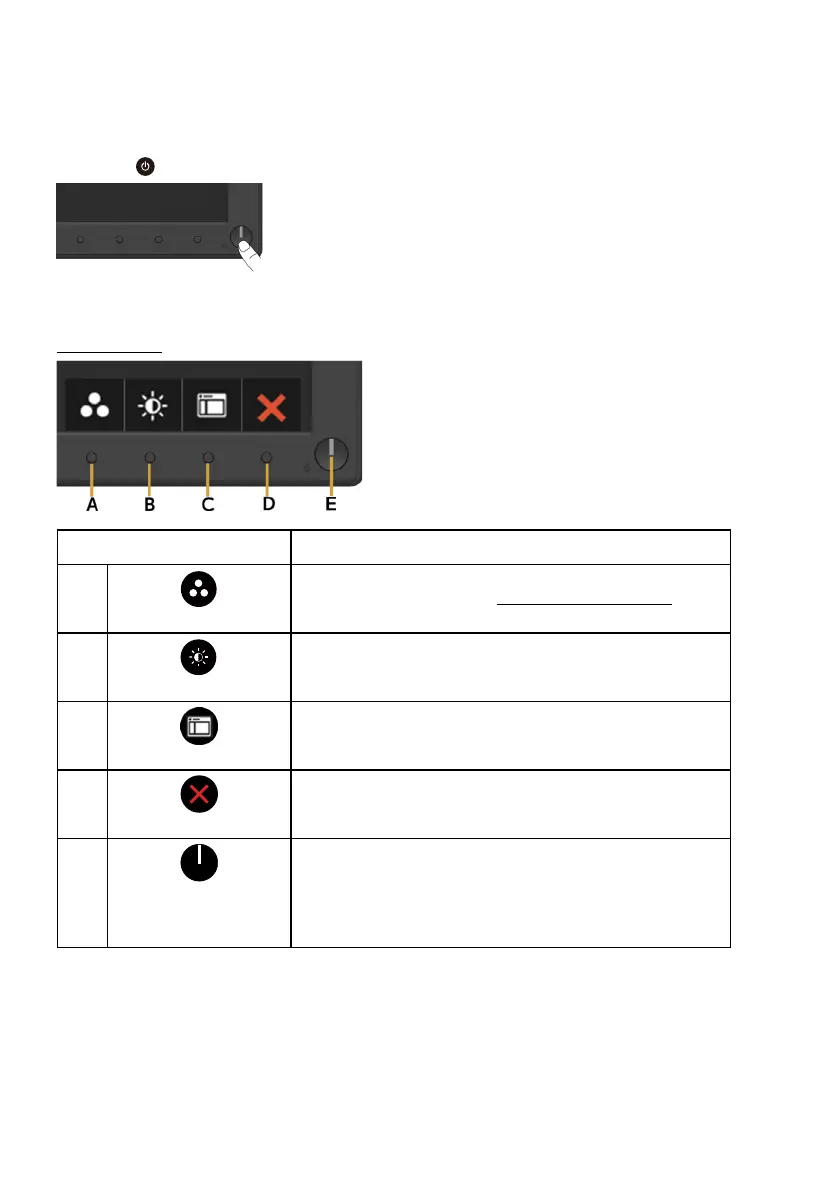
Press the button to turn on the monitor.
Using the Front-Panel Controls
Use the keys on the front of the monitor to adjust the image settings.
Front-Panel Keys Description
A
Preset modes
Use the Preset modes key to choose from a list of
preset color modes. See Using the OSD Menu.
B
Brightness /Contrast
Use the Brightness / Contrast key to direct access
to the "Brightness" and "Contrast" control menu.
C
Menu
Use the Menu key to open the on-screen display
(OSD).
D
Exit
Use the Exit key to exit on-screen display (OSD)
from menu and sub-menus.
E
Power button
(with power-status
light)
To turn the monitor on or off.
Solid white light indicates that the monitor is turned
on and functioning normally. Blinking white light
indicates that the monitor is in standby mode.


 To Next Page