About Your Monitor 7
Identifying Parts and Controls
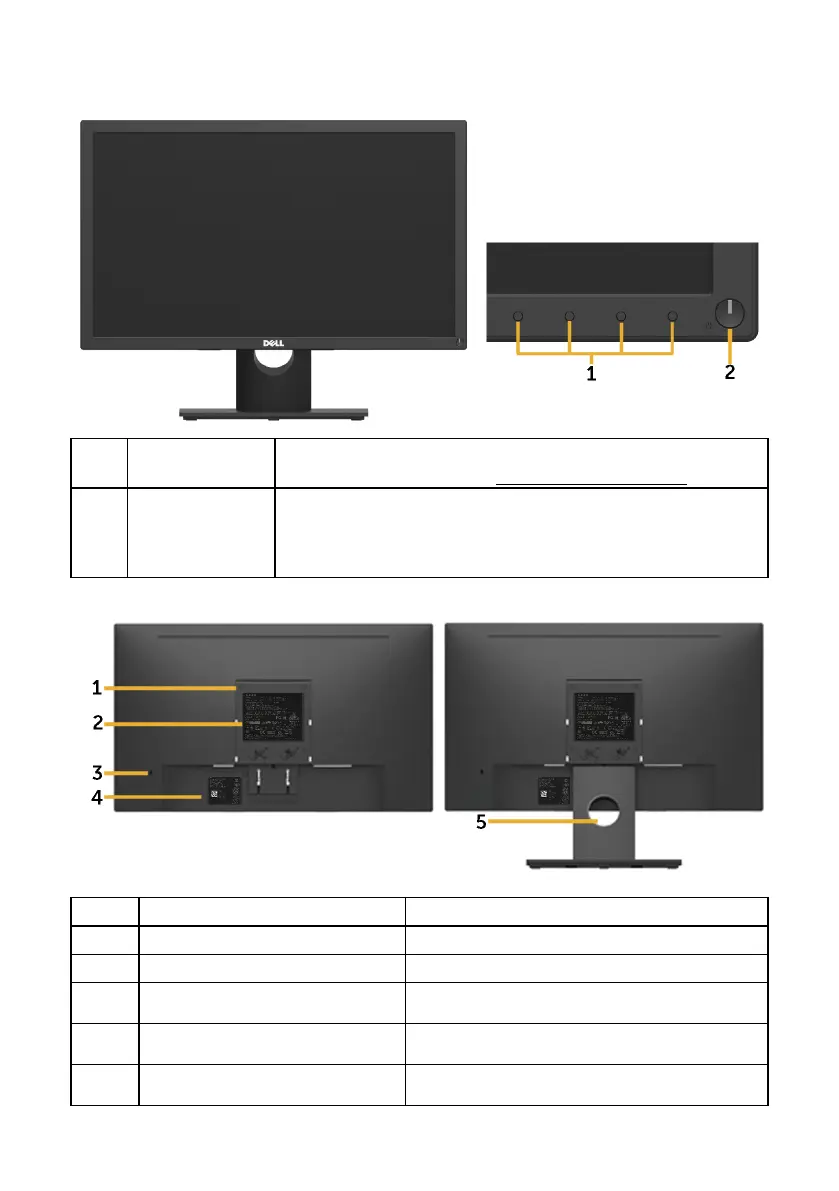
Front View
1 Function buttons To access the OSD menu and change the settings if required.
For more information, see Operating the Monitor.
2 Power On/Off
button (with LED
indicator)
To turn the monitor On or Off.
Solid white light indicates that the monitor is turned on and
functioning normally. Blinking white light indicates that the
monitor is in Standby Mode.
Back View
Back View with Monitor Stand
Label Description Use
1 VESA mounting holes (100 mm) To mount the monitor.
2 Regulatory rating label Lists of regulatory approvals.
3 Security lock slot Secures monitor with security lock (security
lock not included).
4 Barcode serial number label Refer to this label if you need to contact
Dell for technical support.
5 Cable management slot Use to organize cables by placing them
through the slot.


 To Next Page