Operating the Monitor 27
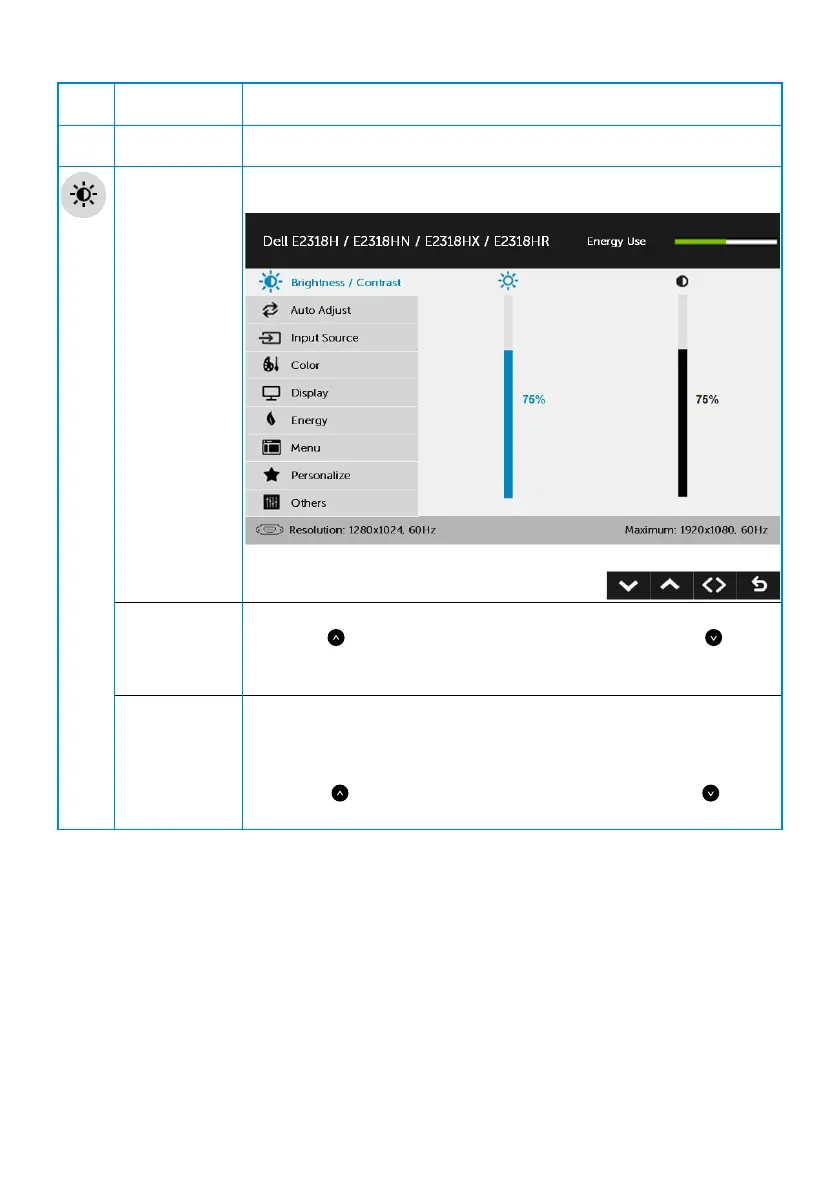
The table below provides a list of all the OSD menu options and their functions.
Icon Menu and
submenus
Description
Energy Use This meter shows the energy level being consumed by the
monitor in real time.
Brightness/
Contrast
Use the Brightness and Contrast menu to adjust the Brightness/
Contrast.
Brightness Allows you to adjust the brightness or luminance of the backlight.
Press the key to increase brightness and press the key to
decrease brightness (min 0 ~ max 100).
Contrast Allows you to adjust the contrast or the degree of difference
between darkness and lightness on the monitor screen. Adjust
brightness first, and adjust contrast only if you need further
adjustment.
Press the key to increase contrast and press the key to
decrease contrast (min 0 ~ max 100).


 To Next Page