3
Operating the Console Trayxxx | xxx10
Operating the Console Tray
NOTE: This console tray features a capacitive touch screen interface. Touch the
LED located below a desired icon. Power is its own icon.
Features
This product has the following features.
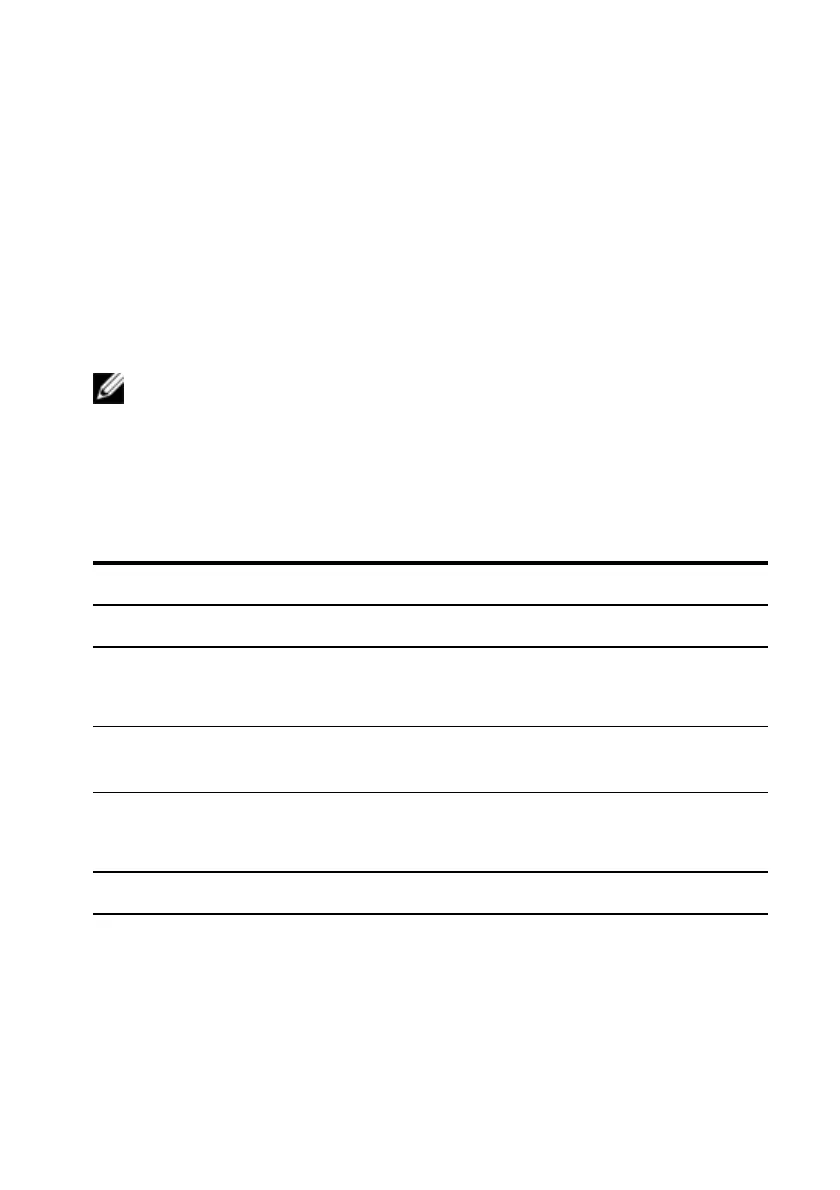
Feature Description
Optimal resolution and refresh 1366 x 768 at 60 Hz
Screen type
Active Matrix Thin Film Transistor (TFT)
Liquid Crystal Display (LCD)
Display active area
409.8 mm x 230.4 mm (13.3 inches x 10.64
inches)
Physical size
(width x depth x height)
358.5 mm x 17.5 mm x 296.5 mm
(14.1 inches x 0.689 inches x 11.67 inches)
Weight (LCD panel only) 2.0 kg (4.41 lbs)
Table 3.1: Features
Power Management Modes
If you have a VESADPMScompliant display card or software installed in your
system, the monitor can automatically reduce its power consumption when not



 To Next Page