Adding and Replacing Parts 109
NOTICE: The keycaps on the keyboard are fragile, easily dislodged, and time-consuming to replace. Be careful
when removing and handling the keyboard.
3
Remove the keyboard:
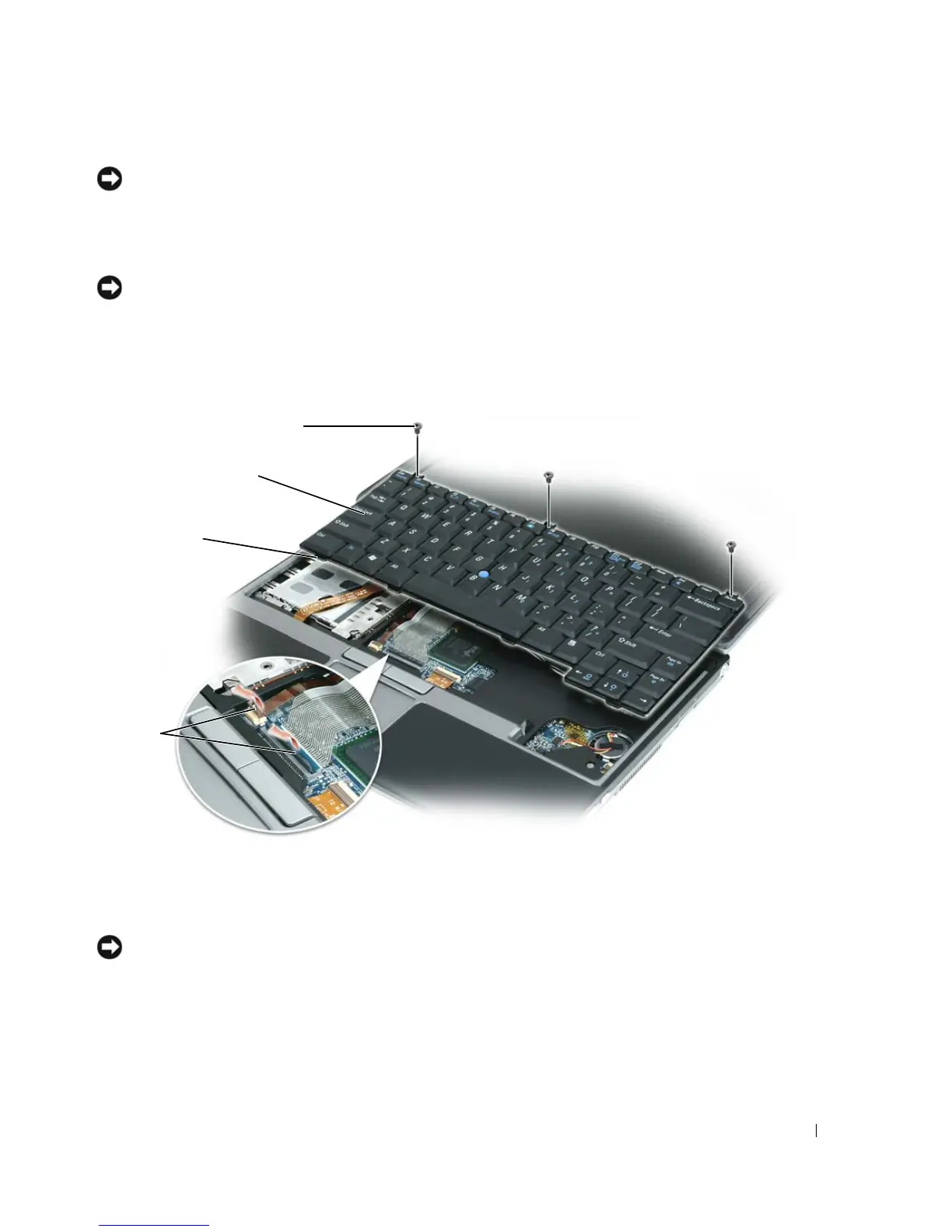
a Remove the three M2 x 3-mm screws across the top of the keyboard.
NOTICE: Lift the keyboard carefully in
step b
to ensure that you do not pull the keyboard wire.
b
Slide the keyboard forward to gain access to the two keyboard connectors.
c Pull up on the plastic bar on the keyboard connectors to disconnect the keyboard connectors
from the system board.
NOTICE: To avoid scratching the palm rest when replacing the keyboard, hook the tabs along the front edge of the
keyboard into the palm rest, and then secure the keyboard in place.
4
To replace the keyboard, connect the keyboard cable to the connector on the system board.
5
Place the tabs along the front edge of the keyboard into the palm rest, and lay the keyboard down on
the palm rest.
6
Replace the three screws at the top of the keyboard.
1 M2 x 3-mm screws (3) 2 keyboard 3 tabs (4)
4 plastic bar on keyboard connectors
1
2
4
3















 To Next Page