112 Adding and Replacing Parts
NOTICE: To prevent damage to the connector, do not use tools to spread the securing clips.
d
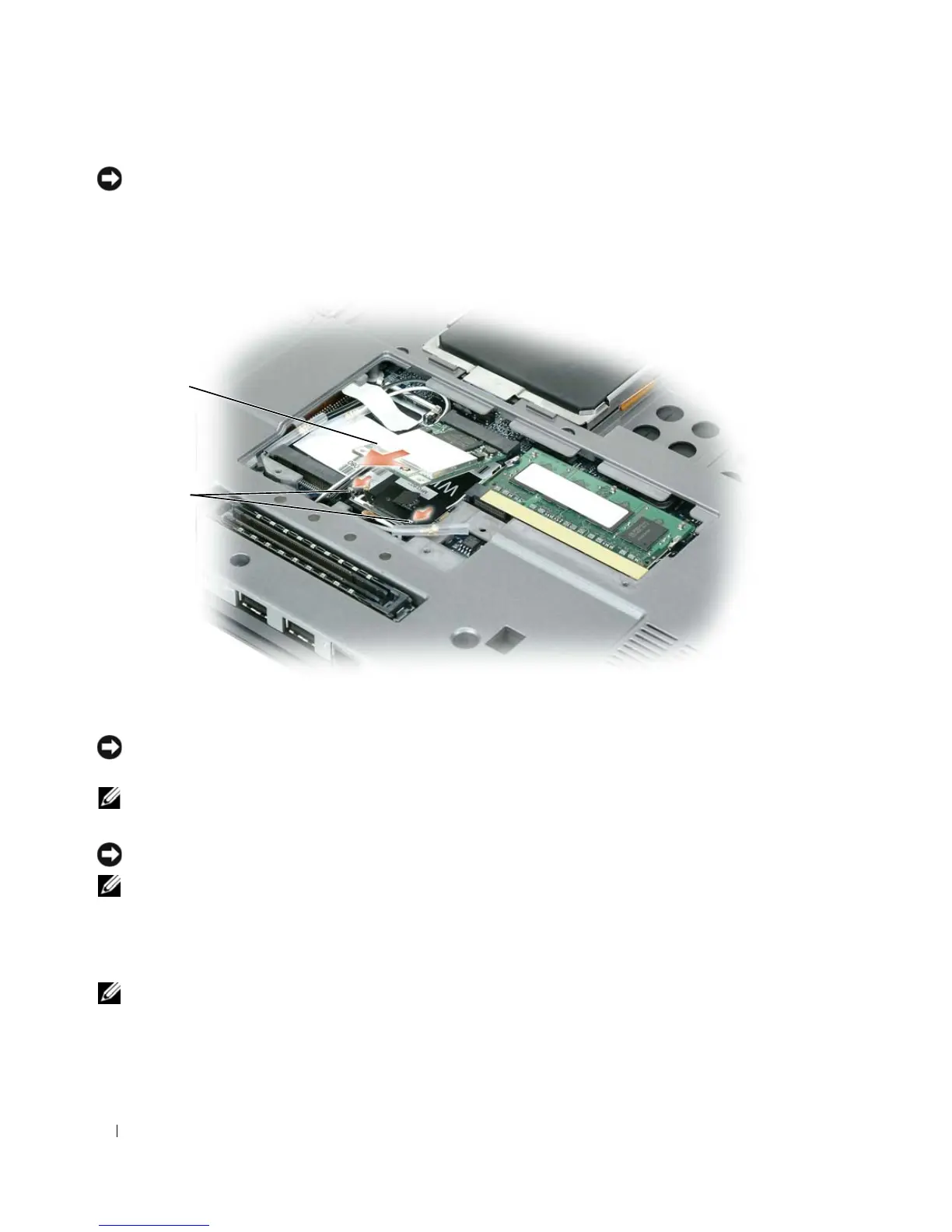
Release the card by pushing the metal securing clips toward the back of the computer until the
card pops up slightly.
e
Lift the card out of its connector.
NOTICE: The connectors are keyed to ensure correct insertion. If you feel resistance, check the connectors and
realign the card.
NOTE: Do not insert a Mobile Broadband (WWAN) network card into the WLAN card connector.
4
Install the WLAN card:
NOTICE: To avoid damaging the WLAN card, never place cables on top of or under the card.
NOTE: The WLAN card may have two or three antenna connectors, depending on the type of card you ordered.
a
Move any antenna cables out of the way to make space for the WLAN card.
b
Align the WLAN card with the connector at a 45-degree angle, and press the card down into the
securing clips until the card clicks into place.
NOTE: For more specific information about which cable to connect to which connector, see the documentation
that came with your WLAN card.
c
Connect the antenna cables to the antenna connectors on the WLAN card by matching the color
of the cable to the color of the triangle above the connector. Connect the main antenna cable
1 WLAN card 2 metal securing clips (2)
1
2















 To Next Page