Dell Latitude E6420 XFR Setup and Features Information
Back View | Page 5
Back View
10
9
8
7
6
54321
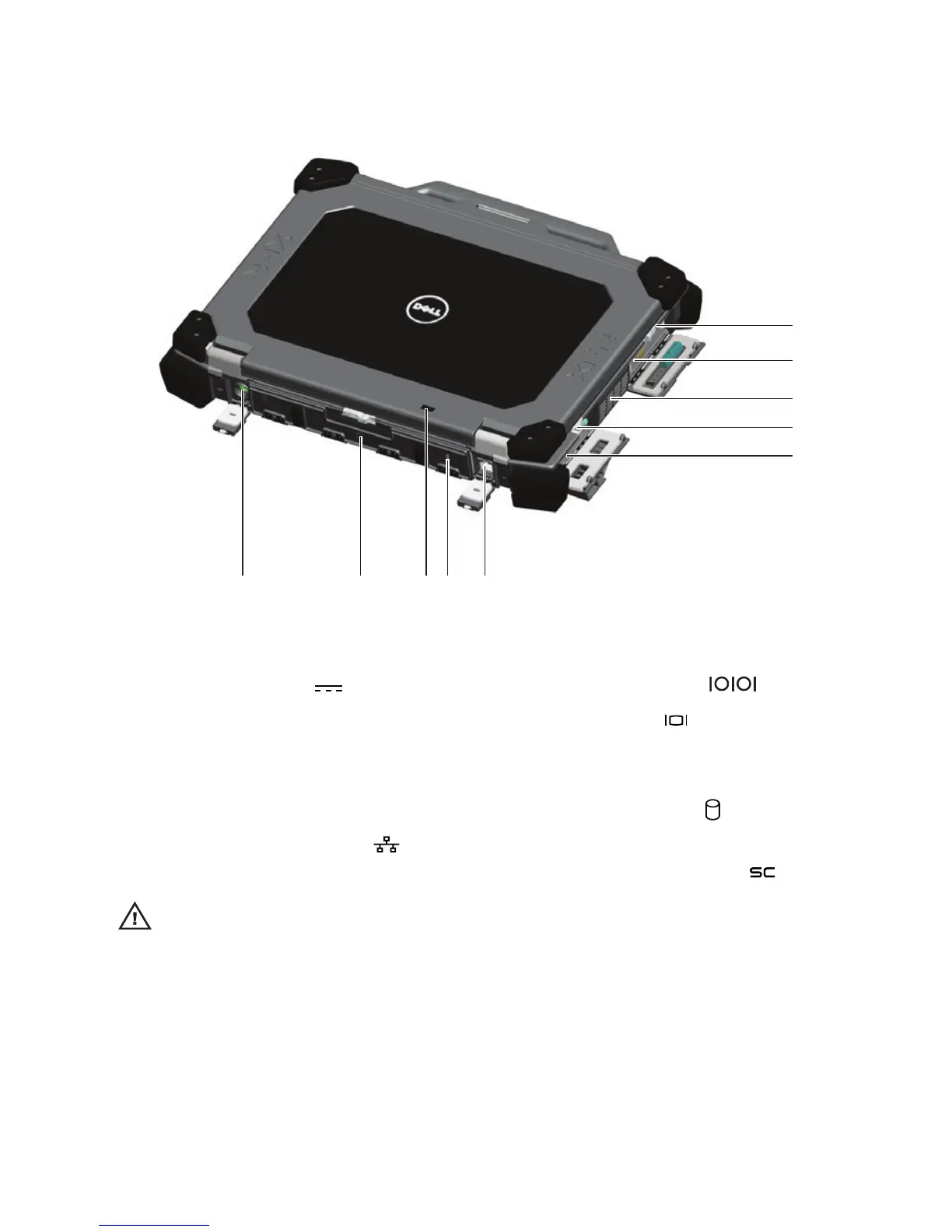
Figure 2. Back View
1. Power connector ( )
2. Battery access panel (see “Battery
Removal” on page 7)
3. Power and battery status lights
4. Security cable slot
5. RJ-45 network connector (
)
6. Serial port connector (
)
7. VGA connector (
)
8. QuadCool™ sealed thermal chamber
9. Hard Disk Drive (see “Hard Drive
Removal” on page 9) (
)
10. Enclosed Smart-card reader (see
“Smart Cards” on page 13) (
)
WARNING: Do not block, push objects into, or allow dust to accumulate in the air vents. Do not
store your Dell computer in a low-airflow environment, such as a closed briefcase, while it is
running. Restricting the airflow can damage the computer or cause a fire. The computer turns
on the fan when the computer gets hot. Fan noise is normal and does not indicate a problem
with the fan or the computer.


 To Next Page