NOTE: When USB wake is enabled in the BIOS the computer will power on or wake from hibernation when a USB mouse
or keyboard that is connected to this port is used.
5. USB 2.0 (480 Mbps) with SmartPower On Port
Connect devices such as external storage devices and printers. Provides a data transfer speed of up to 480 Mbps.
NOTE: When USB wake is enabled in the BIOS the computer will power on or wake from hibernation when a USB mouse
or keyboard that is connected to this port is used.
6. Network port
Connect an Ethernet (RJ45) cable from a router or a broadband modem for network or Internet access.
7. Audio line-out port, retaskable
Connect speakers.
8. Power-adapter port
Connect a power adapter to provide power to your computer.
For computers with a High Performance processor:
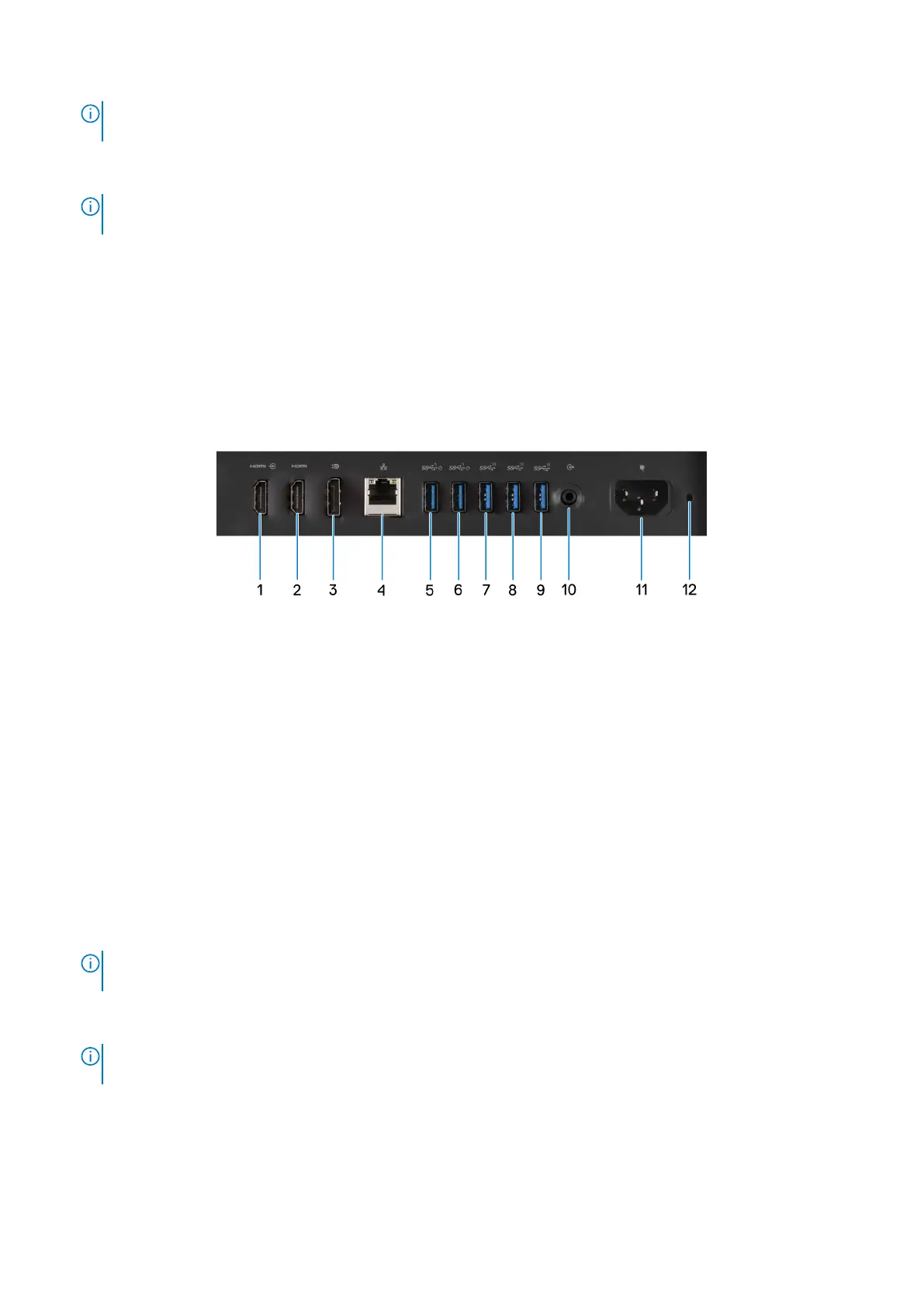
Figure 8. Back panel view of OptiPlex All-in-One 7420 with a High Performance processor
1. HDMI-in 1.4b port
Connect a gaming console, Blu-ray player, or other HDMI-out enabled device.
2. HDMI-out 2.1 port
Connect to a TV, external display or another HDMI-in enabled device. Provides video and audio output and supports video
output of up to 4096 x 2160 at 60Hz.
3. DisplayPort ++ 1.4a
Connect an external display or a projector. Can support video output of up to 5120 x 3200 at 60 Hz.
4. Network port
Connect an Ethernet (RJ45) cable from a router or a broadband modem for network or Internet access.
5. USB 3.2 Gen 1 (5 Gbps) with SmartPower On port
Connect devices such as external storage devices and printers. Provides a data transfer speed of up to 5 Gbps.
NOTE:
When USB wake is enabled in the BIOS the computer will power on or wake from hibernation when a USB mouse
or keyboard that is connected to this port is used.
6. USB 3.2 Gen 1 (5 Gbps) with SmartPower On port
Connect devices such as external storage devices and printers. Provides a data transfer speed of up to 5 Gbps.
NOTE:
When USB wake is enabled in the BIOS the computer will power on or wake from hibernation when a USB mouse
or keyboard that is connected to this port is used.
7. USB 3.2 Gen 2 (10 Gbps) port
Connect devices such as external storage devices and printers. Provides a data transfer speed of up to 10 Gbps.
8. USB 3.2 Gen 2 (10 Gbps) port
Connect devices such as external storage devices and printers. Provides a data transfer speed of up to 10 Gbps.
12
Views of OptiPlex All-in-One 7420









 To Next Page