1. Stand/VESA mount location
Allows for the installation of a 100 mm x 100 mm screw pitch VESA connection for use in standard environmental conditions,
or one of the stands offered by Dell for your OptiPlex All-in-One 7420 .
2. Service Tag label
The Service Tag is a unique alphanumeric identifier that enables Dell service technicians to identify the hardware
components in your computer and access warranty information.
3. Back panel
Connect USB, audio, video, and other devices.
4. SD-card slot
Insert an SD card here to read from and write to the SD card.
5. USB 3.2 Gen 2 (10 Gbps) Type C port
Connect devices such as external storage devices and printers. Provides a data transfer rate of up to 10 Gbps.
6. Display Built-in Self Test (BIST)/Display input button
Press and hold this button until your computer initiates the Built-in Self Test (BIST).
NOTE: Press to switch display input to and from the device connected to the HDMI-in port on the back panel. This
feature is only available on computers shipped with a High Performance processor.
7. Power button
Press to turn on the computer if it is turned off, in sleep state, or in hibernate state.
When the computer is turned on, press the power button to put the computer into sleep state; press and hold the power
button for 10 seconds to force shut-down the computer.
NOTE: You can customize the power-button behavior in Windows.
Back panel
For computers with an Energy Efficient processor:
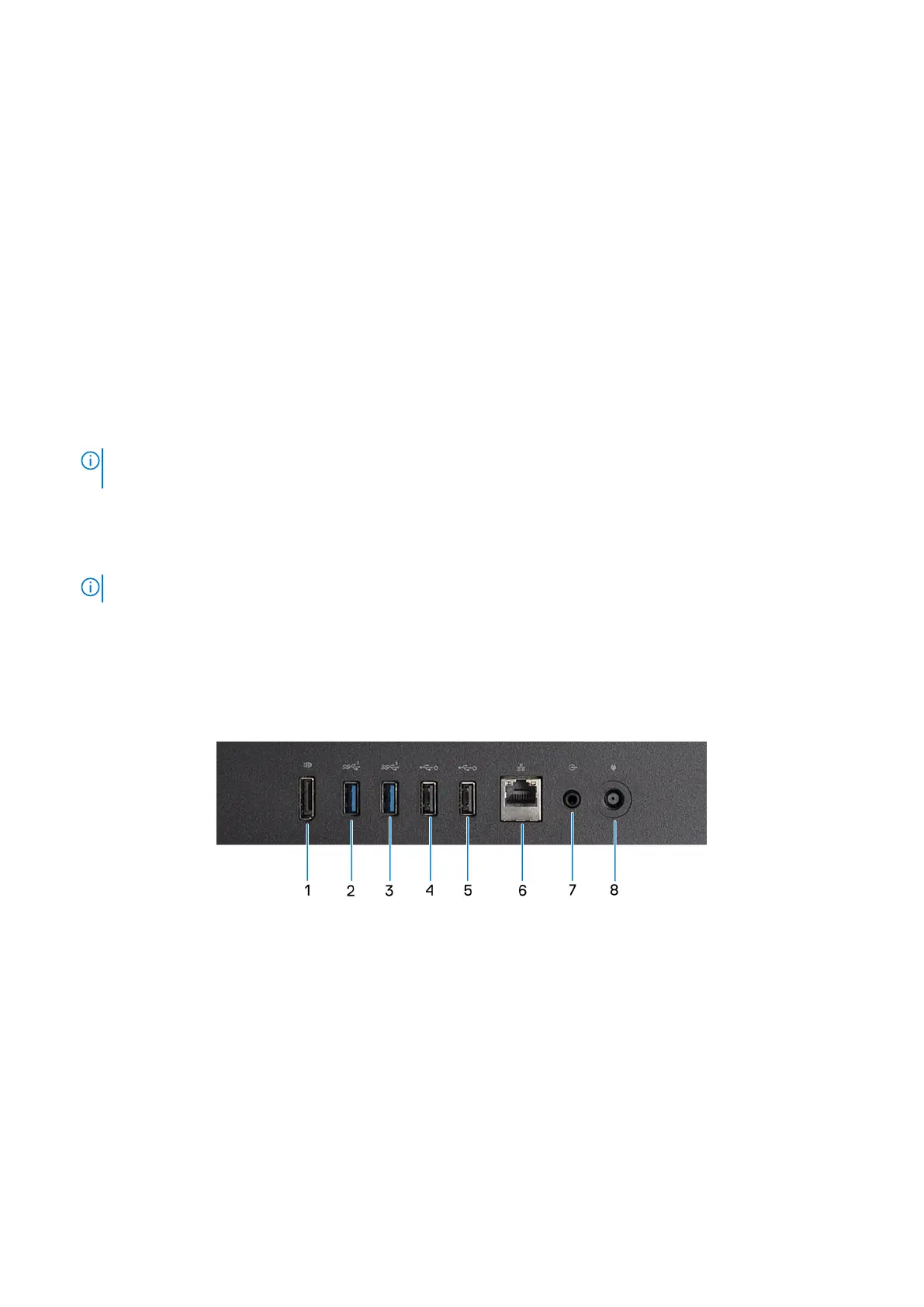
Figure 7. Back panel view of OptiPlex All-in-One 7420 with an Energy Efficient processor
1. DisplayPort ++ 1.4a
Connect an external display or a projector. Can support video output of up to 5120 x 3200 at 60 Hz.
2. USB 3.2 Gen 1 (5 Gbps) port
Connect devices such as external storage devices and printers. Provides a data transfer speed of up to 5 Gbps.
3. USB 3.2 Gen 1 (5 Gbps) port
Connect devices such as external storage devices and printers. Provides a data transfer speed of up to 5 Gbps.
4. USB 2.0 (480 Mbps) with SmartPower On Port
Connect devices such as external storage devices and printers. Provides a data transfer speed of up to 480 Mbps.
Views of OptiPlex All-in-One 7420
11









 To Next Page