System-diagnostic lights
This section lists the system-diagnostic lights of your Latitude 9450 2-in-1.
Battery-status light
Indicates the power and battery-charge status.
Solid white—Power adapter is connected and the battery has more than 5 percent charge.
Amber—Computer is running on battery and the battery has less than 5 percent charge.
Off
● Power adapter is connected and the battery is fully charged.
● Computer is running on battery and the battery has more than 5 percent charge.
● Computer is in sleep state, hibernation, or turned off.
The power and battery-status light blinks amber along with beep codes indicating failures.
For example, the power and battery-status light blinks amber two times followed by a pause, and then blinks white three times.
Followed by a pause. This 2,3 pattern continues until the computer is turned off indicating no memory or RAM is detected.
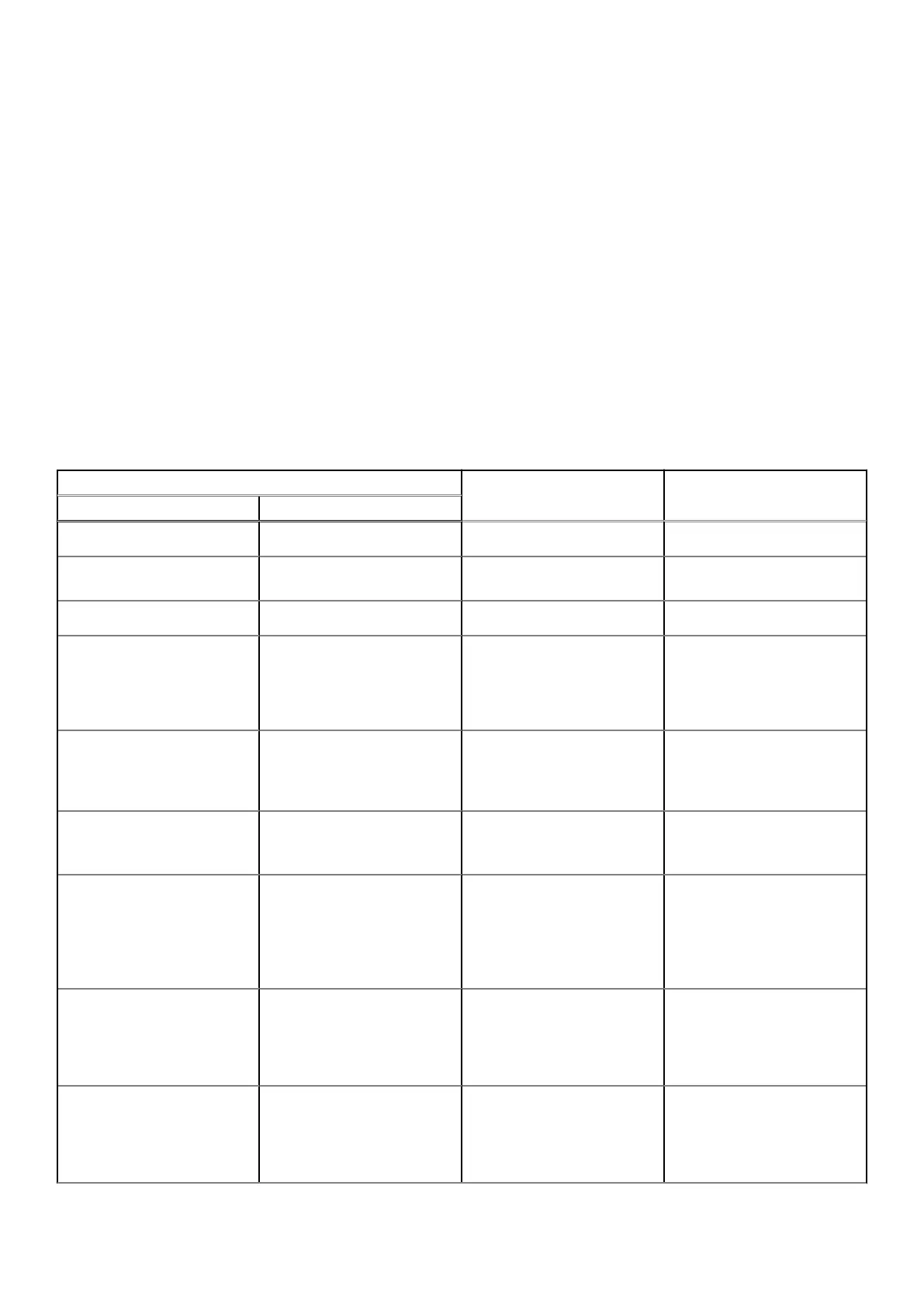
Table 45. System-diagnostic lights
Blinking pattern
Problem description Suggested resolutionAmber White
1 1 TPM detection failure
Replace the system board.
1 2 Unrecoverable SPI Flash
Failure
Replace the system board.
1 5 EC unable to program i-Fuse
Replace the system board.
1 6 Generic catch-all for
ungraceful EC code flow
errors
Disconnect all power source
(AC, battery, coin cell) and
drain flea power by pressing
and holding down the power
button for 3~5 seconds.
2 1 CPU failure
● Run the Dell SupportAssist
or Dell Diagnostics tool.
● If the problem persists,
replace the system board.
2 2 System board failure (included
BIOS corruption or ROM
error)
● Flash latest BIOS version
● If the problem persists,
replace the system board.
2 3 No memory or RAM detected
● Confirm that the memory
module is installed
properly.
● If the problem persists,
replace the memory
module.
2 4 Memory or RAM failure
● Reset and swap memory
modules among the slots.
● If the problem persists,
replace the memory
module.
2 5 Invalid memory installed
● Reset and swap memory
modules among the slots.
● If the problem persists,
replace the memory
module.
Troubleshooting 119



 To Next Page