About your monitor | 31
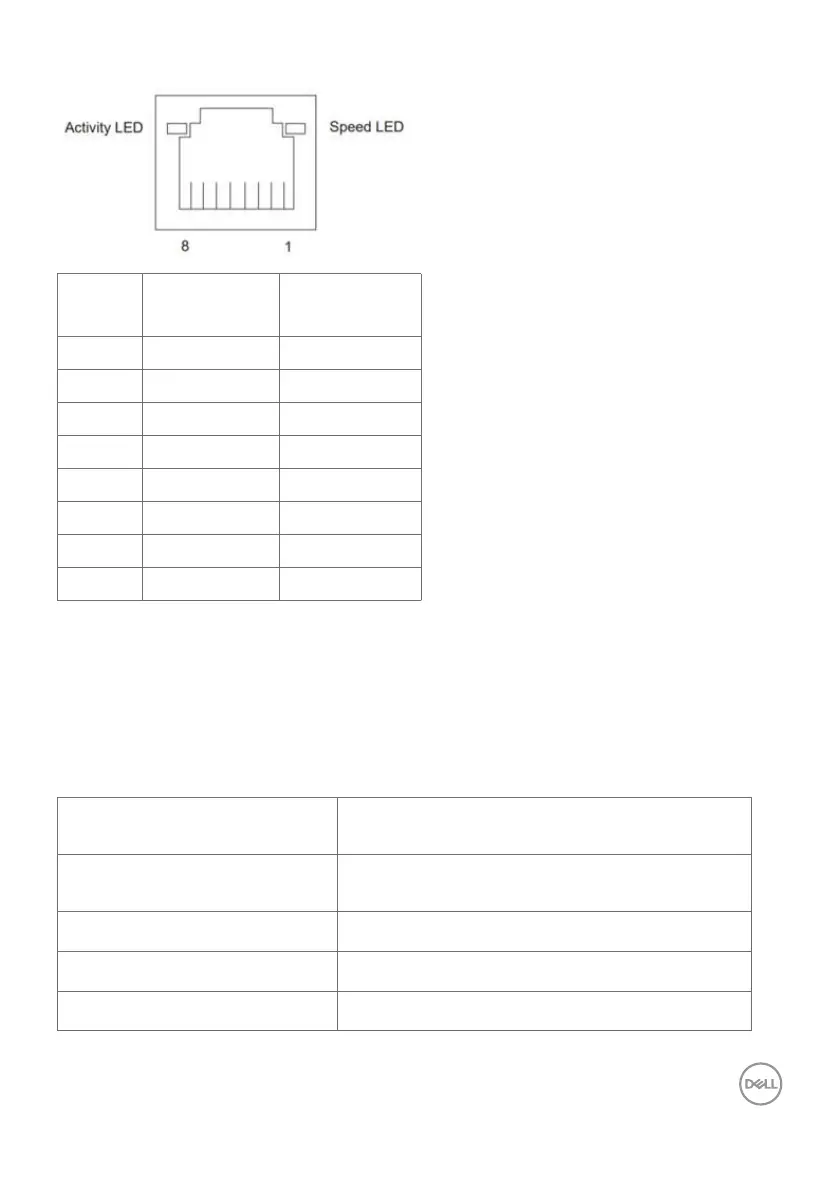
RJ45 Port (Connector Side)
Pin No. 10BASE-T
100BASE-T
1000BASE-T
1 Transmit+ BI_DA+
2 Transmit- BI_DA-
3 Receive+ BI_DB+
4 Unused BI_DC+
5 Unused BI_DC-
6 Receive- BI_DB-
7 Unused BI_DD+
8 Unused BI_DD-
Driver installation
Install the Realtek USB GBE Ethernet Controller Driver available for your system. This
is available for download at
https://www.dell.com/support under the “Driver and
download” section.
Network (RJ45) data rate via USB-C max speed is 1000 Mbps.
Wake-on-LAN behavior
Computer power save state System behavior after receiving Wake-on-
LAN (WOL) command
Modern Standby (S0ix) Computer and Monitor remain in Standby but
network communication is enabled.
Standby/Sleep (S3) Both Computer and Monitor are turned ON.
Hibernate (S4) Both Computer and Monitor are turned ON.
OFF/Shutdown (S5) Both Computer and Monitor are turned ON.



 To Next Page