2
DELL P3424WEB
S12
S11
S10
S8
S9
S13
(No.1~6 screw size=M3x6, Torque=3~5kgfxcm)
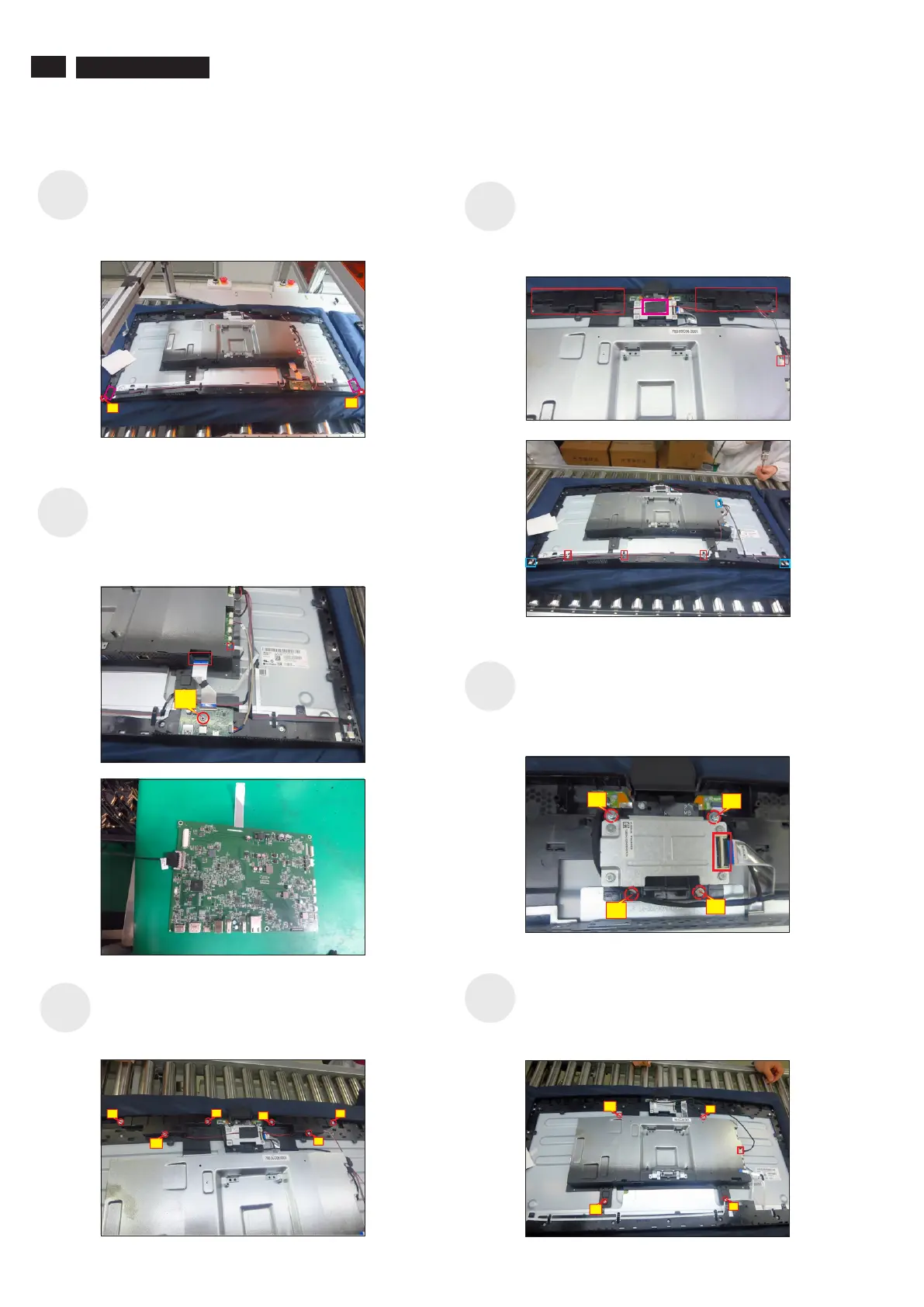
Use a Philips-head screwdriver to remove 6pcs
screws for unlocking the two speakers away from
middle frame.
Tear off 1pcs tape, then disconnect the speaker cable
away from the board, then release the speakers from
the probers of the middle frame. Disconnect the panel
lamp cable away from the connectors of the main
board and panel, then release the panel lamp cables
from the hooks of the middle frame.
No.3~4 Screw size= M3x4, Torque=5±1kgfxcm)
Use a Philips-head screwdriver to remove 4pcs
screws for unlocking the camera module with the
middle bezel, then disconnect the camera cable from
the connector.
(No.1~2 Screw size= M3x8, Torque=4±1kgfxcm;
Use a Philips-head screwdriver to remove 1pcs
screw for unlocking the USB board, then disconnect
the USB cable and touch cable away from the
connectors of main board. Release the USB board
away from the hook of the middle frame.
(No.1 screw size=M3x3.5, Torque=4 0.5 kgfxcm)±
Use a Philips-head screwdriver to remove 4pcs
screws for unlocking the bracket chassis with the
panel, then disconnect the Mic cable away from the
connector of the main board.
(No.1~4 Screw size=M3x4, Torque=5±1kgfxcm )
Tear off 2pcs tape, then disconnect the LED cable
away from the connector of the interface board. Use
a Philips-head screwdriver to remove 2pcs screws
for unlocking the middle frame and front frame.
(No.1~2 screw size=M2x3.3,Torque=1±0.2kgfxcm)
4
1
1
2
4
1
5
3
6
4
3
2
1
2
1
4
3



 To Next Page