About your monitor | 9
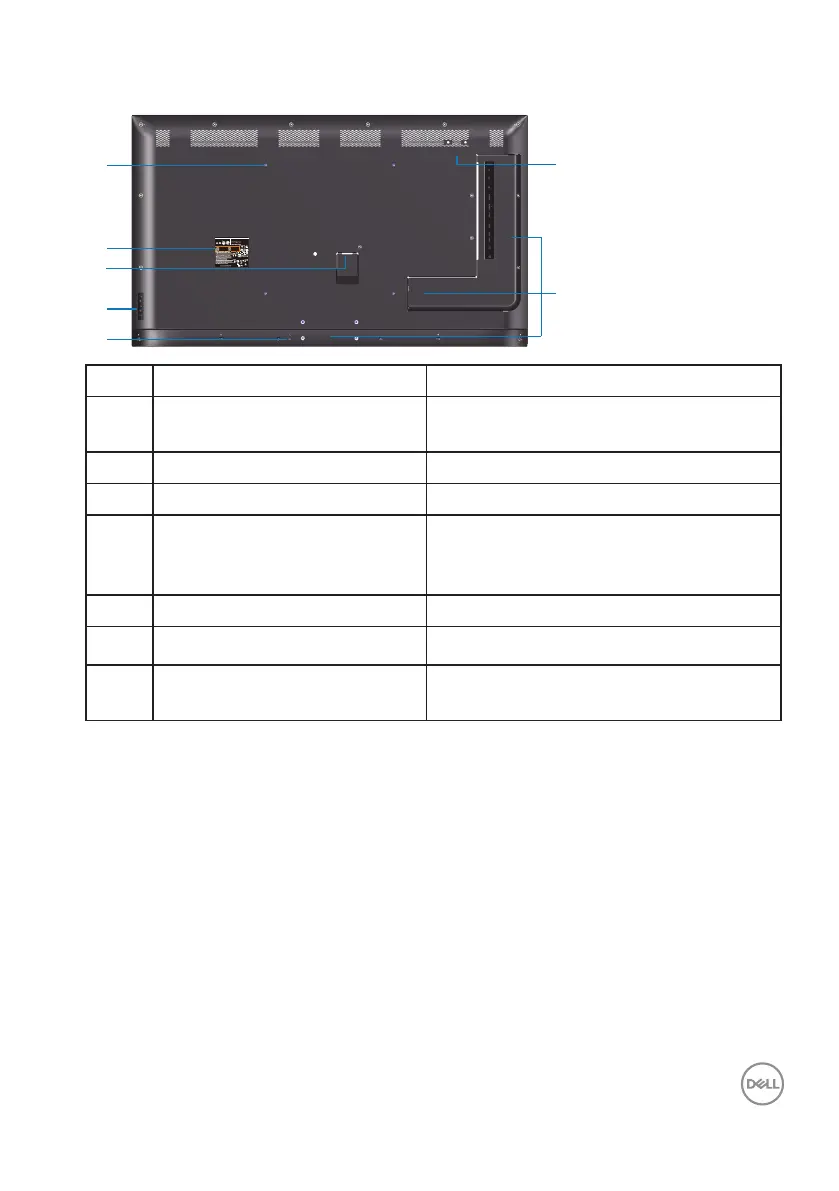
Back view
DELL P5524Q
XXXXX
XXXXXXX-XXXXX
R-R-E2K-P5524Qc
제조자:TPV Electronics (Fujian) Co., Ltd.
080-854-0066
SVC Tag:
xxxxxxx
Express Service
Code:
xxx xxx xxx x
S/N: XXXXXXXX
XXXXXXXXXXXX
XXX
Date of Mfg/
MAC address: XXXXXXXXXXXXXX
生产日期/生產日期: January. 2023
R33037
RoHS
IS 13252 (Part 1)/
IEC 60950-1
R-41018660
www.bis.gov.in
液晶显示器
型号: P5524Q
输入电源:100-240V 50/60Hz,2.5A
中国制造
XXXXXX-XX
This device complies with part 15 of the FCC Rules.
courant munie d'une mise à la terre.
Q40G055N-700-07A XX P
CAN ICES-003 (B)/NMB-003(B) 警語: 使用過度恐傷害視力。
Made in China/
/中國製造
For UK only: One Creechurch Place, London EC3A 5AF
入力:100 V~, 2.5 A, 50/60 Hz
デル・テクノロジーズ
Flat Panel Monitor /Monitor Plano Panel /
Moniteur écran plat /液晶顯示器
Model No. /Modelo /N°de modelo /
모델명/モデル番号/型號
: P5524Qc
/Tension d’entrée/
정격입력:
100-240V 50/60Hz,2.5A
輸入電源:交流電壓100-240伏特,2.5安培,50/60赫茲
Raheen Business Park Limerick Ireland (for EU Only)
/
중국제조
신청인:DELL INC.
1
2
3
4
5
6
7
Label Description Use
1 VESA mounting holes (400
mm x 400 mm)
To mount the monitor.
2 Regulatory label List of approved regulatory labels.
3 AC power connector To connect the monitor power cable.
4 Function buttons (For more
information, see Operating the
monitor)
Use the keys on the back of the monitor
to adjust the image settings.
5 Security lock slot Secures monitor with security lock.
6 Screw Hole For accessory mounting.
7 Cable clips position Sticking cable clips on these positions to
organize the cables.



 To Next Page