● Removable Drive (if available)
● STXXXX Drive (if available)
NOTE: XXX denotes the SATA drive number.
● Optical Drive (if available)
● SATA Hard Drive (if available)
● Diagnostics
The boot sequence screen also displays the option to access the System Setup screen.
System Setup Options
NOTE: Depending on your computer and its installed devices, the items listed in this section may or may not appear.
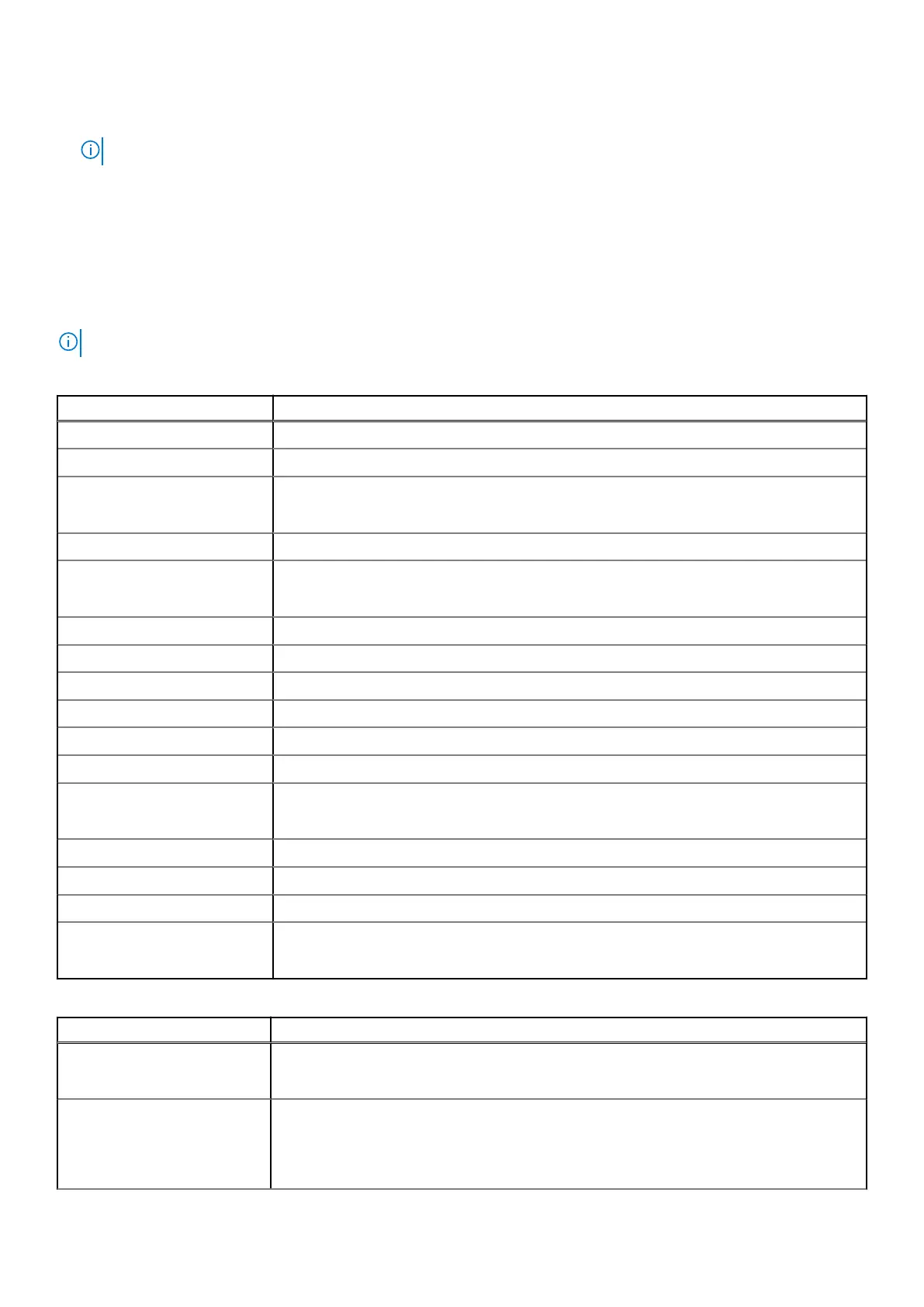
Table 4. Main
Option Description
System Time/Date Allows you to set the date and time.
BIOS Version Displays the BIOS version.
Product Name Displays the product name.
Dell Precision 5520 (Default Setting)
Service Tag Displays the service tag.
Asset Tag Displays the asset tag.
None (Default Setting)
CPU Type Displays the CPU type.
CPU Speed Displays the CPU speed.
CPU ID Displays the CPU ID.
CPU Cache Displays the sizes of the CPU caches.
Fixed HDD Displays the type and size of the HDD.
mSATA Device Displays the type and size of the mSATA device.
AC Adapter Type Displays the type of the AC adapter.
None (Default Setting)
System Memory Displays the size of the system memory.
Extended Memory Displays the size of the extended memory.
Memory Speed Displays the speed of the memory.
Keyboard Type Displays the type of keyboard.
Backlite (Default Setting)
Table 5. Advanced
Option Description
Intel (R) SpeedStep (TM) Allows you to enable or disable the Intel (R) SpeedStep (TM) feature.
Enabled (Default Setting)
Virtualization This option specifies whether a Virtual Machine Monitor (VMM) can utilize the additional
hardware capabilities provided by Intel Virtualization technology. Allows you to enable or
disable the Virtualization feature.
Enabled (Default Setting)
36 System Setup





 To Next Page