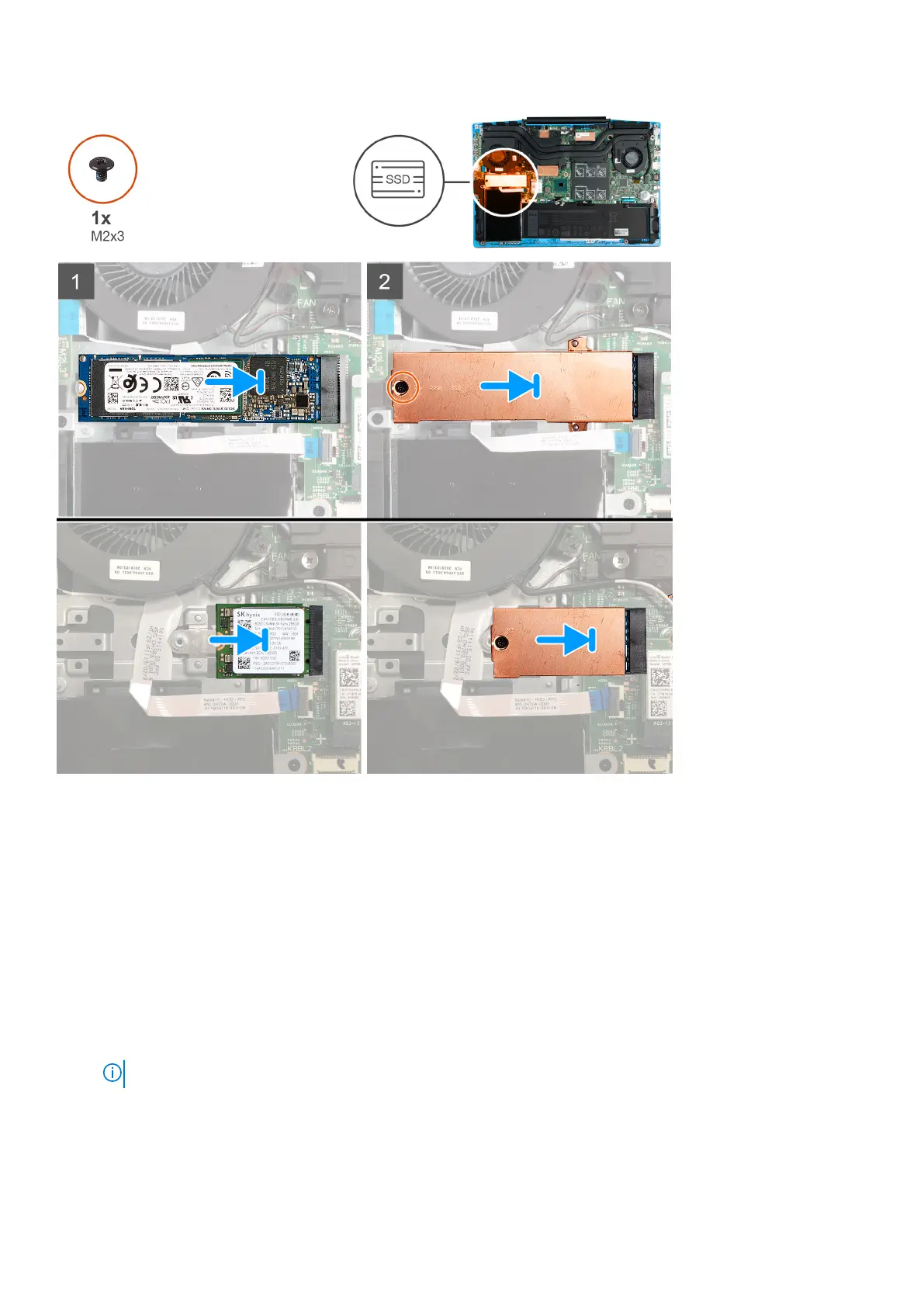
Steps
1. Align the notches on the solid-state drive/Intel Optane memory module with the solid-state drive/Intel Optane memory
module slot on the system board.
2. Slide the solid-state drive/Intel Optane memory module into the solid-state drive/Intel Optane memory module slot on the
system board.
3. Install the screw (M2x3) that secures the solid-state drive/Intel Optane memory module to the system board.
Next steps
1. Install the base cover.
2. Follow the procedure in After working inside your computer.
3. Verify if the storage device is installed correctly:
a. Turn on or restart your computer.
b. Press F2 when the Dell logo is displayed on the screen to enter the BIOS setup program.
NOTE: Alist of storage devices are displayed under the System Information in the General group.
c. If you have replaced the primary storage device that had the operating system installed, see Reinstall Windows 10 to
the Dell factory image using recovery media in the knowledge base article 000176966.
Removing and installing components
23



 To Next Page