This document is a user's guide for the Dell Active Pen PN556W, providing instructions on its setup, use, troubleshooting, and regulatory information.
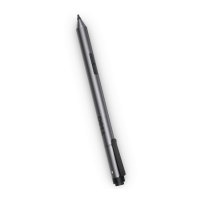
The Dell Active Pen PN556W is a stylus designed for use with compatible Dell computers and tablets, offering enhanced interaction with touchscreens for tasks such as writing, drawing, selecting objects, and navigating. It features multiple buttons that can be customized for various functions, and it supports Bluetooth connectivity for quick-launch features and pairing with devices.
Function Description:
The pen's primary function is to act as an input device for touchscreens, allowing for precise control and interaction beyond what a finger can offer. The pen tip is used to move the pointer, write, draw, and select objects on the screen. It supports pressure sensitivity, which can be adjusted through the Active Pen Control Panel, allowing for varied line thickness and artistic effects depending on the application.
The pen is equipped with several buttons:
- Bottom barrel-button: By default, pressing and holding this button while moving the pen tip over an area enables an erase function. Its functionality can be customized via the Active Pen Control Panel to perform actions like opening a context menu (right-click), page up/down, copy, paste, undo, or redo.
- Top barrel-button: This button, by default, opens the context menu or performs a right-click. Similar to the bottom barrel-button, its function can be reconfigured through the Active Pen Control Panel to suit user preferences.
- Top button: This multi-functional button provides quick-launch features and Bluetooth pairing capabilities.
- Pairing Mode: Pressing and holding the top button for 3 seconds enables Bluetooth pairing mode, indicated by a blinking white light.
- OneNote Launch: Pressing and holding the top button for 1 second opens OneNote, even when the device screen is locked.
- Screenshot: Pressing the top button twice in succession captures a screenshot and sends it to OneNote.
- Wake from Standby: Pressing and holding for 1 second or pressing twice in succession can wake up the computer or tablet from a connected standby state (available on devices supporting this feature).
- Presentation Mode: When in presentation mode, pressing and holding for 1 second advances to the next slide, and pressing twice in succession goes to the previous slide. This feature requires the Active Pen Control Panel to be installed.
A Bluetooth pairing light on the pen indicates the status of its wireless connection: blinking white for pairing mode and solid white for a complete pairing.
Usage Features:
To maximize the pen's utility, users can install the Dell Active Pen Control Panel. This software allows for extensive customization of the pen's buttons and pressure sensitivity.
- Button Customization: Users can assign different functions to the top and bottom barrel buttons, choosing from options like context menu, erase, page navigation, copy/paste, undo/redo, or enabling a "presentation mode" for navigating PowerPoint presentations.
- Pressure Sensitivity: The Active Pen Control Panel includes a slider to adjust the pen's sensitivity, allowing users to fine-tune how the pen responds to pressure. An option for "Hard press to double-click" can also be enabled, allowing a firm press and hold of the pen tip to register as a double-click.
- Hovering Functionality: The control panel also offers a setting to enable barrel button functions while hovering the pen tip over the screen without actually touching it.
- Microsoft Pen Control Panel: For additional configuration options, the guide directs users to the Microsoft Pen Control Panel.
The guide emphasizes proper pen holding technique, suggesting users hold it like a pencil or pen, adjusting their grip to easily access the barrel buttons without accidentally pressing them during use.
Maintenance Features:
The Dell Active Pen PN556W requires batteries for operation. It uses one AAAA battery and two coin-cell batteries.
- AAAA Battery: This battery powers the pen tip and the barrel buttons. Instructions are provided for its installation: removing the top cover, inserting the AAAA battery with the positive side facing in, and then replacing the top cover.
- Coin-Cell Batteries: These batteries power the Bluetooth functionality and the quick-launch features of the top button. The guide details how to install them: removing the top cover, removing the coin-cell battery holder (which may require a coin or flat-head screwdriver if difficult to unscrew by hand), inserting the two coin-cell batteries with the negative side facing in, replacing the holder, and then replacing the top cover.
Troubleshooting:
The guide includes a comprehensive troubleshooting section to address common issues:
- Pen not working: Possible causes include incorrectly installed or discharged batteries. Solutions involve ensuring correct battery installation or replacing them.
- Pen not writing or barrel buttons not working: This points to an incorrectly installed or discharged AAAA battery. The solution is to replace the AAAA battery.
- Default barrel button functions not working: This may be due to the application not supporting the functions. Users are advised to test the buttons in OneNote or another compatible application.
- Top button not opening OneNote: Possible causes include OneNote not being installed, the pen not being paired, or discharged coin-cell batteries. Solutions include installing OneNote, pairing the pen, or changing the coin-cell batteries.
- Top button not capturing screenshots: This issue may arise if a specific Windows update (KB2968599) is not installed. The solution is to install the update from the Microsoft website.
- Unable to pair the pen or pen showing as "Not Connected": This can be due to an unsupported device, an outdated Bluetooth driver, or incorrect pairing. Solutions include ensuring the device is compatible, installing the latest Bluetooth driver, or removing and re-pairing the pen.
- Bluetooth-pairing light not turning on: This indicates discharged coin-cell batteries, requiring replacement.
- Pen not waking device from standby: This feature may not be supported by the computer or tablet, or the coin-cell batteries may be discharged. Users should verify device compatibility and check/replace batteries.
The guide also provides information on obtaining self-help resources and contacting Dell support for further assistance. It highlights that pairing information is lost when coin-cell batteries are removed, necessitating re-pairing the pen with the device afterward.

 Need help?
 General


 To Next Page