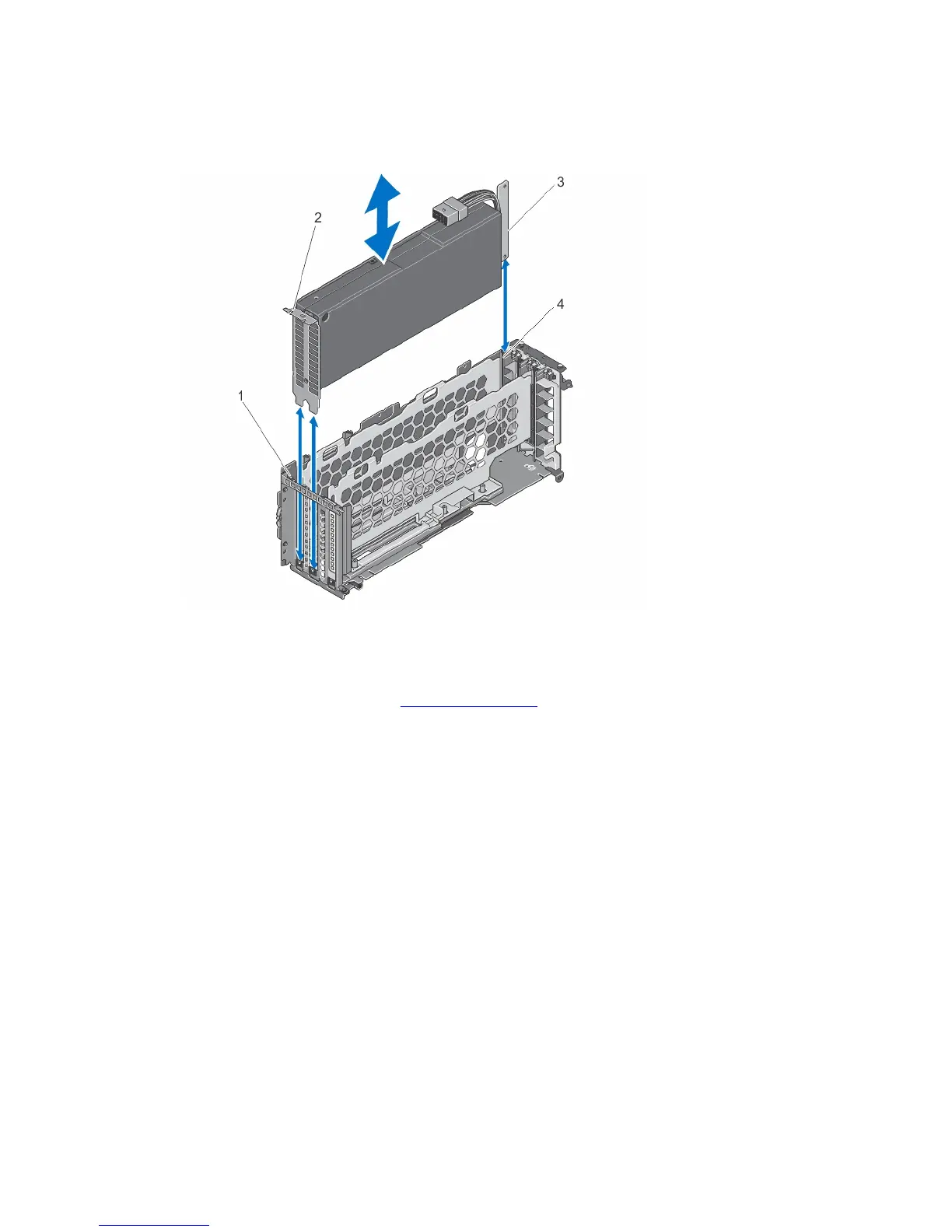
11. Lower the double-wide GPGPU card into the double-wide PCIe cage and insert the card-edge connector firmly into
the expansion-card connector on the riser, until the card is fully seated.
The double-wide GPGPU card bracket aligns with the tab on the double-wide PCIe cage.
Figure 68. Installing the Double-Wide GPGPU Card into the Double-Wide PCIe Cage
1. tab on the double-wide PCIe cage 2. double-wide GPGPU card bracket
3. double-wide GPGPU card 4. double-wide PCIe cage
12. Install the double-wide PCIe cage. See Installing The PCIe Cage.
13. Route the power cable from the double-wide GPGPU card into the double-wide PCIe cage.
14. Connect the 8-pin connector on one end of the auxiliary power cable to the power cable connector of the double-
wide GPGPU card.
102
















 To Next Page