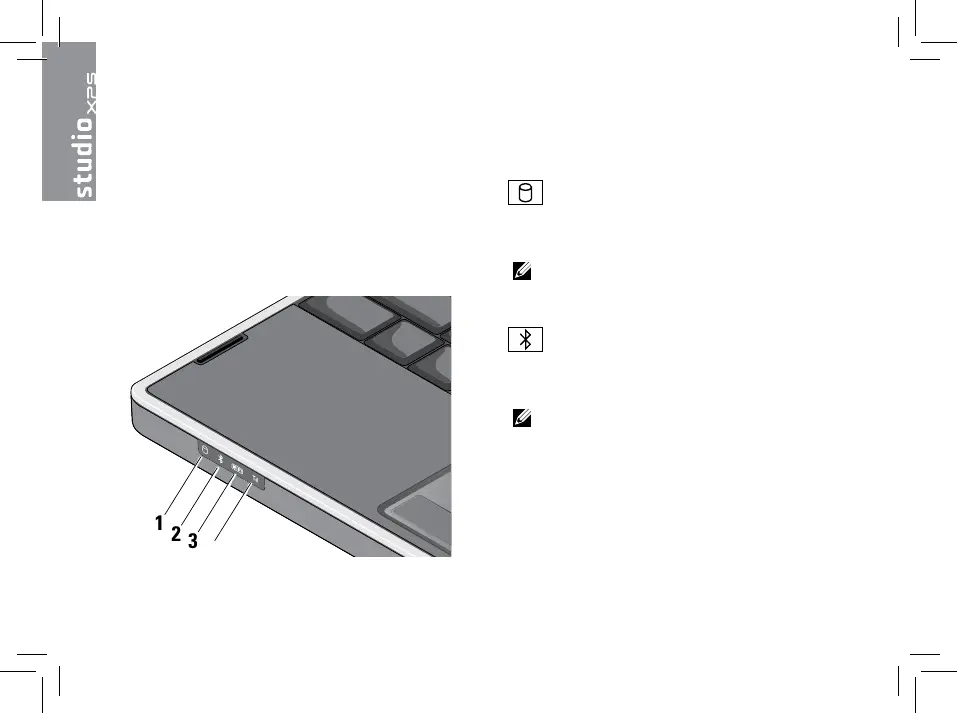
Your computer has several indicators, buttons,
and features that provide information at-a-
glance and time-saving shortcuts for common
tasks.
Device Status Lights
1
Hard drive activity light – Turns on
when the computer reads or writes data. A
flashing light indicates hard drive activity.
NOTE: To avoid loss of data, never
turn off the computer while the hard
drive activity light is flashing.
2
Bluetooth
®
status light (optional)
– Turns on when a card with Bluetooth
wireless technology is enabled.
NOTE: The card with Bluetooth
wireless technology is an optional
feature.
To turn off Bluetooth wireless, right-click
the bluetooth icon in the notification
area of your desktop, and click Disable
Bluetooth Radio or use the wireless
switch.
Using Your Dell
™
Laptop



 To Next Page