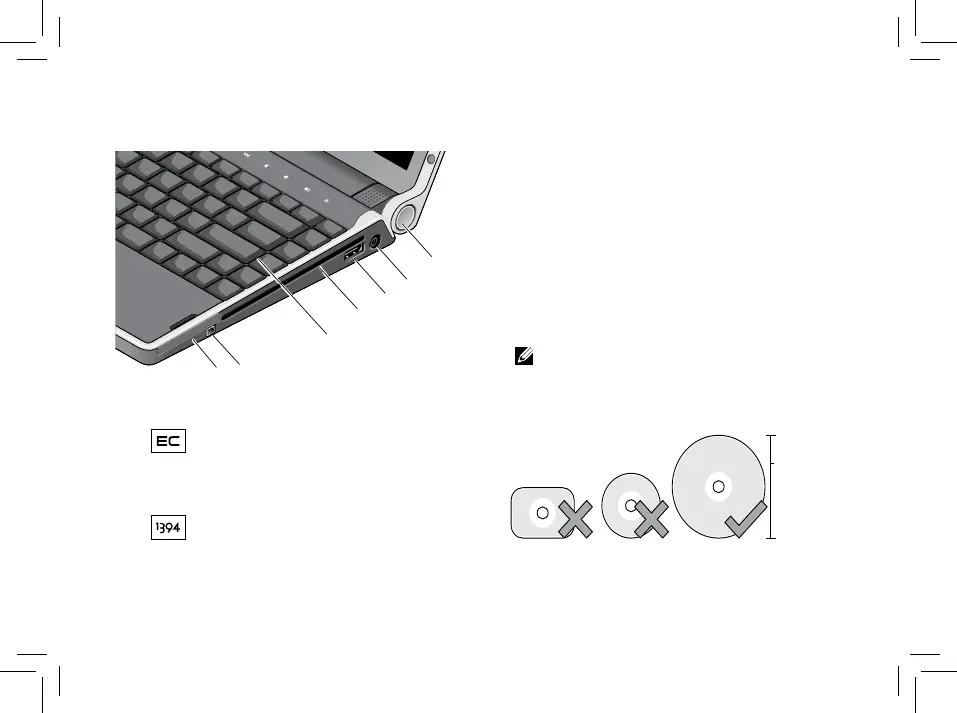
1
ExpressCard slot – Supports one
ExpressCard. The computer ships with a
plastic blank installed in the slot.
2
IEEE 1394 connector – Connects to
high-speed serial multimedia devices,
such as digital video cameras
3
Backlit Keyboard – The backlit keyboard
provides visibility in dark environments
by illuminating all symbols on the keys.
For more information see
Dell Technology
Guide.
4
Optical Drive – Plays or burns only
standard-size and shape (12 cm) CDs, and
DVDs. Ensure that the side with print or
writing is facing upward when inserting
discs
NOTE: Do not use non-standard-size
or shape discs (including mini-CDs
and mini-DVDs) or you will damage
the drive.



 To Next Page