Operating the monitor | 35
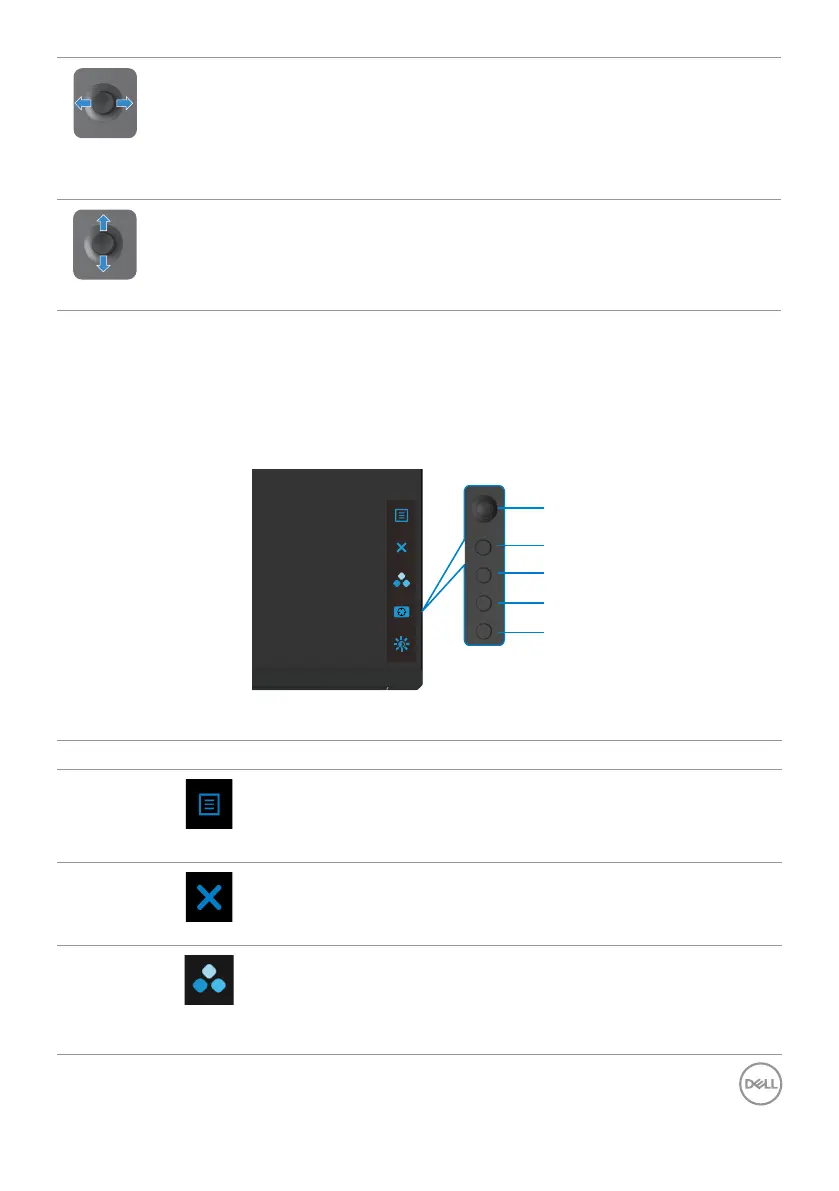
• For 2-way (right and left) directional navigation.
• Move right to enter the submenu.
• Move left to exit from the submenu.
• Increases (right) or decreases (left) the parameters of selected menu
item.
• For 2-way (up and down) directional navigation.
• Toggles between the menu items.
• Increases (up) or decreases (down) the parameters of selected menu
item.
Using the rear-panel controls
Use the control buttons on the rear of the monitor to adjust the display settings. As
you use these buttons to adjust the settings, an OSD shows the numeric values of
each feature as they change.
1
2
3
4
5
The following table describes the rear panel buttons:
Rear-panel button Description
1
Menu
Use this menu button to launch the on-screen
display (OSD) and select the OSD menu.
See Accessing the menu system.
2
Exit
Use this button to go back to the main menu or exit
the OSD main menu.
3
Shortcut key:
Preset Modes
Use this button to choose from a list of preset
colormodes.



 To Next Page