26 │ Setting up the monitor
Wall Mounting (Optional)
Refer to the instructions that come with the VESA-compatible base mounting kit.
(Screw dimension: M4 x 10 mm)
1.
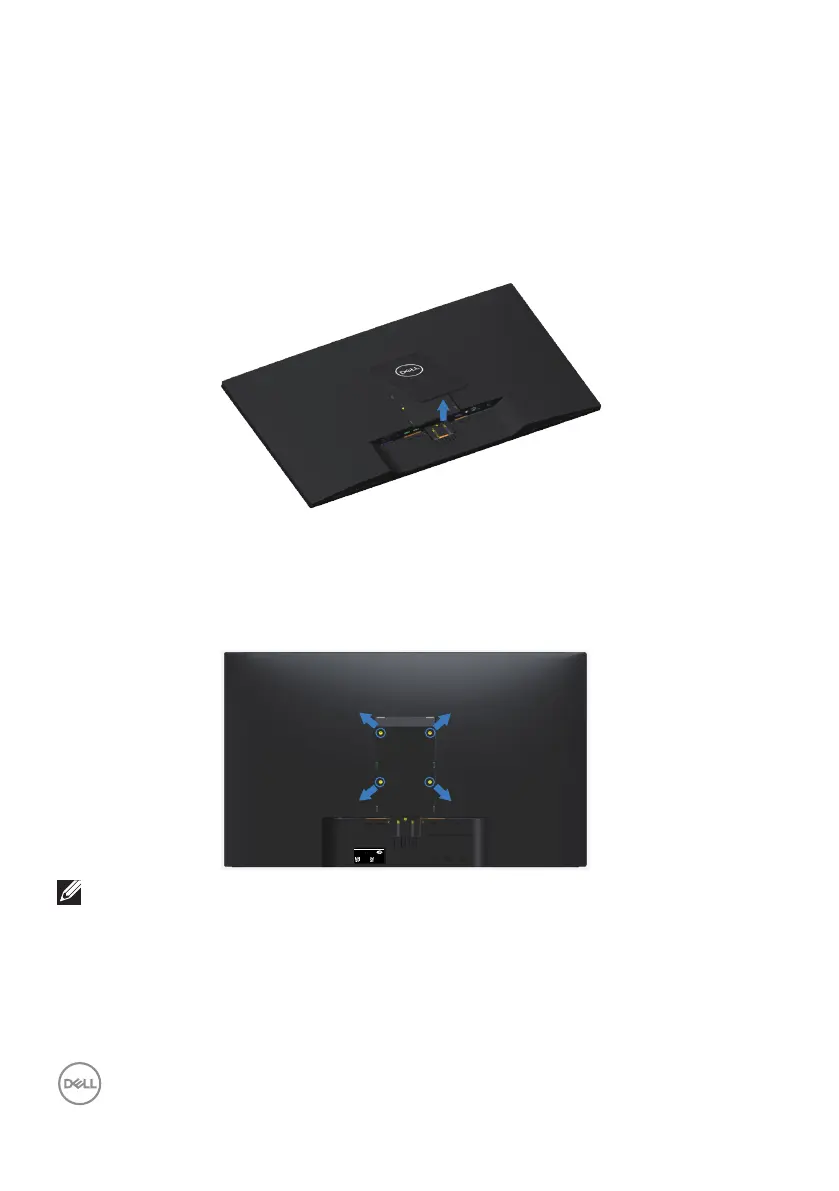
Place the monitor panel on a soft cloth or cushion on a stable flat table.
2.
Remove the stand.
3.
Remove the VESA cover.
4.
Use a screwdriver to remove the four screws securing the plastic cover.
5.
Attach the mounting bracket from the wall mounting kit to the LCD.
6.
Mount the LCD on the wall by following the instructions that came with the
base mounting kit.
SVC Tag:
1234567
Express Service
Code:
123 456 789 0
S/N: CN-0YNW31
-TV100-888-001U
A00
Date of Mfg/生产日期/生產日期: Aug. 2018
Q40G032N-700-02A
Flat Panel Monitor
Model: S3219Dc
Input Rang :100-240V 50/60Hz,1.5A
Made in China
DELL S3219D
DELL S3219D
www.dell.com/regulatory_compliance
Flat Panel Monitor /Monitor Plano Panel /Moniteur écran plat /液晶顯示器
Model No. /Modelo /N°de modelo /型號: S3219Dc
Input Rang /Entrade /Daya Tegangan:100-240V 50/60Hz,1.5A
輸入電源:交流電壓100-240伏特,1.5安培,50/60赫茲
CAN ICES-3 (B)/NMB-3(B)
сделанный в Китай /Fabriqué en Chine /中國製造
This device complies with part 15 of the FCC Rules.
Operaon is subject to the following two condions:
(1) this device may not cause harmful interference,
and (2) this device must accept any interference received,
including interference that may cause undesired operaon.
NOTE: For use only with UL-listed wall-mount bracket with minimum
weight/load bearing capacity of 30.32 kg.



 To Next Page