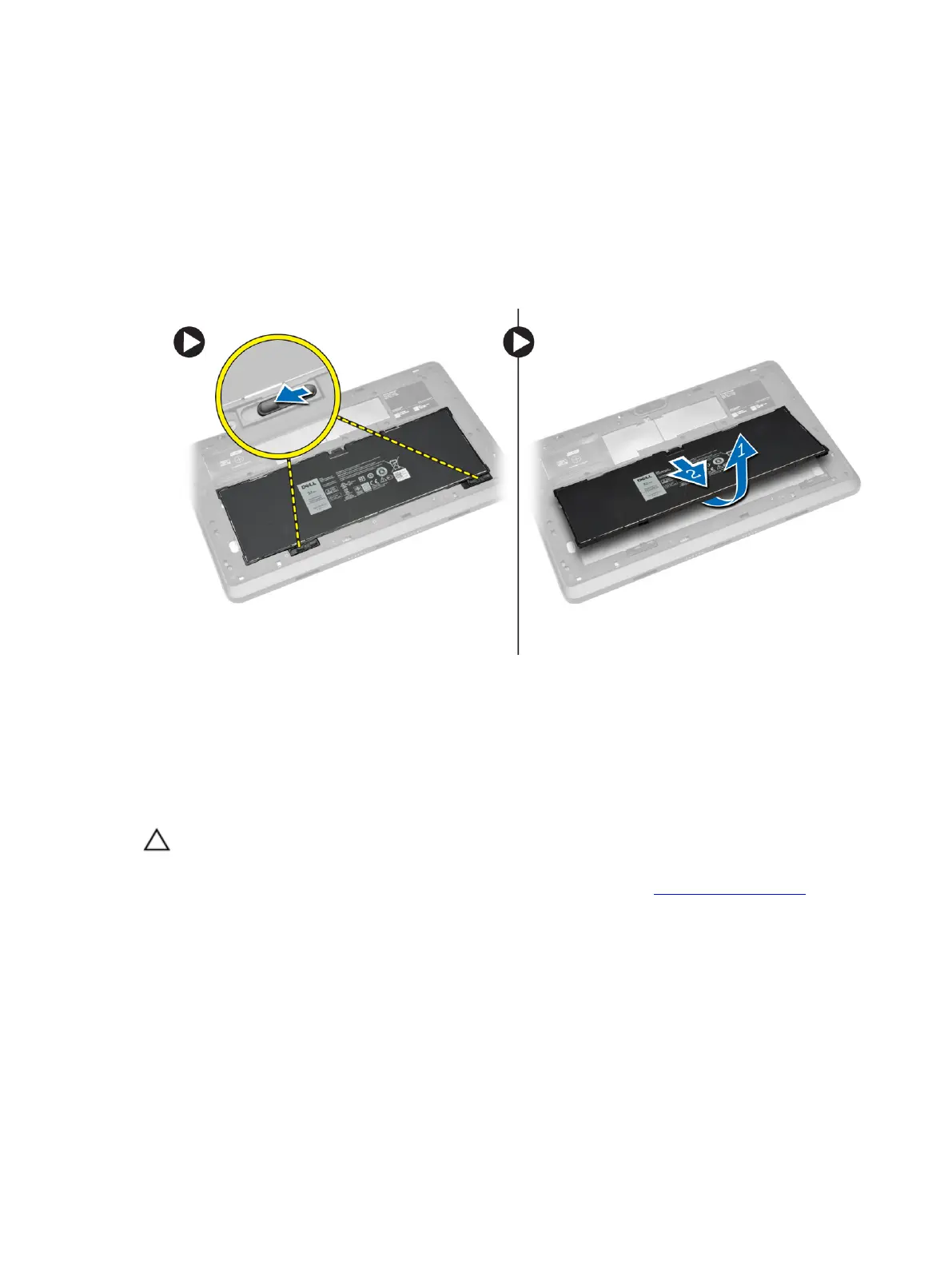
Removing the Battery
1. Follow the procedures in Before Working Inside Your Tablet.
2. Remove the base cover.
3. Perform the following steps:
a) Slide the release latch in the direction indicated to unlock the battery.
b) Push the battery forward to release it from its connector on the system board.
c) Lift and remove the battery from the tablet.
Installing the Battery
1. Slide the battery into its slot until it clicks into place.
2. Install the base cover.
Installing the micro-SIM Card
CAUTION: Removing the Micro-SIM card when the tablet is on may cause data loss or damage
the card. Make sure your tablet is turned off or the network connections are disabled.
1. Turn off your tablet. For more information on turning off your tablet, see Turning off Your Tablet.
2. Pry the base cover in the direction indicated and lift it at an upward angle to remove it from the
tablet.
19



 To Next Page