DisplayPort 1.2
Press the
key to enable or disable DisplayPort 1.2
To use the DP MST (Daisy Chain) or HBR2 feature, enable DP1.2.
NOTE: Ensure your Graphics Card can support these features before selecting DP1.2. Wrong setting may result in blank screen.
Display Info Displays the monitor's current settings.
Reset Display
Settings
Select this option to restore default display settings.
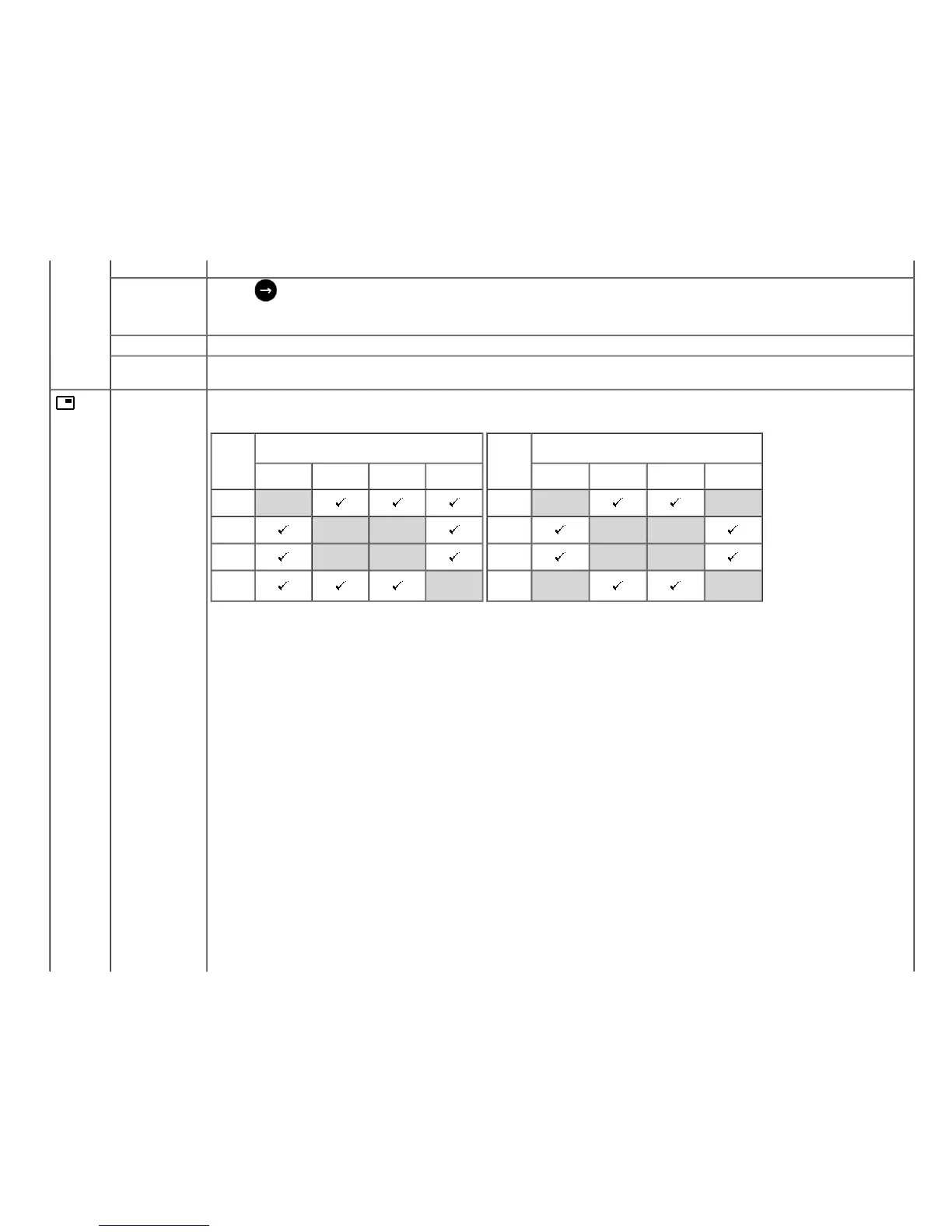
PIP Settings This function brings up a window displaying image from another input source.
U2413 U2713H
Main
Window
Sub-Window
DVI-D DP Mini DP HDMI
DVI-D X
DP X X
Mini DP X X
HDMI X
Main
Window
Sub-Window
DVI-D DP Mini DP HDMI
DVI-D X
X
DP
X X
Mini DP X X
HDMI X X
NOTE: The images under PBP will be displayed at the center of the screen, not full screen.
PIP/PBP submenu when PIP/PBP Off









 To Next Page