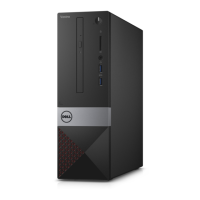
Back panel four USB 2.0 connectors
Front Panel two USB 3.0 connectors
Video
• one 15-hole VGA connector
• one 19-pin HDMI connector
Memory-card reader one
Table 19. — Control Lights And Diagnostic Lights
power button light
• white light — solid white light indicates power-
on state ; blinking white light indicates sleep/
stand-by state of the computer.
• amber light —solid amber light indicates boot
failure - System Power Error; blinking amber
light indicates boot failure - System Power OK .
drive activity light white light — blinking white light indicates that the
computer is reading data from, or writing data to
the hard drive.
Table 20. — Power
Coin-cell battery 3 V CR2032 lithium coin-cell
Input voltage 100 VAC — 240 VAC
Input frequency 50 Hz — 60 Hz
Input current 1.7 A / 2.5 A
Output current 3.34 A / 4.62 A
Maximum heat dissipation
NOTE: Heat dissipation is calculated by using the power supply wattage rating.
Table 21. — Physical Dimensions of Chassis
Height 290 mm (11.42 inches)
Width 92.60 mm (3.65 inches)
Depth 293 mm (11.53 inches)
Weight (Minimum) 3.17 kg (6.99 pounds)
Table 22. — Environmental Specifications
Temperature
Operating 10 °C to 35 °C (50 °F to 95 °F)
Storage –40 °C to 65 °C (–40 °F to 149 °F)
Relative humidity 20 % to 80 % (non-condensing)
Altitude
37


 To Next Page