1. woofer
2. system fan
3. heat sink
4. display cable
5. WLAN card
6. memory
7. system board
8. coin-cell battery
9. battery
10. hard drive
11. speaker
12. I/O board
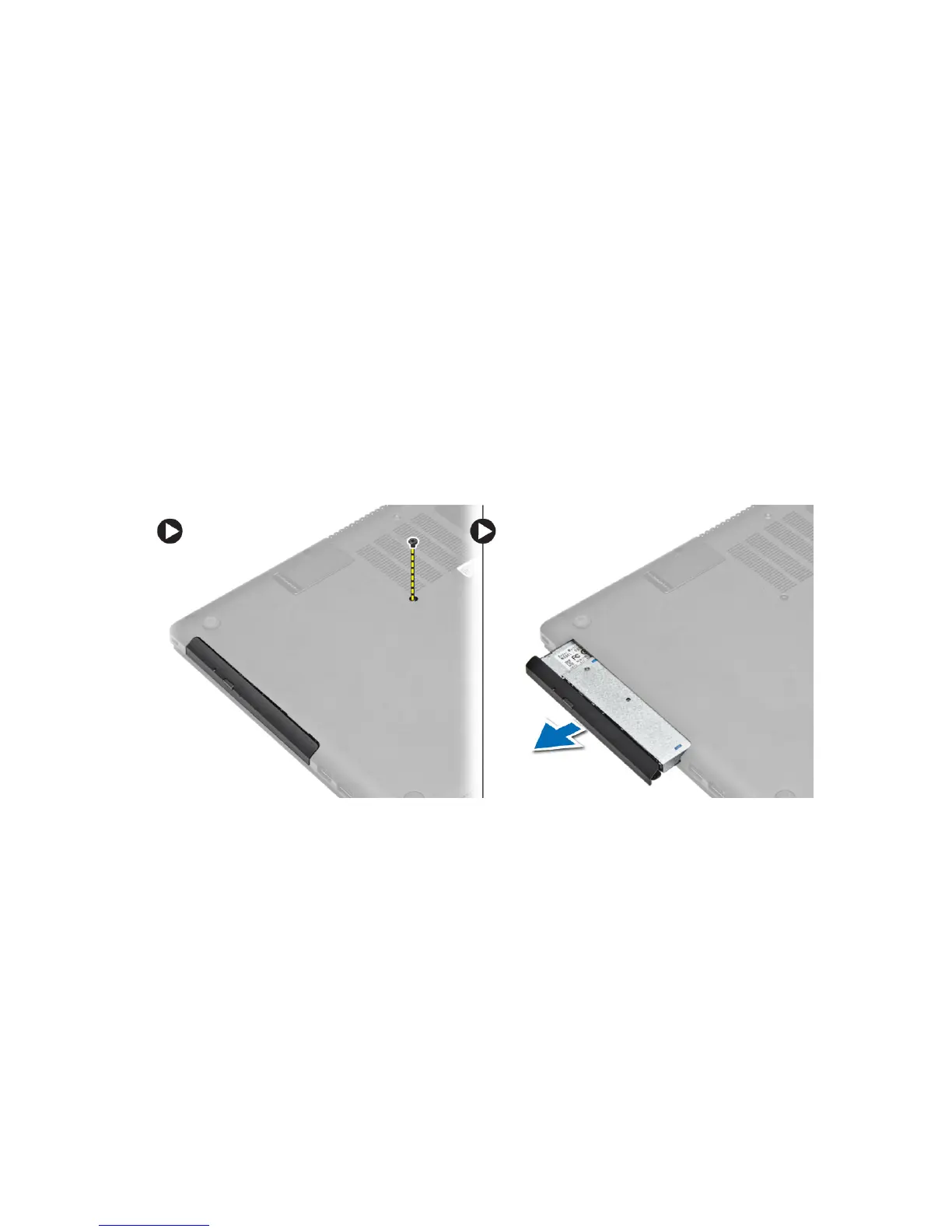
Removing The Optical-Disk Drive (ODD)
1. Follow the procedures in
Before Working Inside Your Computer
.
2. Remove the screw that secures the base cover to the computer.
3. Pull the optical-drive and remove from the computer.
Installing The Optical-Disk Drive (ODD)
1. Slide the optical drive into the computer.
2. Tighten the screw to secure the base cover to the computer.
3. Follow the procedures in
After Working Inside Your Computer.
Removing the Base Cover
1. Follow the procedures in
Before Working Inside Your Computer
.
2. Remove optical drive.
3. Remove the screws that secure the base cover to the computer.
8





 To Next Page