DVP-ES2/EX2/EC5/SS2/SA2/SX2/SE&TP Operation Manual - Programming
ASCII mode (COM3: M1320 = OFF, COM1: M1139 = OFF):
When X0 = ON, MODRW executes the function specified by Function Code H0F
PLC1 PLC2, PLC sends: “ 01 0F 0500 0010 02 3412 93 ”
PLC2 PLC1, PLC receives: “ 01 0F 0500 0010 DB ”
(No data processing on received data)
RTU mode (COM3: M1320 = ON, COM1: M1139 = ON):
When X0 = ON, MODRW executes the function specified by Function Code H0F
PLC1 PLC2, PLC1 sends: “01 0F 0500 0010 02 34 12 21 ED”
PLC2 PLC1, PLC1 receives: “01 0F 0500 0010 54 CB” ,
(No data processing on received data)
Program Example 11: COM2 (RS-485), Function Code H10
1. Function code K16 (H10): Write in multiple Word devices. Up to 16 Words can be written. For
PLC COM2 ASCII mode, only 8 words can be written.
2. For ASCII or RTU mode, PLC COM2 stores the data to be sent in D1256~D1295, and the
received data in D1070~D1085.
3. Take the connection between PLC COM2 and VFD-B AC motor drive for example, the tables
below explain the status when PLC COM2 writes multiple word devices in VFD-B.
H87
MOV
M1002
D1120
SET
M1120
K100
MOV
D1129
RST
M1127
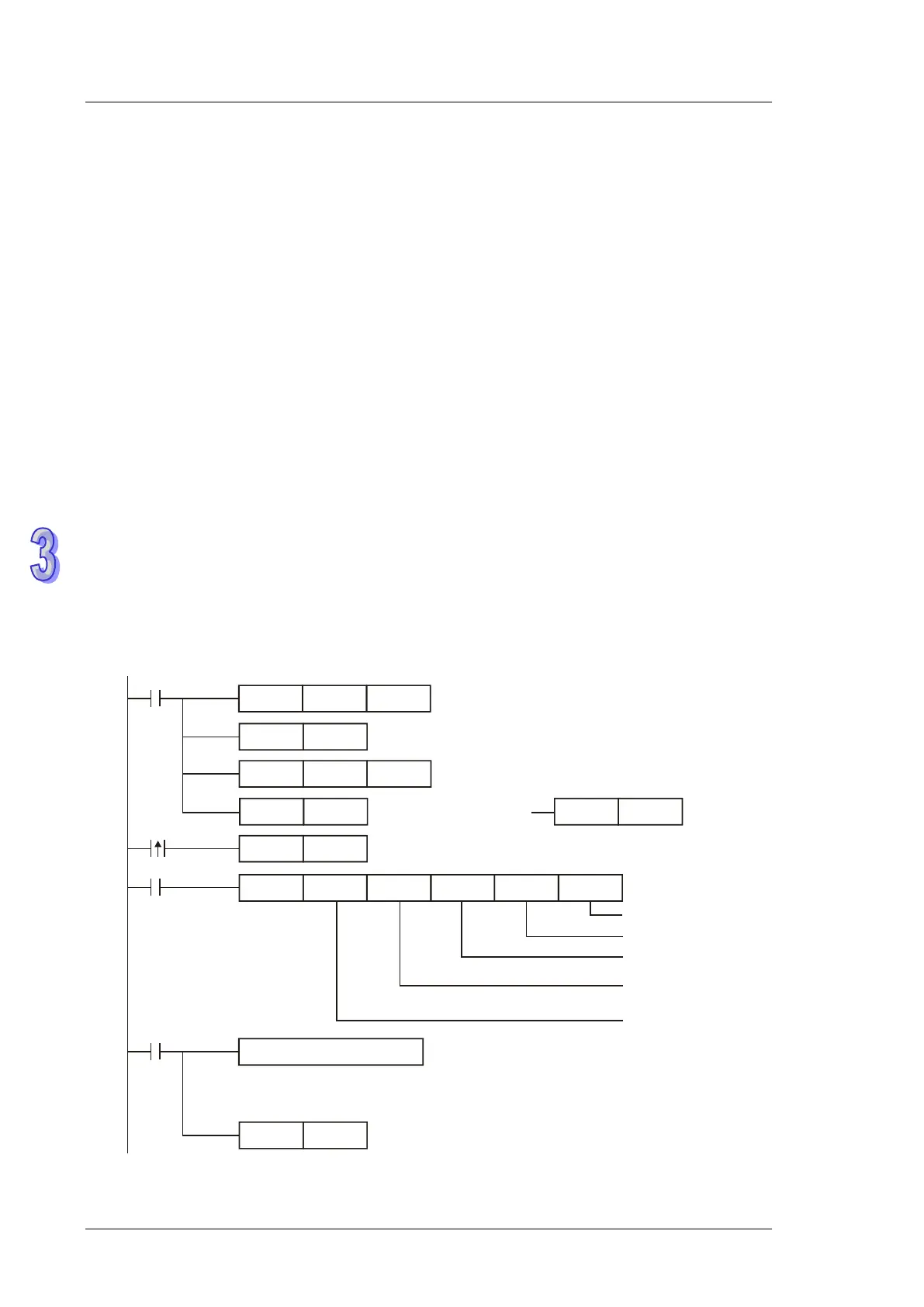
Set communication protocol as 9600, 8, E, 1
Retain communication protocol
Set communication timeout as 100ms
MODRW K16K1
X0
H2000 D50 K2
Connection device
address: K1
Function code: K16
write in multiple Words
Data address: H2000
Data storing register
Data length(word)
Processing received data
ASCII mode: The received data is stored in D1070~D1085 in ASCII format
RTU mode: The received data is stored in D1070~D1085 in Hex
Reset M1127
M1127
SET
X0
M1122
Sending request
M1143 = OFF
ASCII mode
RST
M1143
M1143 = ON
RTU mode
SET
M1143
Receiving completed


 To Next Page