EasyManua.ls Logo

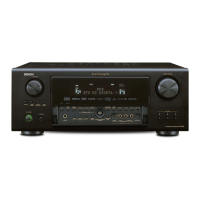
Denon ADV-700 - User Manual

Denon ADV-700
168 pages
Print Icon
To Next Page IconTo Next Page
Loading...
REMOTECONTROLUNITRC-902
VOLUME
ENTER
BAND
MODE
MENU
FUNCTION
DISPLAY RETURN INPUT MODE SURROUND
TOP MENU
SETUP
SDB/TONE
MUTE
SURR.PARA
SUB TITLE ANGLE
AUDIO
SHIFT
CH.SELECT
CH
T.TONE
TU
PROG/DIRECT
REPEAT A-B
REPEAT RANDOM
DVD
TV/VCR
CH
VOL
SLEEP
ON
OFF
REMOCON MODE
2
3
4
56
8
9
CLEAR
CALL
0
+10
7
1
STATUS
CDR/MD/TAPE
TUNER/TV/VCR
VCR POWER
TV POWER
TV
VCR
NTSC/PAL
MEMO
POWER
CH
CH
CH
FUNCTION
/SELECT
MASTER VOLUME
ON / STANDBY
SURROUND
MODE
SDB/TONE
TIMER/SET
STATUS
OPEN/CLOSE
PHONES
DVD SURROUND
RECEIVER
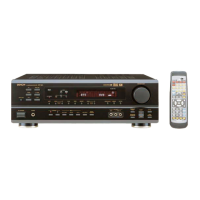
ADV-700
1
c 8 1:02:46
DVD
TONE
- TUNING +BAND
DVD SURROUND RECEIVER
ADV-700
OPERATING INSTRUCTIONS
MODE D’EMPLOI
2
We greatly appreciate your purchase of this unit.
2
To be sure you take maximum advantage of all the
features this unit has to offer, read these instructions
carefully and use the set properly. Be sure to keep this
manual for future reference should any questions or
problems arise.
“SERIAL NO.
PLEASE RECORD UNIT SERIAL NUMBER ATTACHED TO
THE REAR OF THE CABINET FOR FUTURE REFERENCE”
“NO. DE SERIE
PRIERE DE NOTER LE NUMERO DE SERIE DE L’APPAREIL
INSCRIT A L’ARRIERE DU COFFRET DE FAÇON A POUVOIR
LE CONSULTER EN CAS DE PROBLEME.”
2
Nous vous remercions pour l’achat de cet appareil.
2
Pour être sûr de profiter au maximum de toutes les
caractéristiques qu’offre cet appareil, lire avec soin ces
instructions et bien utiliser l’appareil. Toujours
conserver ce mode d’emploi pour s’y référer
ultérieurement en cas de question ou de problème.
FOR ENGLISH READERS PAGE 4 ~ PAGE 85 POUR LES LECTEURS FRANCAIS PAGE 86 ~ PAGE 167

Other manuals for Denon ADV-700

Questions and Answers

  • J
    Joseph NelsonSep 9, 2025
    Why won't my Denon Stereo Receiver start playback, or why does it stop immediately?
    • D
      Daryl ColeSep 9, 2025
      If playback doesn't start or stops immediately on your Denon Stereo Receiver, consider the following: * If there's condensation on the disc or player, let it stand for 1 or 2 hours. * Ensure you are using compatible discs (DVDs, video CDs, and music CDs). * Wipe off any dirt from the disc.
  • K
    Kathleen GarciaAug 23, 2025
    How to fix Denon Home Cinema speakers subwoofer when it's not producing sound?
    • D
      Daniel ChandlerAug 23, 2025
      If your Denon Home Cinema subwoofer isn't producing sound, first, ensure the subwoofer is powered on. Next, check the setup to confirm the subwoofer setting is set to “Subwoofer” and not “No”. Finally, verify that the output of the subwoofer is properly connected.
  • D
    Daniel TaylorAug 25, 2025
    Why is my Denon Stereo Receiver display on but there is no sound?
    • Z
      zimmermanscottAug 25, 2025
      If the display on your Denon Stereo Receiver is lit but no sound is coming out, here are a few things to check: * Ensure the speaker cords are securely connected. * Verify the audio function button is in the correct position. * Make sure the volume isn't set to the minimum; turn it up. * Check if MUTING is enabled and, if so, switch it off. * If you're using digital inputs, ensure digital signals are being input or that you've selected the correct input jacks.
  • K
    kristophervelezAug 26, 2025
    How to fix a Denon Stereo Receiver that has no display and no sound?
    • D
      desiree09Aug 27, 2025
      If the display isn't lit and there's no sound from your Denon Stereo Receiver when you turn it on, the first thing to check is whether the power cord is securely plugged in. Make sure it's properly inserted into the outlet and the receiver.
  • M
    Melissa StoneAug 27, 2025
    Why is there no sound coming from my Denon Stereo Receiver subwoofer?
    • C
      cardenasnicoleAug 28, 2025
      If your subwoofer isn't producing sound with your Denon Stereo Receiver, consider the following: * Ensure the subwoofer is powered on. * Check the receiver's setup menu to confirm the subwoofer setting is enabled (set to “Subwoofer”). * Verify that the subwoofer output is properly connected.
  • K
    kaitlynshawAug 29, 2025
    What to do if Denon Home Cinema speakers remote control is not working?
    • C
      Cindy SaundersAug 29, 2025
      If the Denon Home Cinema speakers aren't working with the remote, first, replace the batteries with new ones. If that doesn't work, move closer to the unit or remove any obstacles between the remote and the unit. Ensure you're pressing the correct button and that the batteries are inserted correctly. Finally, make sure the remote control mode is properly selected; for this unit, use the DVD mode.
  • J
    Jennifer TorresSep 17, 2025
    Why isn't my Denon Stereo Receiver playing the disc with my default audio or subtitle language?
    • D
      Devin LopezSep 18, 2025
      The disc may not play with the selected audio or subtitle language on your Denon Stereo Receiver if that language is not included on the DVD.
  • A
    andrea56Sep 18, 2025
    Why can't I switch the angle on my Denon Stereo Receiver?
    • J
      Jeffrey BradfordSep 22, 2025
      The angle may not switch on your Denon Stereo Receiver if the DVD does not contain multiple angles, or if multiple angles are only recorded for specific scenes.
  • K
    Kyle ColemanSep 8, 2025
    What to do if my Denon Stereo Receiver monitor doesn't display an image?
    • D
      Diamond HodgeSep 8, 2025
      If your monitor isn't displaying an image from your Denon Stereo Receiver, try the following: * Check the connections between the video output jack on the unit and the input connector on the monitor to ensure they are correct. * Verify that the input setting on your monitor TV is set to the correct jack where the video input is connected. * Ensure that the video signals from all devices are uniform, using either composite video or S-video connectors consistently.
  • J
    Jill AndrewsSep 4, 2025
    Why is there no display and sound from my Denon Home Cinema speakers when the power is on?
    • M
      Michael BrownSep 5, 2025
      If the Denon Home Cinema speakers display is not lit and no sound is produced when the power switch is on, check the power cord to ensure it is securely plugged in.

Summary

SAFETY PRECAUTIONS

General Safety Warnings

Includes cautions regarding fire, shock hazard, opening the unit, and handling power cords.

Operating Precautions

Advice on avoiding high temperatures, moisture, dust, and ensuring proper ventilation.

BEFORE USING

CAUTIONS ON INSTALLATION

Preventing Interference

Advice on placement and cable routing to avoid picture or sound disturbances.

PRODUCT FEATURES

Dolby Digital Decoder

Digital discrete system for 3D sound fields with no crosstalk.

Dolby Pro Logic II Decoder

Enhances stereo sources to 5 channels for improved surround sound.

DISC COMPATIBILITY

Supported Disc Formats

Lists compatible disc types like DVD Video, CD, CD-R/RW.

Unsupported Disc Formats

Lists incompatible discs like DVD-ROM/RAMS, CVD, SVCD.

DISC HANDLING PRECAUTIONS

Handling and Cleaning Discs

Advice on touching, cleaning, and avoiding damage to discs.

Disc Loading Procedures

Steps and warnings for safely loading discs into the player.

CONNECTIONS

Audio Component Connections

Guide to connecting digital audio, recorders, and subwoofer.

Connecting Video Components

Connecting TV;DBS Tuner

How to connect a TV or DBS tuner's video and audio outputs.

SPEAKER SYSTEM CONNECTIONS

Speaker Connection Guidelines

Precautions on wire gauge, polarity, and terminal contact.

Protector Circuit and Speaker Impedance

Explains the protector circuit and notes on speaker impedance.

COMPONENT OVERVIEW

Front Panel Controls and Indicators

Identifies and describes the functions of front panel buttons and displays.

REMOTE CONTROL UNIT

Remote Control Description

Identifies buttons and their functions on the remote control.

Button Operation Notes

Details on button usage for DVD, system, and amplifier functions.

REMOTE CONTROL UNIT OPERATION

REMOTE CONTROL FUNCTIONS

SYSTEM SETUP

System Setup Items Overview

Introduction to system setup and available settings.

QUICK SYSTEM SETTINGS

Selecting Speaker System Configuration

Choosing between 5.1 or 2-channel virtual modes.

ADVANCED SYSTEM SETTINGS

Speaker Configuration Setup

Setting speaker type (Large/Small) and subwoofer presence.

Subwoofer Frequency and Mode Settings

Details on subwoofer frequency crossover and mode selection.

Speaker Distance and Delay Time Setup

Speaker Distance and Delay Time Setup

Inputting distances for accurate surround sound timing.

Setting Speaker Distance Values

Inputting distances for accurate surround sound timing.

Channel Level Adjustment

Channel Level Adjustment

Using test tones (Auto/Manual) to balance speaker levels.

Test Tone Mode Explanation

Using test tones (Auto/Manual) to balance speaker levels.

DVD AUTO POWER OFF SETTING

DISC PLAYBACK

Loading Discs into the Player

Steps for opening/closing the tray and loading discs.

Starting Disc Playback

Starting Disc Playback

Turning on the unit and pressing the PLAY button.

Stopping Playback

Stopping Playback

Using the STOP button to halt playback.

Resume Play Memory Function

Stores the position for resuming playback later.

Pausing Playback

Using the PAUSE button to temporarily stop playback.

OPERATING THE UNIT

Selecting Input Source

Choosing the audio/video input (DVD, TUNER, VCR, etc.).

Input Mode and Surround Mode Selection

Setting digital input modes and surround sound modes.

Volume Control and Input Signal Display

Volume Control and Signal Display

Adjusting volume and understanding input signal indicators.

SURROUND SOUND MODES

Dolby Digital (AC-3) Explained

Details on Dolby Digital technology and compatibility.

Dolby Pro Logic II Explained

Explanation of Dolby Pro Logic II for multi-channel playback.

DTS Digital Surround

DTS Digital Surround Explained

Explanation of DTS technology and compatibility.

SURROUND PLAYBACK ADJUSTMENT

Using Test Tones for Adjustment

Calibrating speaker levels using test tones.

AUTO DECODE SURROUND MODES

2-Channel Decode Mode Settings

Selecting between Auto Stereo and Pro Logic II for 2-channel sources.

Dolby Pro Logic II Mode Settings

Adjusting Surround Parameters

AUTO DECODE MODE OPERATION

Dolby Digital and DTS Playback

Steps for playing Dolby Digital and DTS sources in AUTO DECODE.

Dolby Pro Logic II Mode Operation

Dolby Pro Logic II Mode Operation

How to select and operate Dolby Pro Logic II modes.

DSP SURROUND SIMULATION MODES

Surround Modes Overview

Descriptions of 7 DSP surround modes (STEREO, MONO MOVIE, etc.).

Adjusting DSP Surround Parameters

SURROUND MODE AND PARAMETER SUMMARY

USING ON-SCREEN DISPLAY FOR DISC INFO

REPEAT PLAYBACK

MP3 File Playback

DVD MULTI-LANGUAGE FEATURES

TIMER FUNCTIONS

Everyday Timer Function

Timer Start and End Time Settings

Sleep Timer Function

DVD DEFAULT SETTINGS

Accessing DVD Setup Menu

Navigating to the DVD setup menu.

Disc Setup Options

Subtitle Language Selection

Video Setup Options

TV Type and Format Settings

Audio Setup Options

Ratings Setup Options

MEMORY FUNCTIONS

TROUBLESHOOTING

Common Problems and Solutions

Table of symptoms, causes, and corrective measures.

DVD Operation Troubleshooting

Common problems like playback failure, menu issues, language problems.

TECHNICAL SPECIFICATIONS

Denon ADV-700 Specifications

General IconGeneral
Channels5.1
Frequency Response20 Hz - 20 kHz
Input Sensitivity200 mV (line)
Input Impedance47 kOhms
TypeAV Receiver
Surround Sound FormatsDolby Digital, DTS
Signal-to-Noise Ratio100 dB (line)

Related product manuals