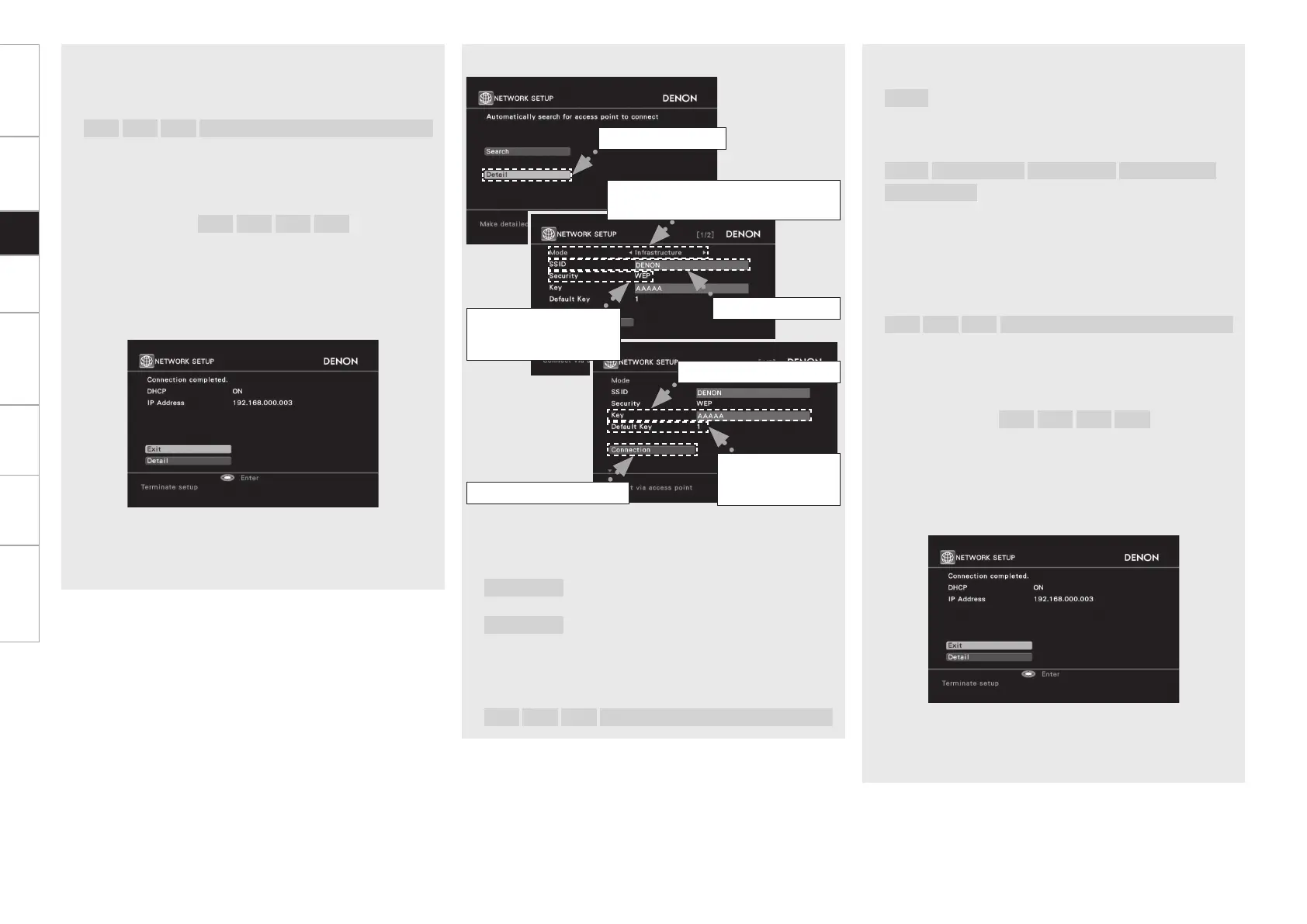
Use uio p to input the “Key” (encryption key) and press
ENTER.
Enter the same encryption key as used for the access point.
[Characters that can be input]
A ~ Z
a ~ z
0 ~ 9
! “ # % & ’ ( ) * + , - . / : ; < = > ? @ [ \ ] (space)
When no security settings have been used in the Internet
connection settings, this step is not necessary.
r
When encryption is by “WEP”, select the “Default Key” using
i, and then press o p.
[Selectable items]
1
2
3
4
Select the same default key as used for the access point. This
should normally be set to “1”.
t
Use i to select “Connection” and press ENTER.
Network connection starts.
When connection is established with the access point,
“Connection completed.” is displayed.
AVR-5308CI performs automatic network setup due to the DHCP
function.
When connecting to a network that has no DHCP function,
perform the setting in step 4.
r Use ui to select the Security and press i.
[Selectable items]
None
:
Select if not encrypted.
Can also be used even without encryption, through we
recommend encryption for improved security.
WEP
WPA-PSK(TKIP)
WPA-PSK(AES)
WPA2-PSK(TKIP)
WPA2-PSK(AES)
:
Select the encryption method according to the encryption setting
of the access point you are using.
t
Use uio p to input the “Key” (encryption key) and press
ENTER.
Enter the same encryption key as used for the access point.
[Characters that can be input]
A ~ Z
a ~ z
0 ~ 9
! “ # % & ’ ( ) * + , - . / : ; < = > ? @ [ \ ] (space)
When no security settings have been used in the Internet
connection settings, this step is not necessary.
y
When encryption is by “WEP”, select the “Default Key” using
i, and then press o p.
[Selectable items]
1
2
3
4
Select the same default key as used for the access point. This
should normally be set to “1”.
u
Use i to select “Connection” and press ENTER.
Network connection starts.
When connection is established with the access point,
“Connection completed.” is displayed.
AVR-5308CI performs automatic network setup due to the DHCP
function.
When connecting to a network that has no DHCP function,
perform the setting in step 4.
n Manual settings
q Select “Detail” and press ENTER.
w
Use o p to select the Mode and press i.
[Selectable items]
Infrastructure
:
Select when communication is via an access
point.
Ad-hoc
:
Select during direct communication, when an
access point is not used.
e
Use uio p to input the name of the wireless network (SSID)
and press ENTER.
[Characters that can be input]
A ~ Z
a ~ z
0 ~ 9
! “ # % & ’ ( ) * + , - . / : ; < = > ? @ [ \ ] (space)
q Select “Detail”.
e Input the SSID.
w Select the communication mode.
Example) Infrastructure
r Select the
encryption method.
Example) WEP
y Set only
during “WEP”
in step r.
u Select “Connection”.
t Enter encryption key.
Getting Started Connections Setup Playback Remote Control Multi-Zone Information Troubleshooting
AVR5308CIEU_100_初校作成中.indd 37 2008/05/26 9:40:43



 To Next Page
 Loading...