6
ENGLISH
Easy Setup and Operation Easy Setup and Operation
2 Connections
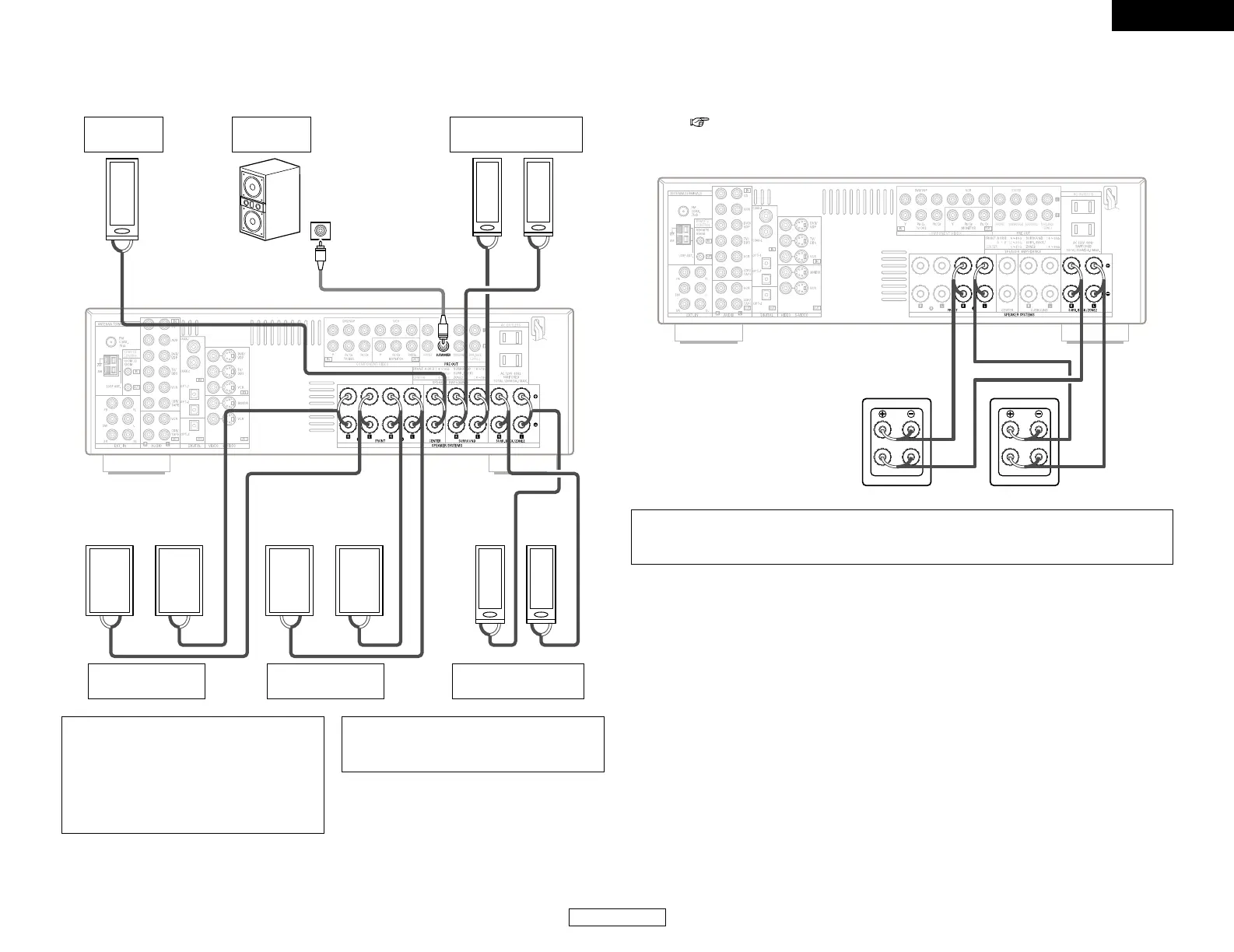
When making connections, also refer to the operating instructions of the other components.
Connection terminal
for a subwoofer with
built-in amplifier.
Surround speaker
systems
Subwoofer
Front speaker
systems (B)
Precautions when connecting speakers:
If a speaker is placed near a TV or video
monitor, the colors on the screen may be
disturbed by the speaker’s magnetism. If
this should happen, move the speaker away
to a position where it does not cause this
effect.
NOTE:
• When using only one surround back
speaker, connect it to the left channel.
Front speaker
systems (A)
Center
speaker
Surround back
speaker systems
2 Bi-Amp connections
Certain loudspeakers are equipped with two sets of input terminals, for bi-amplification. The AVR-
786 Power Amp Assign. mode allows you to power bi-amp-capable speakers with two amplifier
channels ( page 43). Be sure to consult the owner’s manual of your bi-amp-capable speakers
for further information before proceeding.
NOTE:
• When making Bi-Amp connections, be sure to remove the short-circuiting bar included with
the speaker.
AVR-786
SPEAKER SPEAKER


 To Next Page
 Loading...