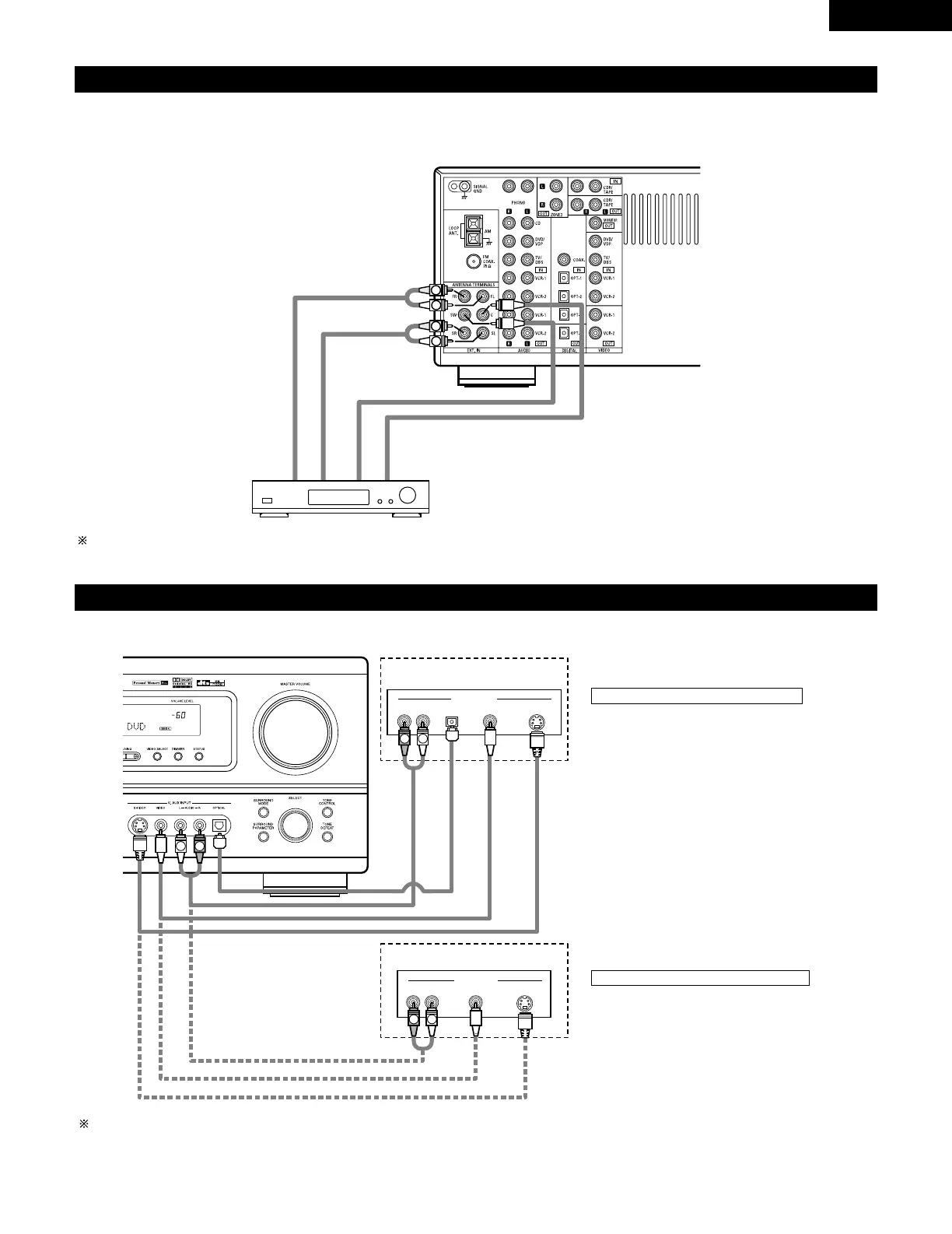
Connecting the external input (EXT. IN) jacks
• These jacks are for inputting multi-channel audio signals from an outboard decoder, or a component with a different type of multi-channel
decoder, such as a DVD Audio player, or a multi-channel SACD player, or other future multi-channel sound format decoder.
• When making connections, also refer to the operating instructions of the other components.
Decoder with 6-
channel analog output
Front
Surround
Subwoofer
Center
For instructions on playback using the external input (EXT. IN) jacks, see page 38.
Connecting the video component equipped with a V. AUX jacks
To connect the video signal, connect using a 75 Ω/ohms video signal cable cord. Using an improper cable can result in a drop in sound quality.
Connecting a Video game component
• Connect the Video game component’s output jacks to
this unit’s V. AUX INPUT jacks.
Video game
Video camera
Connecting a video camera component
• Connect the video camera component’s output jacks to
this unit’s V. AUX INPUT jacks.
The V. AUX jacks is covered with a cap. Remove this cap in order to use the terminal. (See page 5 for instructions on removing the cap.)
ENGLISH


 To Next Page
 Loading...