Simple
version
3
ENGLISH
Basic version Advanced version InformationSimple version
Simple version (Simple setup guide)
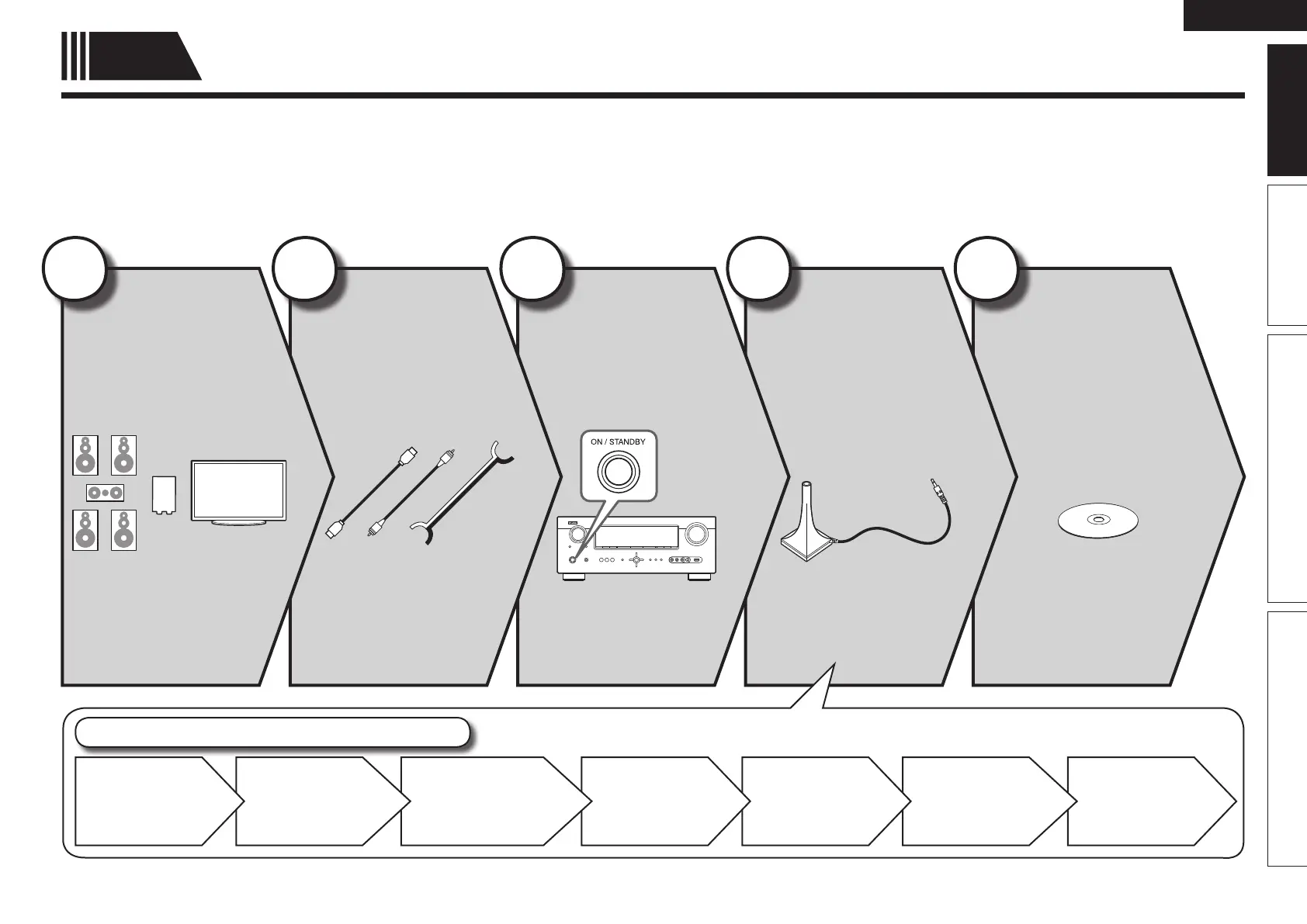
Here, we explain the entire setup procedure, from unboxing the unit to using it in a home theater.
The “Simple version” describes the installation, connection and setup methods for 5.1-channel speakers.
See page 47 for the installation, connection and setup methods for speakers other than 5.1-channel speakers.
n Before connecting the unit, turn off the power to all devices.
n For operation of the connected devices, refer to the user manuals for each device.
Play back
disc
(vpage11)
Enjoy Blu-ray Disc and DVD
in surround sound.
5
Set up
speakers
(vpage6)
Use the setup microphone
(DM-A409) included with
the product, for automatic
setup.
4
Turn on
power
(vpage6)
3
Connect
(vpage4)
Connect 5.1-channel
speakers, a TV and
Blu-ray Disc player
equipped with an HDMI
connector.
2
Install
(vpage4)
Enjoy better audio, using
the correct install method.
1
Finish
STEP 6
Store
STEP 5
Check
STEP 4
Calculation
STEP 3
Measurement
STEP 2
Speaker
Detection
STEP 1
Preparation
Set up speakers (Audyssey
®
Auto Setup)


 To Next Page
 Loading...