EasyManua.ls Logo

Denon COCOON - PC;Mac Network Configuration; Web Browser Configuration Steps

Denon COCOON
77 pages
Print Icon
To Next Page IconTo Next Page
To Previous Page IconTo Previous Page
Loading...
CONNECTING
TO YOUR
HOME
NETWORK
USING
A PC
OR MAC
(CONTINUED)
Use web browser for configuration
000
Gill81~~~~
ht
-
tp
~
:V
~
16
=
9
~
.2
~
54
~
.1
~
.
1
------------------~J
0
(
Conne
cti
ng
)
~
+
0 0
~
S
ucceeded
)
Plense wart
as
rebooting may take approximately
30
-
120
seconds.
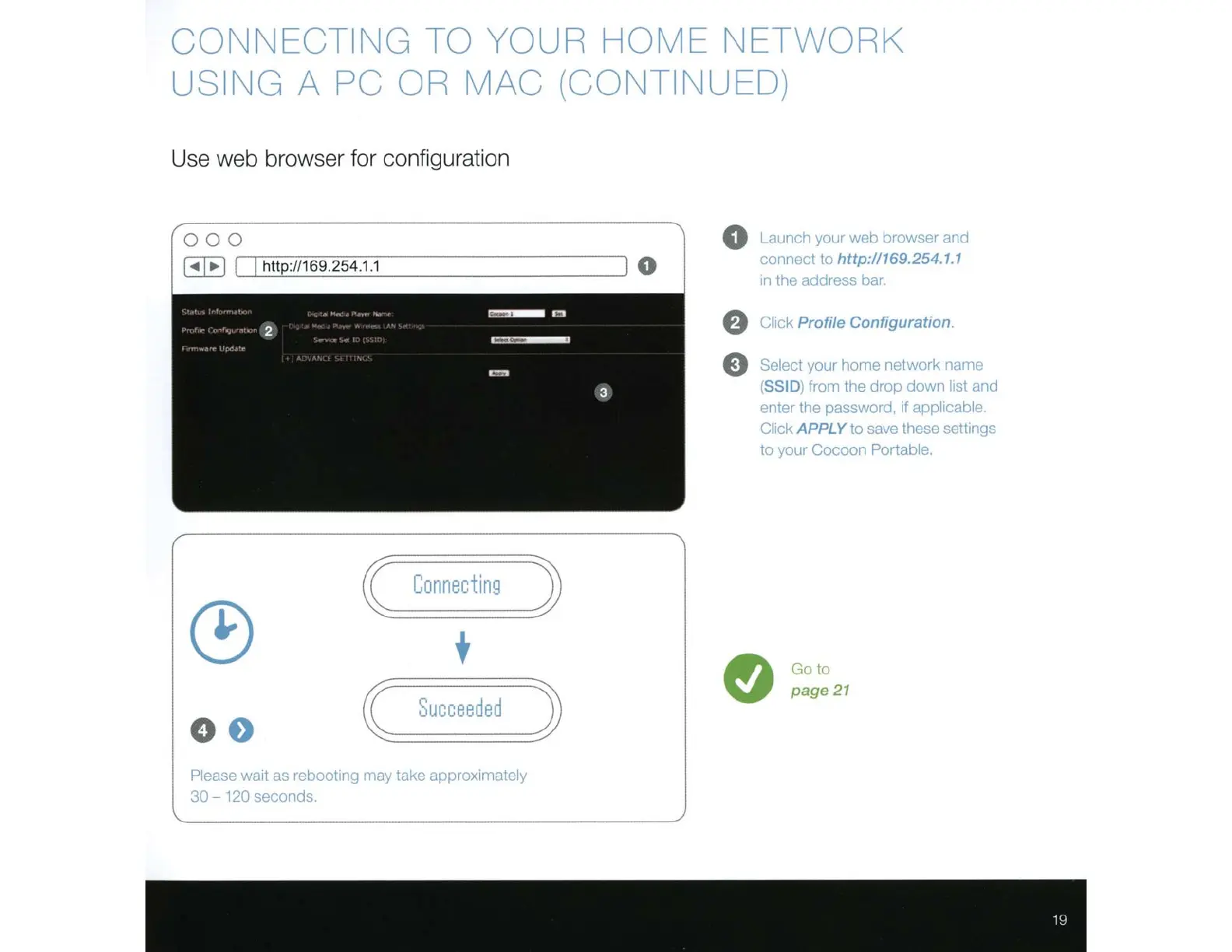
0 Launch your web browser and
connect to
http
:
/1169
.254.1.1
rn
the address bar.
f)
Click
Profile Configuration.
e
Select your home network
11ame
(SSID)
from the dr
op
down list and
enter the password, if
app
li
cable
Click
APPLY
to save these settrngs
to your Cocoor. Portable.
e
Go
to
page
21

Related product manuals