27
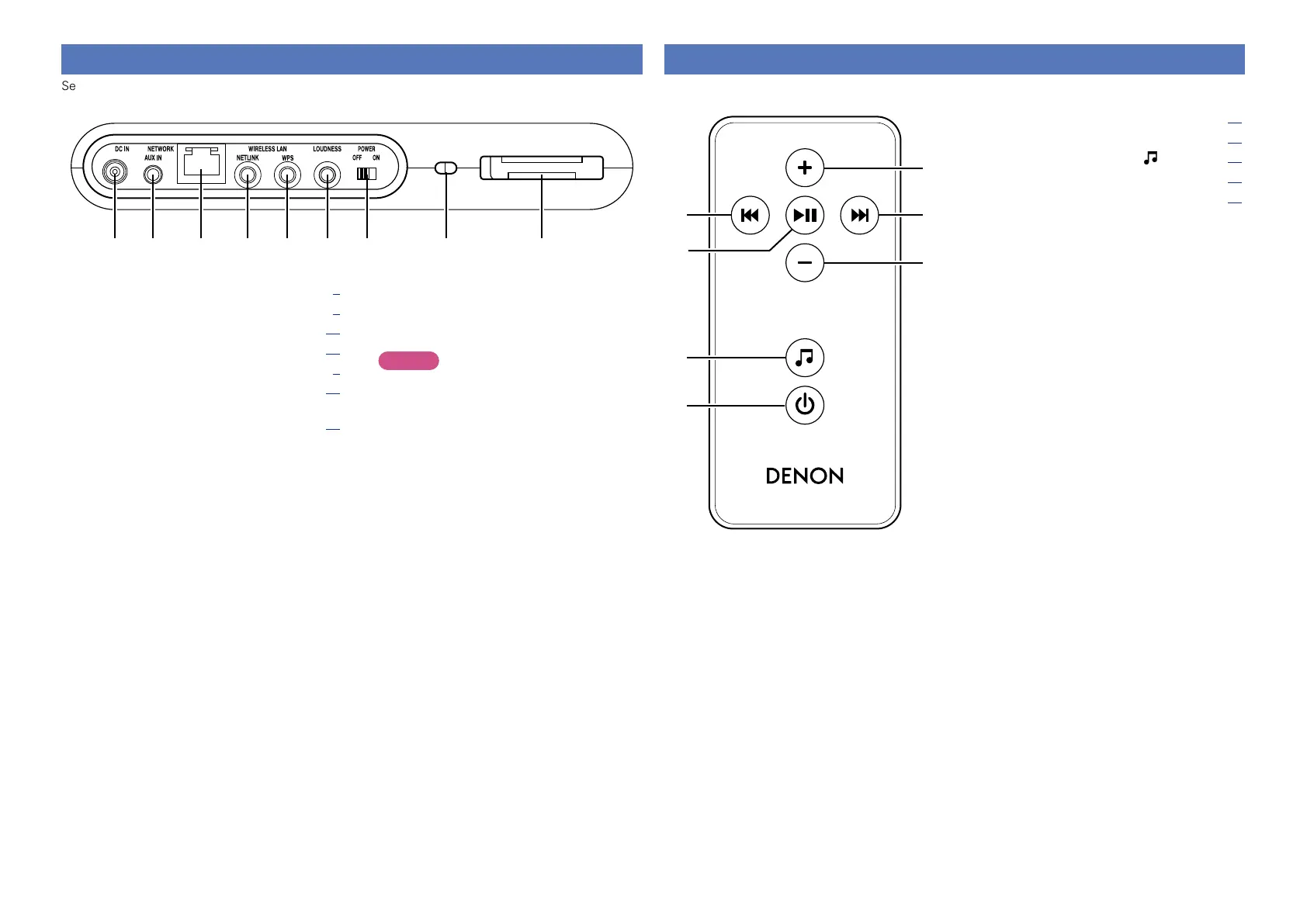
Remote control unit
For buttons not explained here, see the page indicated in parentheses ( ).
q Skip buttons (8, 9) ··························· (14)
w Play/Pause button (13) ···························· (14)
e Input source select button ( ) ················· (13)
r Power operation button (X) ······················ (13)
t Volume control buttons (+, – ) ·················· (13)
e
q
r
w
q
t
t
Rear panel
See the page indicated in parentheses ( ).
wq e r t y u i o
q DC input (DC IN) ··········································· (5)
w AUX IN jack ··················································· (5)
e Network connector (NETWORK) ·············· (10)
r NETLINK button ········································· (11)
t WPS button ··················································· (9)
y LOUDNESS button ····································· (14)
u Power operation slide switch
(POWER ON/OFF) ······································· (13)
Turns power to this unit on and off.
i Security slot
You can attach a security cable to deter theft.
Use a security cable that is compatible with this
unit. For details, contact your dealer.
NOTE
Security cables have deterrent effects, but do
not completely prevent theft or misuse of this
unit.
o Remote control storage space


 To Next Page