26
Front panel
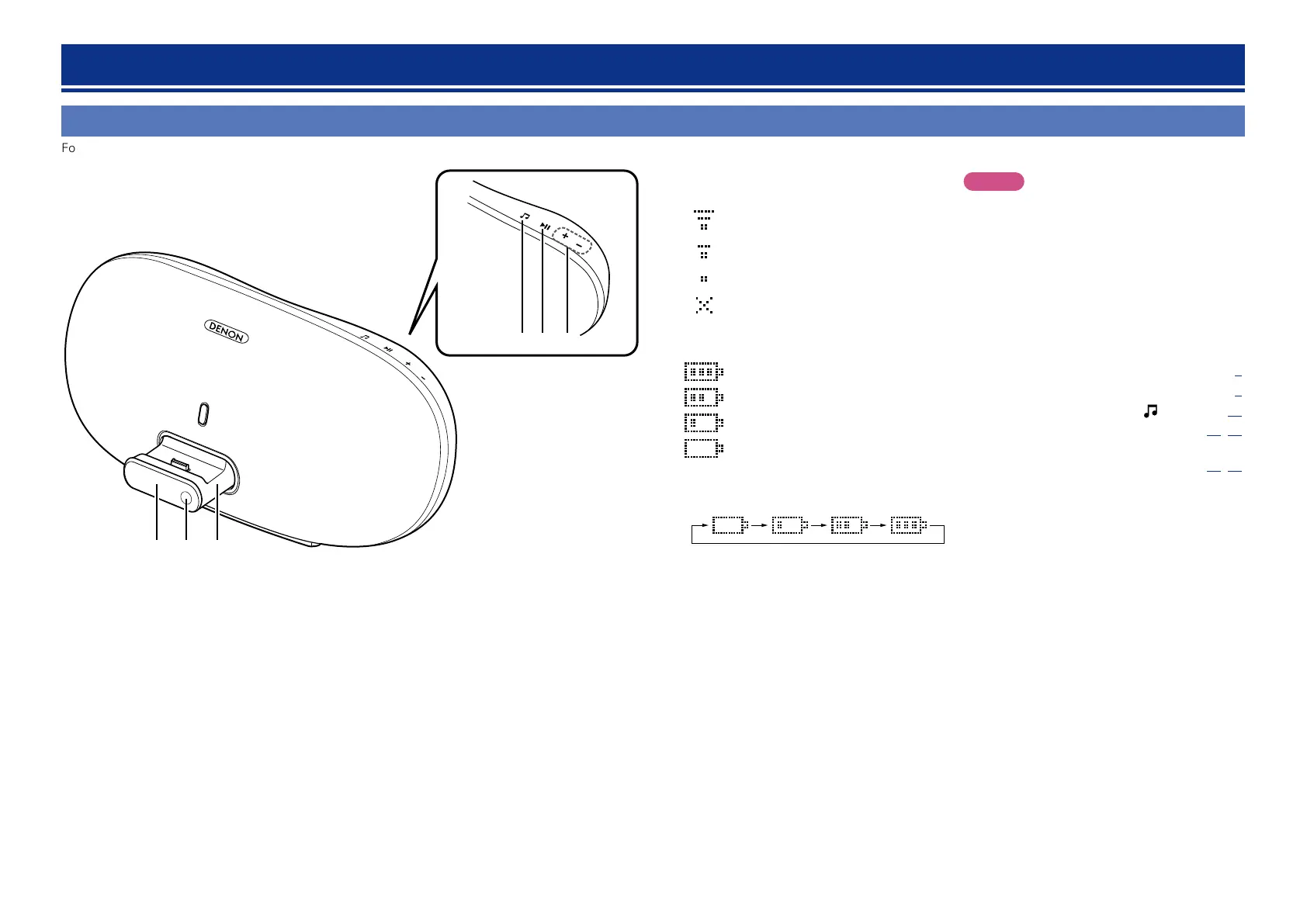
For buttons not explained here, see the page indicated in parentheses ( ).
q ew
r t y
q Display
GWireless LAN signal strengthH
: Strong
: Medium
: Weak
: Not connected
GRemaining battery level indication during
battery operationH
: 75 % or more
: 50 – 75%
: 25 – 50%
: 25 % or less
(“Low Battery” is displayed.)
•Battery level indication while the battery is
being charged during AC operation
During AC operation, the battery mark lights
off when the battery is fully charged.
Part names and functions
NOTE
•If the battery level reaches zero during use, the
power is turned off.
•Usage time may vary depending on the usage
environment’s temperature, method of use, etc.
•If usage time is extremely short even when the
battery has been fully charged, the battery may be
near the end of its life. In this case, please contact
DENON service center.
•Battery replacement must be performed by a
service person.
w Remote control sensor ································ (3)
e Dock ······························································· (6)
r Input source select button ( ) ················· (13)
t Play/Pause button (13) ······················ (14, 20)
y Volume control buttons
(+, – ) ······················································ (13, 20)


 To Next Page