EasyManua.ls Logo

Denon DAP-2500 - Page 11

Denon DAP-2500
14 pages
Print Icon
To Next Page IconTo Next Page
To Previous Page IconTo Previous Page
Loading...
ENGLISH
PLAYBACK
USING
THE
REMOTE
CONTROL
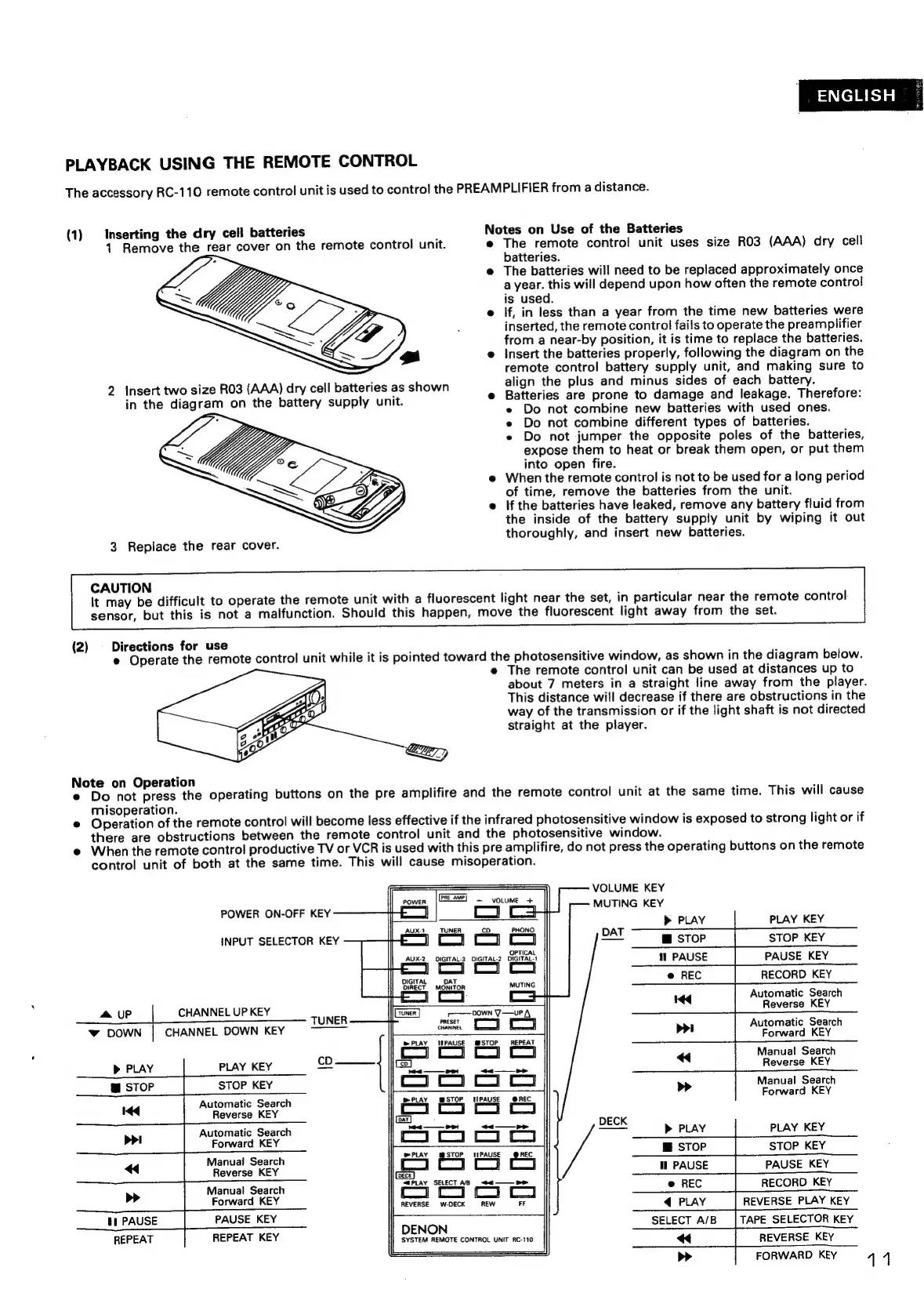
The
accessory
RC-110
remote
control
unit
is
used
to
control
the
PREAMPLIFIER
from
a
distance.
(1)
Inserting
the
dry
cell
batteries
Notes
on
Use
of
the
Batteries
1
Remove
the
rear
cover
on
the
remote
control
unit.
e
The
remote
contro!
unit
uses
size
RO3
(AAA)
dry
cell
batteries.
e
The
batteries
will
need
to
be
replaced
approximately
once
a
year.
this
will
depend
upon
how
often
the
remote
control
is
used.
e
If,
in
less
than
a
year
from
the
time
new
batteries
were
inserted,
the
remote
control
fails
to
operate
the
preamplifier
from
a
near-by
position,
it
is
time
to
replace
the
batteries.
e
Insert
the
batteries
properly,
following
the
diagram
on
the
remote
control
battery
supply
unit,
and
making
sure
to
align
the
plus
and
minus
sides
of
each
battery.
e
Batteries
are
prone
to
damage
and
leakage.
Therefore:
e
Do
not
combine
new
batteries
with
used
ones.
e
Do
not
combine
different
types
of
batteries.
e
Do
not
jumper
the
opposite
poles
of
the
batteries,
expose
them
to
heat
or
break
them
open,
or
put
them
into
open
fire.
e@
When
the
remote
control
is
not
to
be
used
for
a
long
period
of
time,
remove
the
batteries
from
the
unit.
e
Ifthe
batteries
have
leaked,
remove
any
battery
fluid
from
the
inside
of
the
battery
supply
unit
by
wiping
it
out
thoroughly,
and
insert
new
batteries.
2
Insert
two
size
RO3
(AAA)
dry
cell
batteries
as
shown
in
the
diagram
on
the
battery
supply
unit.
3
Replace
the
rear
cover.
CAUTION
It
may
be
difficult
to
operate
the
remote
unit
with
a
fluorescent
light
near
the
set,
in
particular
near
the
remote
control
sensor,
but
this
is
not
a
malfunction.
Should
this
happen,
move
the
fluorescent
light
away
from
the
set.
(2)
Directions
for
use
Aaa
e
Operate
the
remote
control
unit
while
it
is
pointed
toward
the
photosensitive
window,
as
shown
in
the
diagram
below.
e
The
remote
control
unit
can
be
used
at
distances
up
to
about
7
meters
in
a
straight
line
away
from
the
player.
This
distance
will
decrease
if
there
are
obstructions
in
the
way
of
the
transmission
or
if
the
light
shaft
is
not
directed
straight
at
the
player.
Note
on
Operation
.
:
:
e
Do
not
press
the
operating
buttons
on
the
pre
amplifire
and
the
remote
control
unit
at
the
same
time.
This
will
cause
misoperation.
e
Goaration
of
the
remote
control
will
become
less
effective
if
the
infrared
photosensitive
window
is
exposed
to
strong
light
or
if
there
are
obstructions
between
the
remote
control
unit
and
the
photosensitive
window.
e@
When
the
remote
control
productive
TV
or
VCR
is
used
with
this
pre
amplifire,
do
not
press
the
operating
buttons
on
the
remote
contro!
unit
of
both
at
the
same
time.
This
will
cause
misoperation.
_
VOLUME
KEY
MUTING
KEY
[ean]
VOLUME
+
POWER
ON-OFF
KEY
PLAY
KEY
STOP
KEY
PAUSE
KEY
RECORD
KEY
Automatic
Search
Reverse
KEY
Automatic
Search
Forward
KEY
Manual
Search
PLAY
TUNER
cD
I
Co
co
OPTICAL
2
DIGITAL-3 DIGITAL-2
DIGITAL-1
}
=
INPUT
SELECTOR
KEY
DAT
MORATOR
MUTING
m&
UP
CHANNEL
UP
KEY
vw
DOWN
CHANNEL
DOWN
KEY
r——
Down
V—uP
A
ec
PAUSE
@STOP
TUNER
»
PLAY
PLAY
KEY
eb
ge
Se
Reverse
KEY
@
STOP
STOP
KEY
co
[ne
oe
|
Manual
Search
Forward
KEY
BPLAY
STOP
TIPAUSE
@AREC
Automatic
Search
Reverse
KEY
Automatic
Search
Forward
KEY
Manual
Search
Reverse
KEY
Manual
Search
Forward
KEY
PAUSE
KEY
REPEAT
KEY
ee
PP
Co
Co
co
co
PLAY
PS
WPAUSE
_@REC
(Gecx)
“SPLAY
SELECT
AB
<4
——
Be
co
ca
REVERSE
w-DECK
REW
FF
DECK
PLAY
KEY
STOP
KEY
PAUSE
KEY
RECORD
KEY
REVERSE
PLAY
KEY
TAPE
SELECTOR
KEY
REVERSE
KEY
FORWARD
KEY
th
PAUSE
REPEAT
DENON
SYSTEM
REMOTE
CONTROL
UNIT
RC-110
11

Related product manuals