EasyManua.ls Logo

Denon DAP-2500 - Page 13

Denon DAP-2500
14 pages
Print Icon
To Next Page IconTo Next Page
To Previous Page IconTo Previous Page
Loading...
“ENGLISH
©
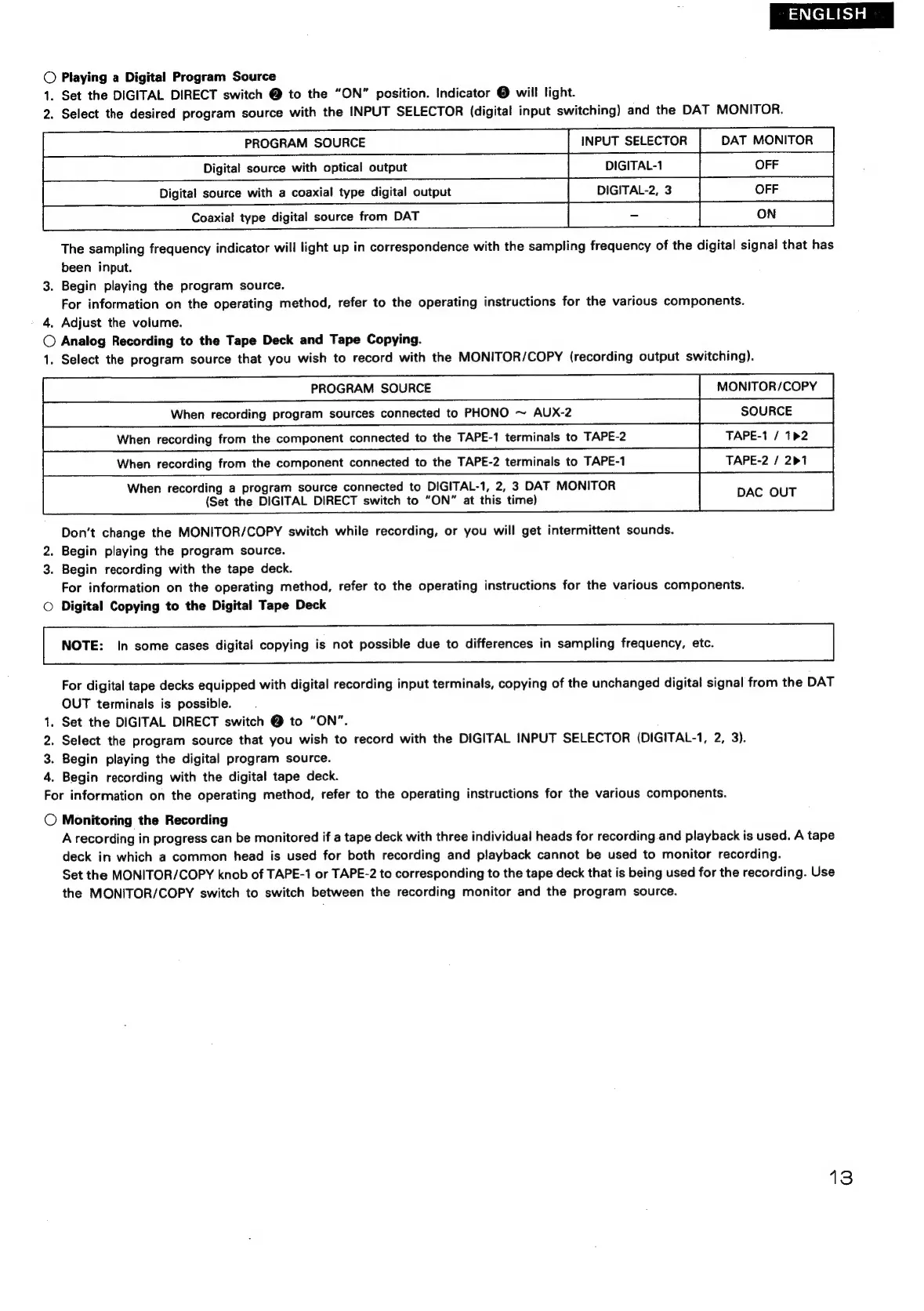
Playing
a
Digital
Program
Source
1.
Set
the
DIGITAL
DIRECT
switch
@
to
the
“ON”
position.
Indicator
@
will
light.
2.
Select
the
desired
program
source
with
the
INPUT
SELECTOR
(digital
input
switching)
and
the
DAT
MONITOR.
|
conn
oe
ia
oure
tom
oar
The
sampling
frequency
indicator
will
light
up
in
correspondence
with
the
sampling
frequency
of
the
digital
signal
that
has
been
input.
3.
Begin
playing
the
program
source.
For
information
on
the
operating
method,
refer
to
the
operating
instructions
for
the
various
components.
'
4,
Adjust
the
volume.
©
Analog
Recording
to
the
Tape
Deck
and
Tape
Copying.
1.
Select
the
program
source
that
you
wish
to
record
with
the
MONITOR/COPY
(recording
output
switching).
When
recording
a
program
source
connected
to
DIGITAL-1,
2,
3
DAT
MONITOR
DAC
OUT
(Set
the
DIGITAL
DIRECT
switch
to
“ON”
at
this
time)
Don’t
change
the
MONITOR/COPY
switch
while
recording,
or
you
will
get
intermittent
sounds.
2.
Begin
playing
the
program
source.
3.
Begin
recording
with
the
tape
deck.
For
information
on
the
operating
method,
refer
to
the
operating
instructions
for
the
various
components.
©
Digital
Copying
to
the
Digital
Tape
Deck
NOTE:
In
some
cases
digital
copying
is
not
possible
due
to
differences
in
sampling
frequency,
etc.
For
digital
tape
decks
equipped
with
digital
recording
input
terminals,
copying
of
the
unchanged
digital
signal
from
the
DAT
OUT
terminals
is
possible.
1.
Set
the
DIGITAL
DIRECT
switch
@
to
“ON”.
2.
Select
the
program
source
that
you
wish
to
record
with
the
DIGITAL
INPUT
SELECTOR
(DIGITAL-1,
2,
3).
3.
Begin
playing
the
digital
program
source.
4.
Begin
recording
with
the
digital
tape
deck.
For
information
on
the
operating
method,
refer
to
the
operating
instructions
for
the
various
components.
©
Monitoring
the
Recording
A
recording
in
progress
can
be
monitored
if
a
tape
deck
with
three
individual
heads
for
recording
and
playback
is
used.
A
tape
deck
in
which
a
common
head
is
used
for
both
recording
and
playback
cannot
be
used
to
monitor
recording.
Set
the
MONITOR/COPY
knob
of
TAPE-1
or
TAPE-2
to
corresponding
to
the
tape
deck
that
is
being
used
for
the
recording.
Use
the
MONITOR/COPY
switch
to
switch
between
the
recording
monitor
and
the
program
source.

Related product manuals