ENGLISH
Using
the
Timer Play Function
Also refer to the operating Instructions
of
the audio timer
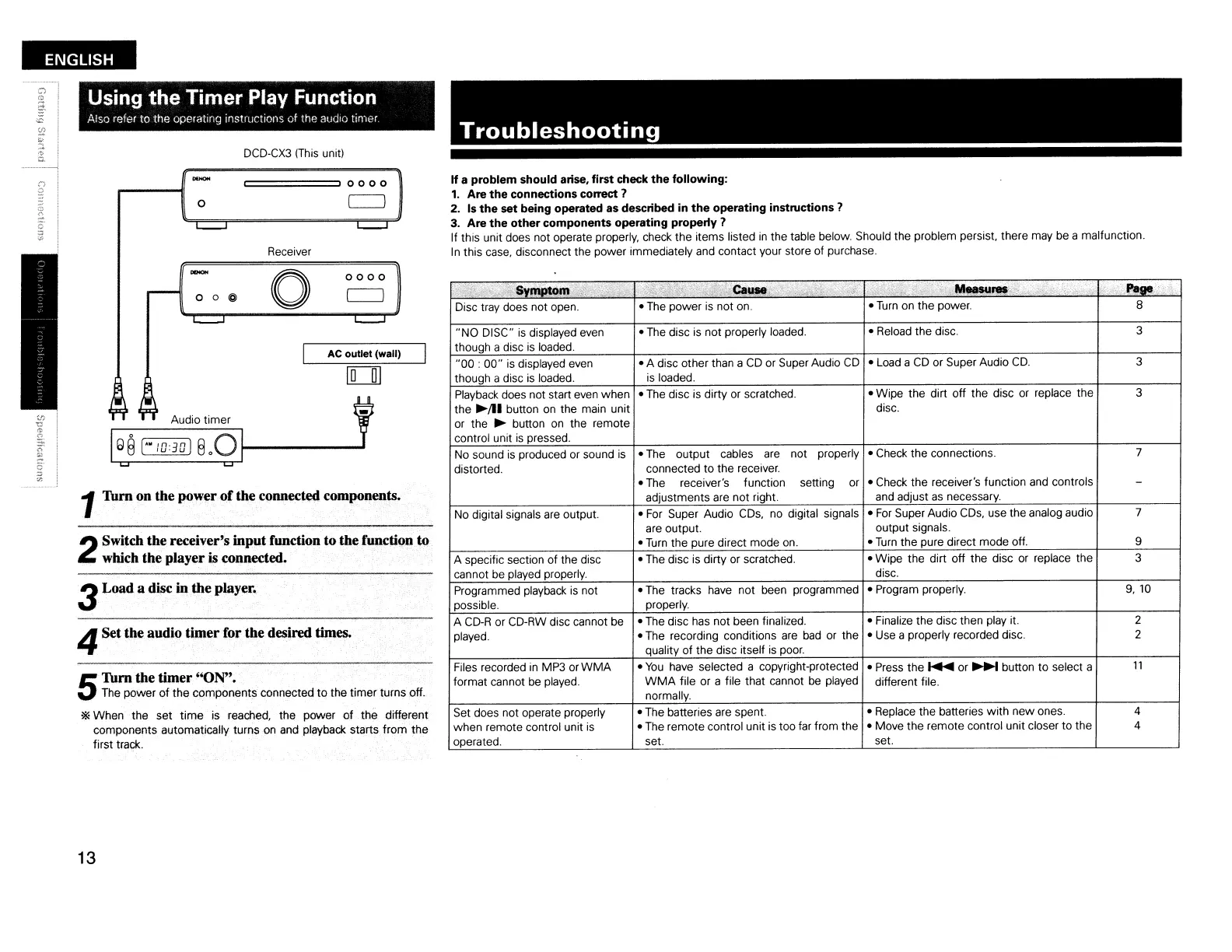
DCD-CX3
(This
unit)
Troubleshooting
o
======,
0 0 0 0
If
a problem should arise. first check
the
following:
1.
Are
the
connections correct 1
2.
Is
the
set being operated
as
described in
the
operating instructions 1
3. Are
the
other components operating property 1
If this unit does not operate properly, check the items listed
in
the table below. Should the problem persist. there may be a malfunction.
In
this case, disconnect the power immediately and contact your store of purchase.
i>
;:;;'/;j",
'I; .
i'
~vmPtotT"\Y
,.,
.
t;;.,~,jl"£\.:
.i·>·Ca~
>:";,
'c'
;;\
I)"
>i.
e
<
.~res,.·.
;'j;
..
',
Paae
Disc tray does not open.
•
The
power
is
not on. •
Turn
on the power.
8
..
NO DISC"
is
displayed even
• The disc
is
not properly loaded.
• Reload the disc.
3
though a disc
is
loaded.
"00
:
00"
is displayed even
• A disc other than a
CD
or Super Audio
CD
• Load a
CD
or Super Audio
CD.
3
though a disc is loaded.
is
loaded.
Playback does not start even when
• The disc
;s
dirty or scratched. • Wipe the dirt off the disc or replace the 3
the
~!l1
button
on
the main unit disc.
or the
~
button on the remote
control unit
is
pressed.
No sound
is
produced or sound
is
•
The
output
cables are not properly
• Check the connections.
7
distorted. connected to the receiver.
• The
receiver's function setting or
• Check the receiver's function and controls
-
adjustments are not right.
and
adjust
as
necessary.
No digital signals are output.
•
For
Super Audio CDs, no digital signals •
For
Super Audio
CDs,
use the analog audio
7
are output. output signals.
•
Turn
the pure direct mode on. •
Turn
the pure direct mode off. 9
A specific section of the disc
•
The
disc is dirty or scratched. • Wipe the dirt off the disc or replace the
3
cannot be played properly.
disc.
Programmed playback
is
not
•
The
tracks have not been programmed
• Program properly.
9,10
possible. properly.
A
CD-R
or CD-RW disc cannot be
• The disc has not been finalized.
• Finalize the disc then play it.
2
played.
• The recording conditions
are
bad
or the • Use a properly recorded disc. 2
quality
of
the disc itself
is
poor.
Files recorded
in
MP3
orWMA
•
You
have selected a copyright-protected
• Press the
~
or
~
button to select a
11
format cannot
be
played.
WMA
file or a file that cannot
be
played
different file.
normally.
Set does not operate properly
• The batteries are spent. • Replace the batteries
with
new
ones. 4
when remote control unit
is
• The remote control unit
is
too far from the
• Move the remote control unit closer to the
4
operated.
set.
set.
0000
AC outlet (wall)
o
Receiver
o 0 @
Audio timer
1Tum on the power
of
the connected components.
3Load a disc in the player.
2
Switch the receiver's input function to the function to
which the player
is
connected.
4Set the audio timer for the desired times.
5
Tum the timer ''ON''.
The
power of the components connected
to
the timer turns off.
*When the set
time
is reached, the power
of
the different
components automatically turns
on
and playback starts from the
first track.
13


 To Next Page