ENGLISH
~
Output
(Input
Audio signal:
Optical fiber cable
RCA
pin-plug cable
Analog connections
Cable Indications
Connections
Digital connections ICoaxial)
(Orange) Q
~(---am:m:P
~
Coaxial cable
(75
OJohms
pin-plug cable)
Digital connections (OpticalI
Connect using the connection cables shown below.
'~(.ji.
• Do not plug
in
the power cord until
all
connections have been completed.
• When making connections, also refer to the operating instructions of the other components.
•
Be
sure to connect the leh
and
right channels properly (Ieh with leh, right with right).
• Do not bundle power cords together
with
connection cables. Doing so
can
result
in
humming or noise.
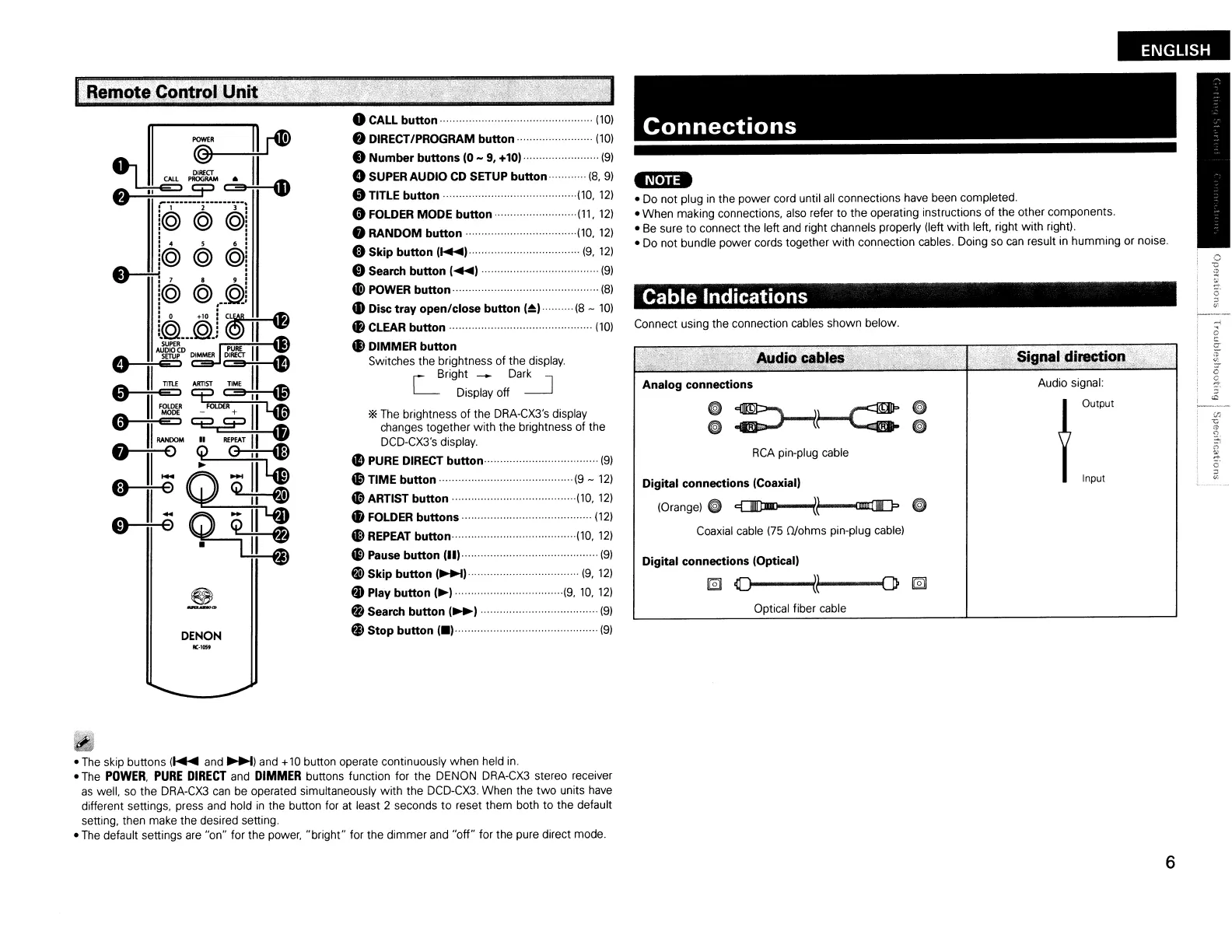
oCALL
button·
(10)
8 DIRECT/PROGRAM button
(10)
•
Number
buttons
10
- 9,
+101
(9)
GSUPER
AUDIO
CD SETUP button (8, 9)
oTITLE button ···(10,
12)
oFOLDER
MODE
button
·(11,
12)
8
RANDOM
button ···(10,
12)
fi) Skip button
I~)···
(9,
12)
CD
Search button 1 1. . (9)
tl
POWER button······ (8)
• Disc tray open/close button
(~I··
(8 -
10)
48
CLEAR button
(10)
il
DIMMER
button
Switches the brightness of the display.
r Bright
--
Dark I
'-
Display off
--.J
'*
The
brightness
of
the DRA-CX3's display
changes together with the brightness of the
DCD-CX3's display.
II
PURE DIRECT button· (9)
G9
TIME
button
..
(9
-
12)
oARTIST button
..
···(10,
12)
fI
FOLDER buttons
(12)
~
REPEAT button
··(10,
12)
i>
Pause button
(III
(9)
€i>
Skip button
I~I
..
(9,
12)
f)
Play button
I~I
·····(9,
10,
12)
fj
Search button
I~I
(9)
@)
Stop button
1.1····················
..
·
..
···················
(9)
DENON
Remote
ContrQI
Unit
...
JIC-1Q5f
•
The
skip buttons
(~
and~)
and +
10
button operate continuously when held
in.
•
The
POWER,
PURE
DIRECT
and
DIMMER
buttons function for the DENON
DRA-CX3
stereo receiver
as
well,
so
the DRA-CX3
can
be operated simultaneously
with
the DCD-CX3. When the
two
units have
different settings, press and hold
in
the button for
at
least 2 seconds
to
reset them both to the default
setting, then make the desired setting.
•
The
default settings are "on" for the power, "bright" for the dimmer and
"off"
for the pure direct mode.
6



 To Next Page