ENGLISH
I
About the Remote Control Unit
IInserting.
th~]latteries
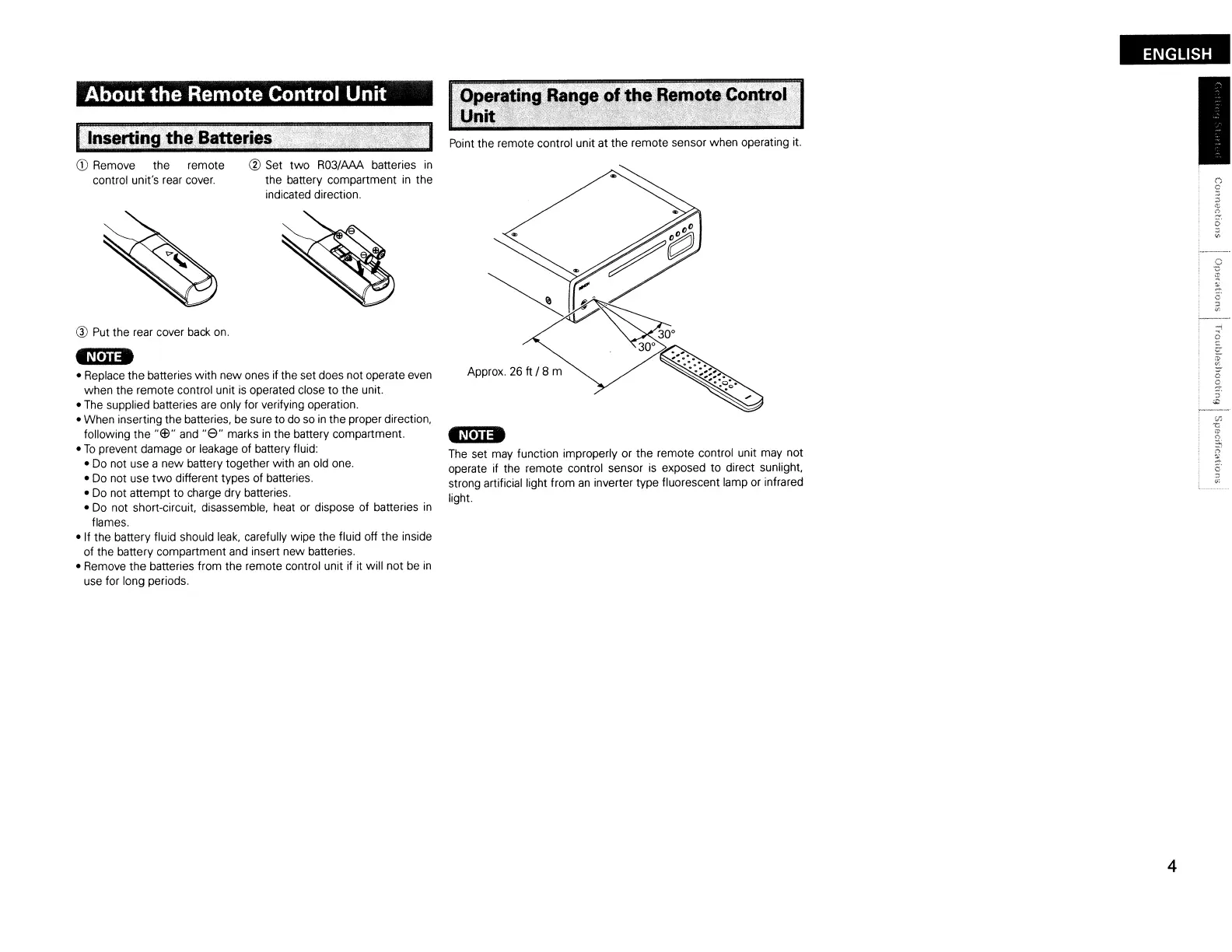
Point the remote control unit at the remote sensor when operating it.
CD
Remove the remote @ Set
two
R03/AAA batteries
in
control unit's rear
cover.
the battery compartment
in
the
indicated direction.
® Put the rear cover
back
on.
_N'U_
• Replace the batteries with new ones if the set does not operate
even
when the remote control unit
is
operated close to the unit.
• The supplied batteries
are
only for verifying operation.
• When inserting the batteries, be sure to
do
so
in
the proper direction,
following the
"G3"
and
"8"
marks
in
the battery compartment.
•
To
prevent damage
or
leakage of battery fluid:
•
Do
not use a
new
battery together with
an
old one.
• Do not use
two
different types of batteries.
• Do not attempt to charge dry batteries.
• Do not short-circuit, disassemble, heat or dispose of batteries
in
flames.
• If the battery fluid should leak, carefully wipe the fluid off the inside
of the battery compartment
and
insert new batteries.
• Remove the batteries from the remote control unit if it will not be
in
use for long periods.
Approx.
26
It / 8 m
-N'U-
The set may function improperly or the remote control unit may not
operate if the remote control sensor
is
exposed to direct sunlight,
strong artificial light from
an
inverter type fluorescent lamp or infrared
light.
4



 To Next Page