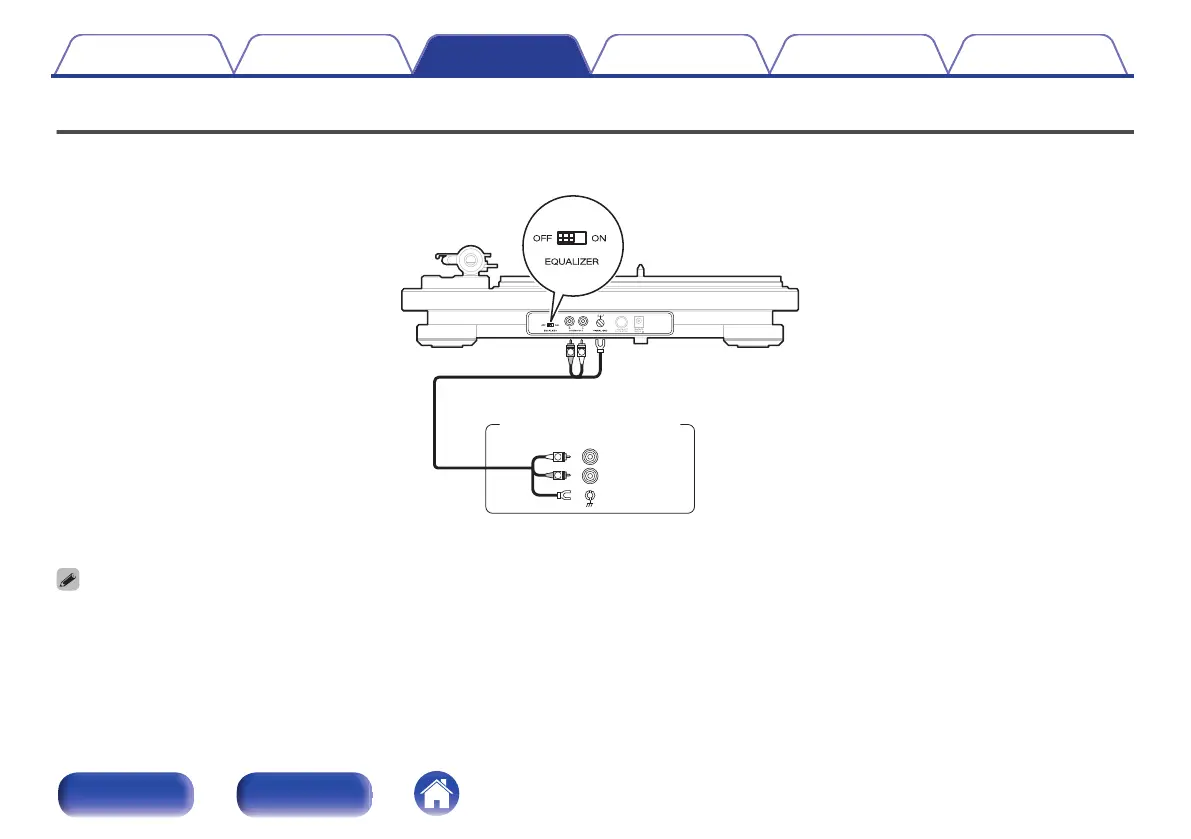
Connecting devices that have a phono input
When connected to a device with a built-in phono equalizer, use that device’s phono equalizer during record playback. Use the EQUALIZER ON/OFF
switch to turn the phono equalizer on this unit “OFF
” when connected to a device with a built-in phono equalizer.
.
R
SIGNAL
GND
L
PHONOIN
R
L
R
L
Audio cable
(supplied)
Amplifiers with a
phono input
0
If a device connected to this unit has an earth terminal, connect the earth wire of the audio cable (supplied) to the earth terminal of this unit (SIGNAL GND). This may reduce
noise during playback.
0
If the EQUALIZER ON/OFF switch is not set correctly, audio will be extremely low or distorted.
Contents Preparations Connections
Playback and recording
Tips Appendix
20
Front panel Rear panel
I
V
\
I
V V \
I
_ -
0



 To Next Page