7
3
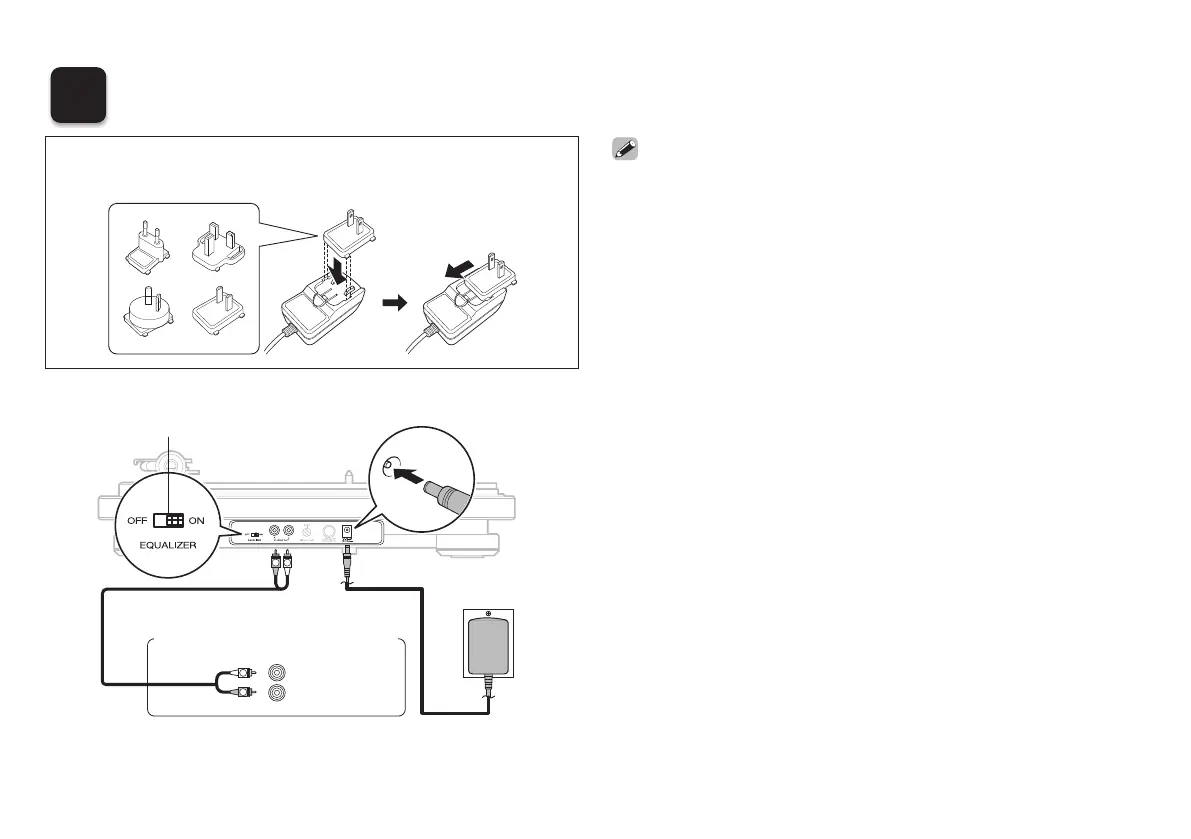
Connections
R
L
AUX IN
R
L
R
L
Household
power outlet
Amplifier/mini stereo system
without a PHONO input terminal
Audio cable
(supplied)
Phono equalizer ON/OFF
switch
Connect an AC adapter conversion plug suitable for the
power outlet you are using to the AC adapter.
PUSH
PUSH
• It is recommended that the earth wire of the included audio cable is
kept out of the way by securing it with a tie such as the twist tie of the
audio cable.
• If a device connected to this unit has an earth terminal, connect the
earth wire of the audio cable (supplied) to the earth terminal of this unit
(SIGNAL GND). This may reduce noise during playback.
• When connecting to an amplifi er with a PHONO input terminal, set the
phono equalizer ON/OFF switch to “OFF”.
AC adapter
(supplied)
1.DP-400EM_ENG_QSG_180320.indd 7 2018/03/20 18:39:17



 To Next Page