DP-DJ151
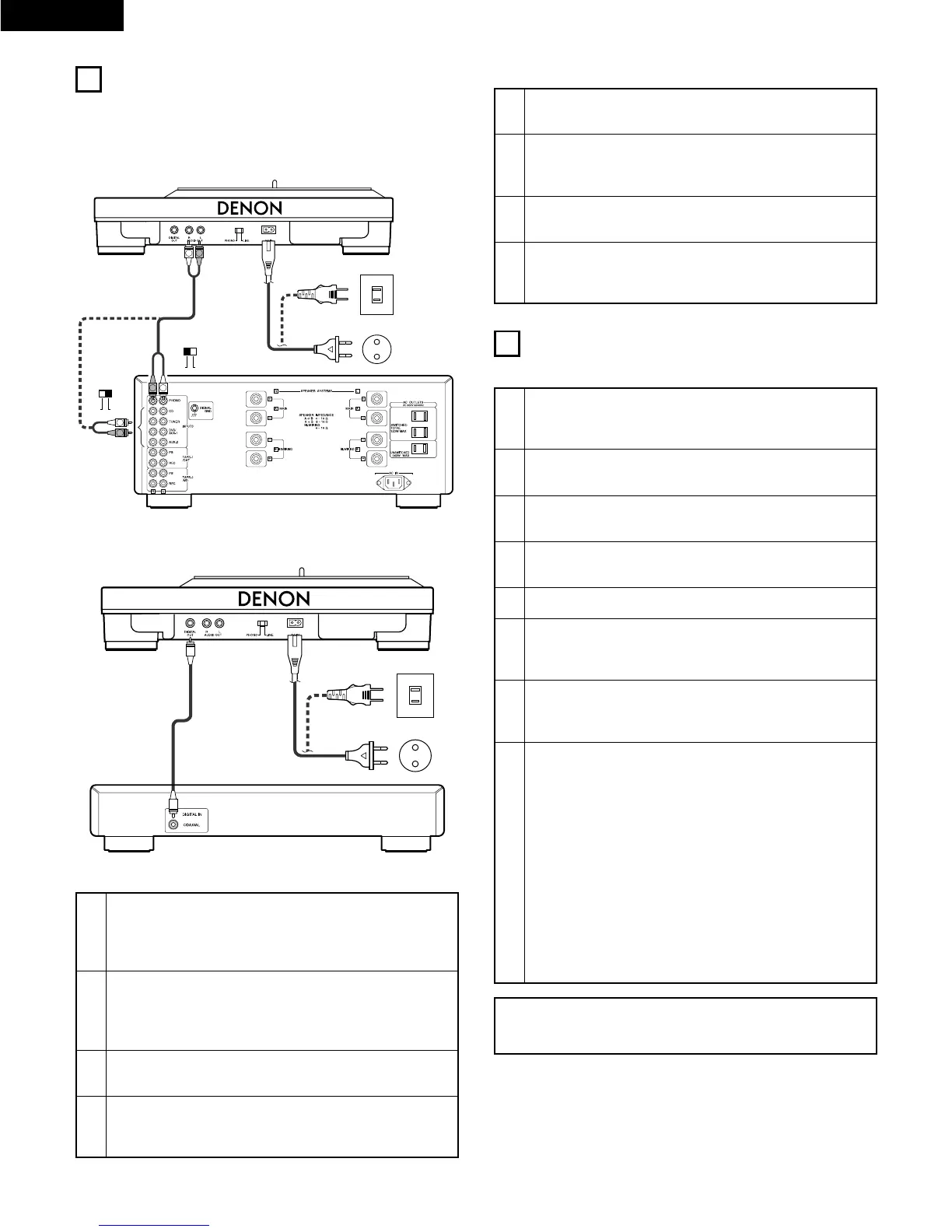
Amplifier
Power outlet
Power outlet
5
OPERATION
(1) Starting playback
1
Turn the power dial to turn on.
• The speed button, the PITCH button and the strobe-
illuminator light up.
2
Turn on the amplifier’s (or mixer’s) power. Then,
select the function switch.
3
Set a record on the platter.
✽ To play 45 rpm records, use the included adaptor.
4
Set the speed button’s according to the record’s
playing speed.
5
Press the START/STOP button.
6
Lift the lifter lever, hold the head shell’s finger sup-
port, and move the tone arm to the desired position
over the record.
7
Lower the lifter lever.
• The tone arm lowers gently until the stylus is on the
record and playback begins.
8
Adjust the speed of rotation.
• When the PITCH button is lit, the speed of the platter
can be adjusted in a range of ±12 % by the pitch
slider.
• The speed is lower than the displayed speed when the
strobe is flowing to the right, higher than the displayed
speed when the strobe is flowing to the left. When
the strobe is stopped, the platter is turning at the
displayed speed.
• When the key adjust button is pressed during the pitch
control mode, the button lights on, and musical key
tone can be kept constant even the platter speed is
changed with the slider. Note that the key adjust
function operates only when switch is set to “LINE”.
Digital processor or MD recorder
(1) Analog connections
1
Connect the left (white) and right (red) plugs of the
pin-plug cord to the set’s left and right outputs
(AUDIO OUT). Then, select the PHONO/LINE
selector.
2
Connect the left (White) and right (red) plugs of the
pin-plug cord to the amplifier’s (or mixer’s) left and
right “PHONO” (PHONO selected) or “CD”, “TUNER”
etc. (LINE SELECTED).
(2) Digital connections
1
Use separately sold “75 Ω/ohms” pin-plug cords to
connect the “COAXIAL” digital output jack.
2
Connect the digital cord of step 1 into the COAXIAL
digital input jacks of “Digital processor” or “MD
recorder”.
3
Connect the connector side of the power cord to the
set’s power connector terminal (AC IN).
4
Plug the power cord into an appropriate power
outlet.
• Check that the power outlet’s capacity is sufficient.
NOTE:
The “KEY ADJUST” function effective only operate while the
“PITCH” button is lit on.
3
Connect the connector side of the power cord to the
set’s power connector terminal (AC IN).
4
Plug the power cord into an appropriate power
outlet.
• Check that the power outlet’s capacity is sufficient.


 To Next Page