EasyManua.ls Logo

Denon DRM-650S - Names and Functions of Parts

Denon DRM-650S
15 pages
Print Icon
To Next Page IconTo Next Page
To Previous Page IconTo Previous Page
Loading...
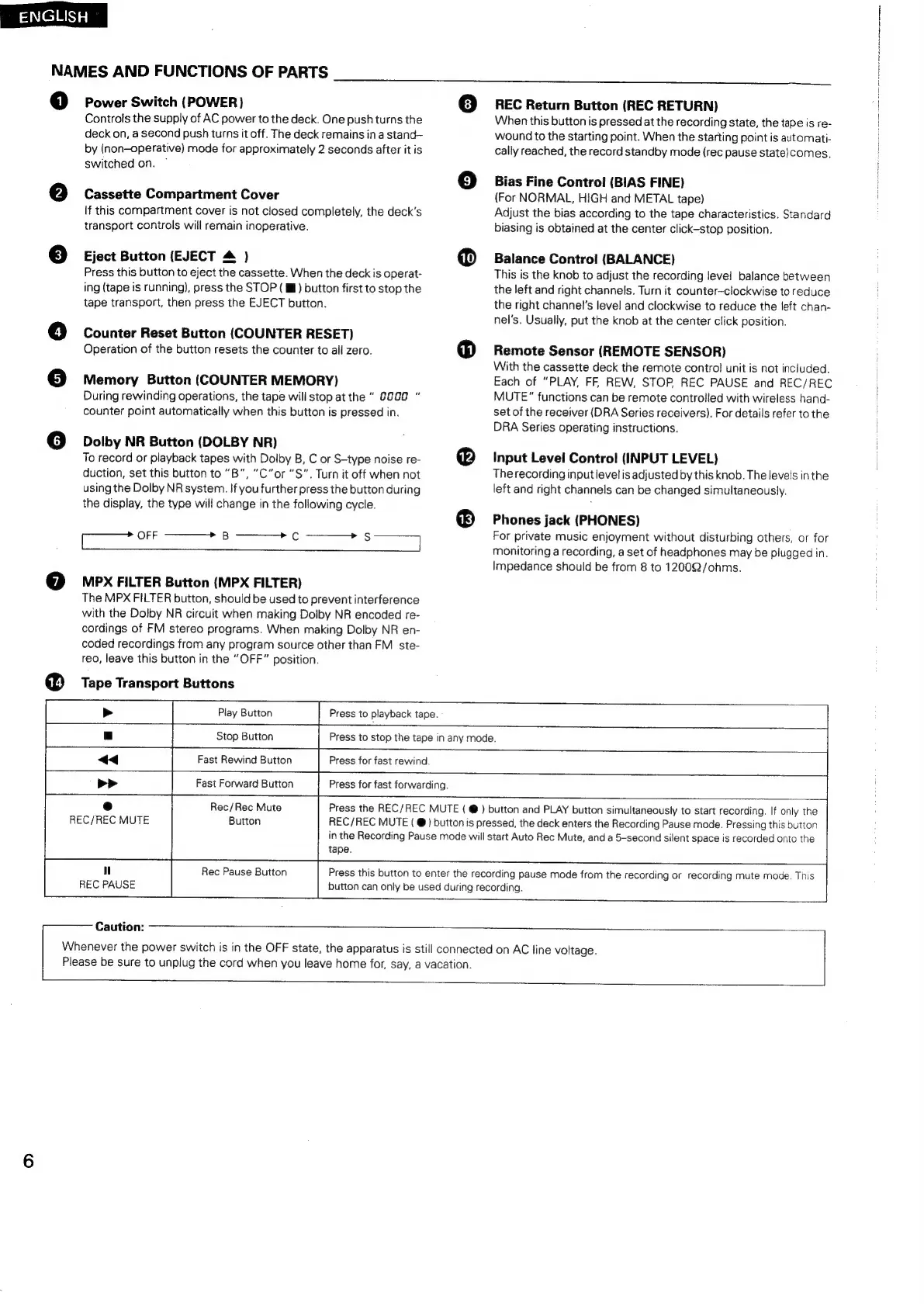
NAMES
AND
FUNCTIONS
OF
PARTS
©
®
Power
Switch
(POWER)
Controis
the
supply
of
AC
power
to
the
deck.
One
push
turns
the
deck
on,
a
second
push
turns
it
off.
The
deck
remains
in
a
stand—
by
(non-operative)
mode
for
approximately
2
seconds
after
it
is
switched
on.
Cassette
Compartment
Cover
if
this
compartment
cover
is
not
closed
completely,
the
deck’s
transport
controls
will
remain
inoperative.
Eject
Button
(EJECT
&
)
Press
this
button
to
eject
the
cassette.
When
the
deck
is
operat-
ing
(tape
is
running),
press
the
STOP
(ll)
button
first
to
stop
the
tape
transport,
then
press
the
EJECT
button.
Counter
Reset
Button
(COUNTER
RESET)
Operation
of
the
button
resets
the
counter
to
all
zero.
Memory
Button
(COUNTER
MEMORY)
During
rewinding
operations,
the
tape
will
stop
at
the
"
8a00
counter
point
automatically
when
this
button
is
pressed
in.
Dolby
NR
Button
(DOLBY
NR)
To
record
or
playback
tapes
with
Dolby
B,
C
or
S-type
noise
re-
duction,
set
this
button
to
“B",
“C”or
“S".
Turn
it
off
when
not
using
the
Dolby
NR
system.
If
you
further
press
the
button
during
the
display,
the
type
will
change
in
the
following
cycle.
ce
MPX
FILTER
Button
(MPX
FILTER)
The
MPX
FILTER
button,
should
be
used
to
prevent
interference
with
the
Dolby
NR
circuit
when
making
Dolby
NR
encoded
re-
cordings
of
FM
stereo
programs.
When
making
Dolby
NR
en-
coded
recordings
from
any
program
source
other
than
FM
ste-
reo,
leave
this
button
in
the
“OFF”
position.
Tape
Transport
Buttons
Play
Button
Stop
Button
Press
to
playback
tape.
Press
to
stop
the
tape
in
any
mode.
REC
Return
Button
(REC
RETURN)
When
this
button
is
pressed
at
the
recording
state,
the
tape
is
re-
wound
to
the
starting
point.
When
the
starting
point
is
automati-
cally
reached,
the
record
standby
mode
(rec
pause
state)comes,
Bias
Fine
Control
(BIAS
FINE)
(For
NORMAL,
HIGH
and
METAL
tape)
Adjust
the
bias
according
to
the
tape
characteristics.
Standard
biasing
is
obtained
at
the
center
click-stop
position.
Balance
Control
(BALANCE)
This
is
the
knob
to
adjust
the
recording
level!
balance
between
the
left
and
right
channels.
Turn
it
counter—clockwise
to
reduce
the
right
channel's
level
and
clockwise
to
reduce
the
left
chan-
nel’s.
Usually,
put
the
knob
at
the
center
click
position.
Remote
Sensor
(REMOTE
SENSOR)
With
the
cassette
deck
the
remote
contro!
unit
is
not
included.
Each
of
“PLAY,
FF,
REW,
STOP
REC
PAUSE
and
REC/REC
MUTE”
functions
can
be
remote
controlled
with
wireless
hand-
set
of
the
receiver
(DRA
Series
receivers).
For
details
refer
to
the
DRA
Series
operating
instructions.
Input
Level
Control
(INPUT
LEVEL)
The
recording
input
level
is
adjusted
by
this
knob.
The
levels
in
the
left
and
right
channels
can
be
changed
simultaneously.
Phones
jack
(PHONES)
For
private
music
enjoyment
without
disturbing
others,
or
for
monitoring
a
recording,
a
set
of
headphones
may
be
plugged
in.
Impedance
should
be
from
8
to
12002/ohms.
Fast
Rewind
Button
Press
for
fast
rewind.
Fast
Forward
Button
Press
for
fast
forwarding.
Rec/Rec
Mute
Button
Press
the
REC/REC
MUTE
(
@
)
button
and
PLAY
button
simultaneously
to
start
recording.
If
only
the
REC/REC
MUTE
(
@)
button
is
pressed,
the
deck
enters
the
Recording
Pause
mode.
Pressing
this
button
in
the
Recording
Pause
mode
will
start
Auto
Rec
Mute,
and
a
5-second
silent
space
is
recorded
onto
the
tape.
REC/REC
MUTE
"
REC
PAUSE
Rec
Pause
Button
Press
this
button
to
enter
the
recording
pause
mode
from
the
recording
or
recording
mute
mode.
This
button
can
only
be
used
during
recording.
Caution:
Whenever
the
power
switch
is
in
the
OFF
state,
the
apparatus
is
still
connected
on
AC
line
voltage.
Please
be
sure
to
unplug
the
cord
when
you
leave
home
for,
say,
a
vacation.

Related product manuals