EasyManua.ls Logo

Denon DRM-650S - Display Indicators; Cassette Tape Handling; Auto Tape Select Feature

Denon DRM-650S
15 pages
Print Icon
To Next Page IconTo Next Page
To Previous Page IconTo Previous Page
Loading...
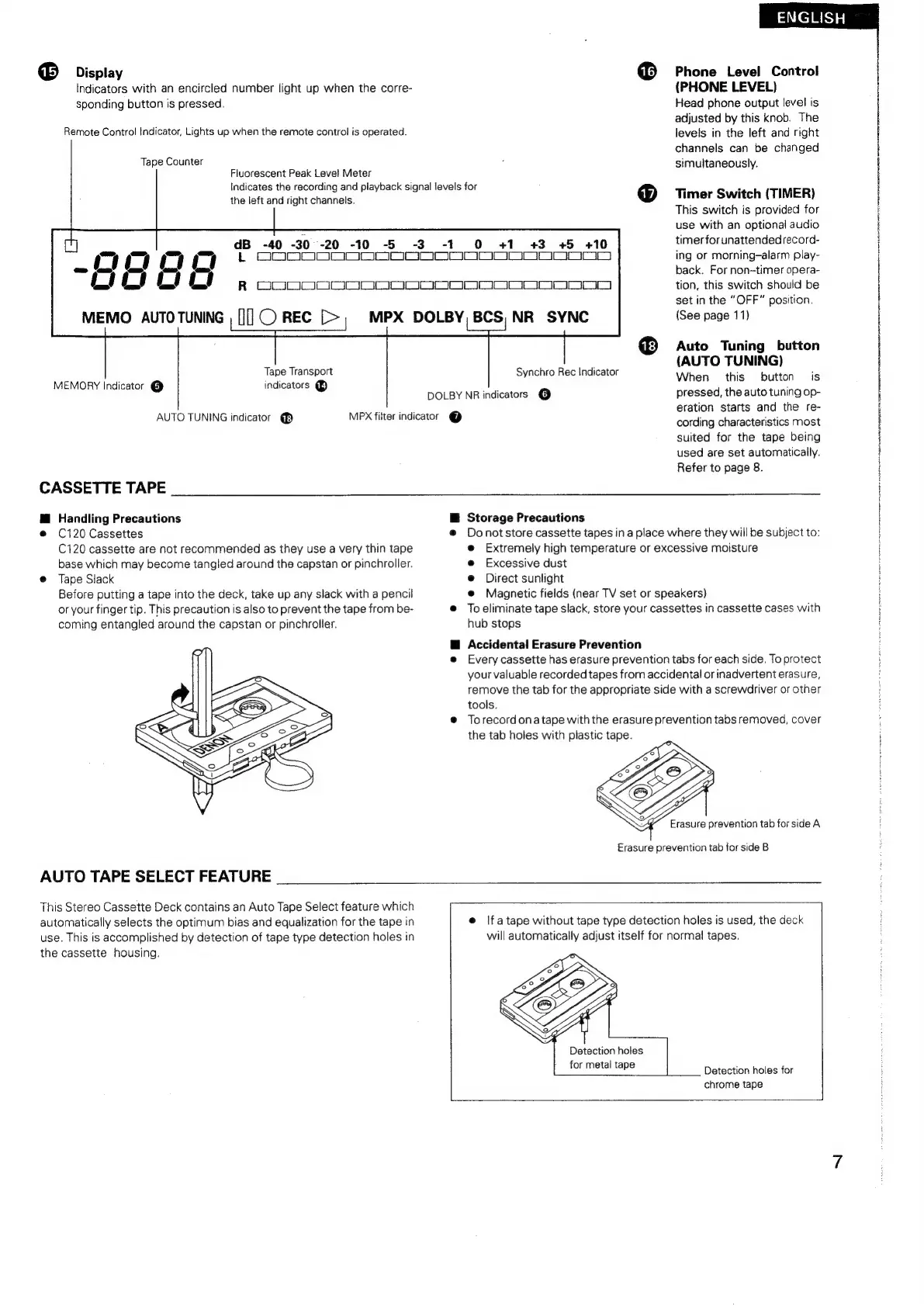
Display
Indicators
with
an
encircled
number
light
up
when
the
corre-
sponding
button
is
pressed.
Remote
Control
Indicator,
Lights
up
when
the
remote
control
is
operated.
Tape
Counter
Fluorescent
Peak
Level
Meter
the
left
and
right
channels.
u
dB
-40
-30°--20
-10
-5
-3
-OO
Ot
Indicates
the
recording
and
playback
signal
levels
for
-1
Phone
Level
Control
(PHONE
LEVEL)
Head
phone
output
level
is
adjusted
by
this
knob.
The
levels
in
the
left
and
right
channels
can
be
changed
simultaneously.
Timer
Switch
(TIMER)
This
switch
is
provided
for
use
with
an
optional
audio
timer
for
unattendedrecord-
O
+1
#+3
=#+5
+10
LODO
ara
ma)
ooon
Tape
Transport
MEMORY
Indicator
@
indicators
@
AUTO
TUNING
indicator
@B
CASSETTE
TAPE
@
Handling
Precautions
C120
Cassettes
C120
cassette
are
not
recommended
as
they
use
a
very
thin
tape
base
which
may
become
tangled
around
the
capstan
or
pinchroller.
Tape
Slack
Before
putting
a
tape
into
the
deck,
take
up
any
slack
with
a
pencil
or
your
finger
tip.
This
precaution
is
also
to
prevent
the
tape
from
be-
coming
entangled
around
the
capstan
or
pinchroller.
AUTO
TAPE
SELECT
FEATURE
R
OOOO
race
MEMO
AUTO
TUNING
,
[][])
REC
[>,
MPX
DOLBY,
BCS,
NR
SYNC
DOLBY
NR
indicators
@
MPX
filter
indicator
@
|
oe
||
ing
or
morning—alarm
play-
back.
For
non-timer
opera-
tion,
this
switch
should
be
set
in
the
“OFF”
position.
(See
page
11)
Auto
Tuning
button
(AUTO
TUNING)
When
this
button
is
pressed,
the
auto
tuning
op-
eration
starts
and
the
re-
cording
characteristics
most
suited
for
the
tape
being
used
are
set
automatically.
Refer
to
page
8.
Synchro
Rec
Indicator
Storage
Precautions
Do
not
store
cassette
tapes
in
a
place
where
they
will
be
subject
to:
e
Extremely
high
temperature
or
excessive
moisture
e
Excessive
dust
e@
Direct
sunlight
@
Magnetic
fields
(near
TV
set
or
speakers)
To
eliminate
tape
slack,
store
your
cassettes
in
cassette
cases
with
hub
stops
Accidental
Erasure
Prevention
Every
cassette
has
erasure
prevention
tabs
for
each
side.
To
protect
your
valuable
recorded
tapes
from
accidental
or
inadvertent
erasure,
remove
the
tab
for
the
appropriate
side
with
a
screwdriver
or
other
tools.
To
record
ona
tape
with
the
erasure
prevention
tabs
removed,
cover
the
tab
holes
with
plastic
tape.
Erasure
prevention
tab
for
side
B
This
Stereo
Cassette
Deck
contains
an
Auto
Tape
Select
feature
which
automatically
selects
the
optimum
bias
and
equalization
for
the
tape
in
use.
This
is
accomplished
by
detection
of
tape
type
detection
holes
in
the
cassette
housing.
e
|fatape
without
tape
type
detection
holes
is
used,
the
deck
will
automatically
adjust
itself
for
normal
tapes.
Detection
holes
for
metal
tape
Detection
holes
for
chrome
tape
|

Related product manuals