EasyManua.ls Logo

Denon DRM-710 - Page 8

Denon DRM-710
58 pages
Print Icon
To Next Page IconTo Next Page
To Previous Page IconTo Previous Page
Loading...
|
ENGLISH
REC/REC
MUTE
BUTTON
REC/REC
MUTE
is
the
DENON's
unique
and
convenient
function.
By
using
this
button,
it
is
easily
possible
to
insert
a
suitable
space
(the
non-recorded
part)
between
two
melodies.
1.
When
you
want
to
make
about
5
sec
of
non-recorded
part
after
the
recording
state:
Press
the
REC/REC
MUTE
button.
The
recorder
will
automatically
create
about
5
sec
of
non-recorded
part
and
will
stay
in
the
recording
standby
state.
2.
To
create
about
5
sec
of
non-recorded
part
after
the
standby
state:
MUSIC
SEARCH
SYSTEM
Press
the
REC/REC
MUTE
button,
and
the
recorder
will
enter
the
non-recording
state,
automatically
create
about
5
sec
of
non-recorded
part
and
stay
in
the
standby
state.
3.
To
cancel
the
non-recording
state
(the
REC
MUTE
state):
Press
the
PAUSE
button,
and
the
recorder
will
cancel
the
non-recording
state
and
will
stay
in
the
standby
state.
4.
To
extend
the
non-recording
state
(the
REC
MUTE
state)
for
further
5
sec
or
more:
Press
the
REC/REC
MUTE
button,
and
the
non-recorded
part
will
automatically
be
extended
for
another
5
sec.
This
device
is
a
convenient
system
which
detects
the
non-recorded
part
of
more
than
4
seconds
between
melodies,
cues
the
next
melody
while
the
present
melody
is
being
reproduced
or
automatically
detects
the
beginning
of
the
melody
now
being
reproduced
and
makes
it
into
the
repro-
duceable
state.
|
1.
For
cueing
the
next
melody
while
the
present
melody
is
being
reproduced
:
At
PLAY
mode,
depress
the
PLAY
button
and
the
FF
button
simultaneously.
This
device
will
detect
the
interval
between
melodies
with
the
CUE
state
on,
auto-
matically
become
the
PLAY
mode
and
begin
performing
the
next
melody.
2.
For
hearing
again
the
melody
being
reproduced:
At
PLAY
mode,
depress
the
PLAY
button
and
the
REW
button
simultaneously.
This
device
will
detect
the
interval
between
melodies
with
the
REVIEW
state
on,
automatically
become
the
PLAY
mode,
detect
the
be-
ginning
of
the
melody
now
being
performed
and
play
it
from
the
first
again.
TAPE
COUNTER
AND
MEMORY
STOP
Note:
Note
about
MUSIC
SEARCH
action
:
MUSIC
SEARCH
is
a
function
which
operates
by
detecting
a
comparatively
long
non-recorded
part
on
the
tape.
There-
fore,
MUSIC
SEARCH
may
not
operate
normally
in
the
following
cases.
e
Sound
on
the
tape
is
interrupted
by
speech
or
conversa-
tion.
eLong
periods
of
pianissimo
(softly
played
music)
or
non-recorded
intervals
occur
on
the
tape.
|
e
The
tape
has
picked
up
noise
in
a
non-recorded
interval.
e
Non-recorded
intervals
on
the
tape
are
less
than
4
seconds
in
length.
e
Noise-emitting
electrical
appliances
are
in
operation
nearby.
i.e.
;
Electric
razors,
drills,
refrigerators,
etc.
d
-40
-30
-20
45 -0
-7
-5
-3
-2
-1
o
+
+3
45
48
+O
L
DODO0ÓQO00000000000000000000000000
O
rec
E
EI
u
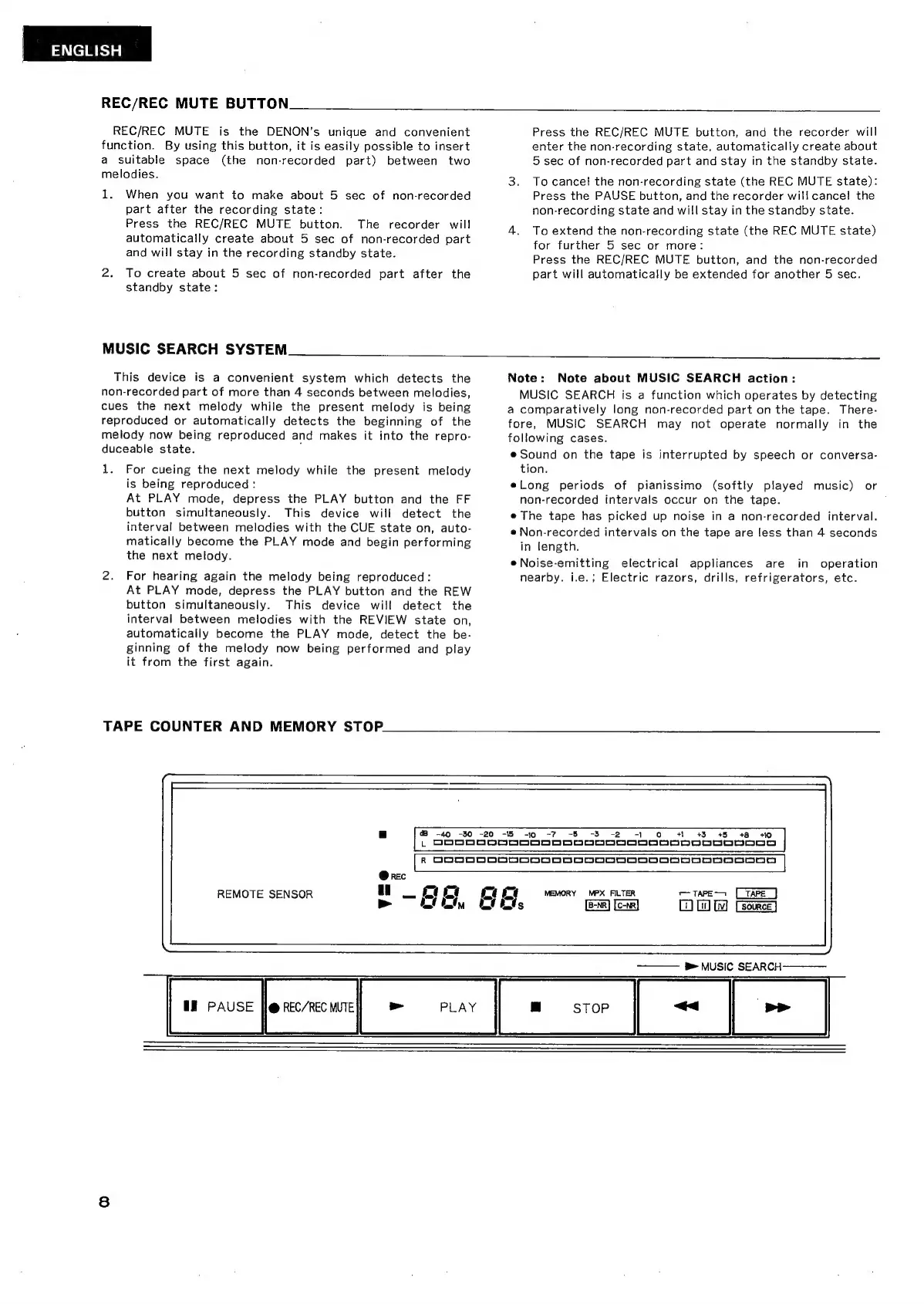
REMOTE
SENSOR
>
E,
EE
PAUSE
||
REC/REC
MUTE
>
PLAY
=
STOP
[=~
|
=
|
R
00900000000000DD00000D0o0000000000
|
DO
MEMORY
MPX
FILTER
——
TAPE
D,
Dow
——
pe
MUSIC
SEARCH

Related product manuals