ENGLISH
TroubleshootingInformationHDMI Control FunctionPlaybackSetupConnections Specications
About Media
About DivX
®
Video-on-Demand (VOD)
When you purchase or rent a DivX
®
le through the ofcial site of
DivX
®
Video-On-Demand (VOD) services, a DVD-A1UD registration
code is required. For details, see “DivX
®
Registration” (vpage
31).
A DivX
®
VOD le recorded with a
different code from the DVD-A1UD
registration code cannot be played
back.
Some DivX
®
VOD les are restricted
with limited playable times. If your
DivX
®
VOD le has such a limit,
the number of playable times is
displayed on the DivX
®
VOD display
screen.
Use to select “Yes” if you want
to play back the le, or to select
“No” if you do not want to play it
back. The press to conrm the
selection.
•
•
•
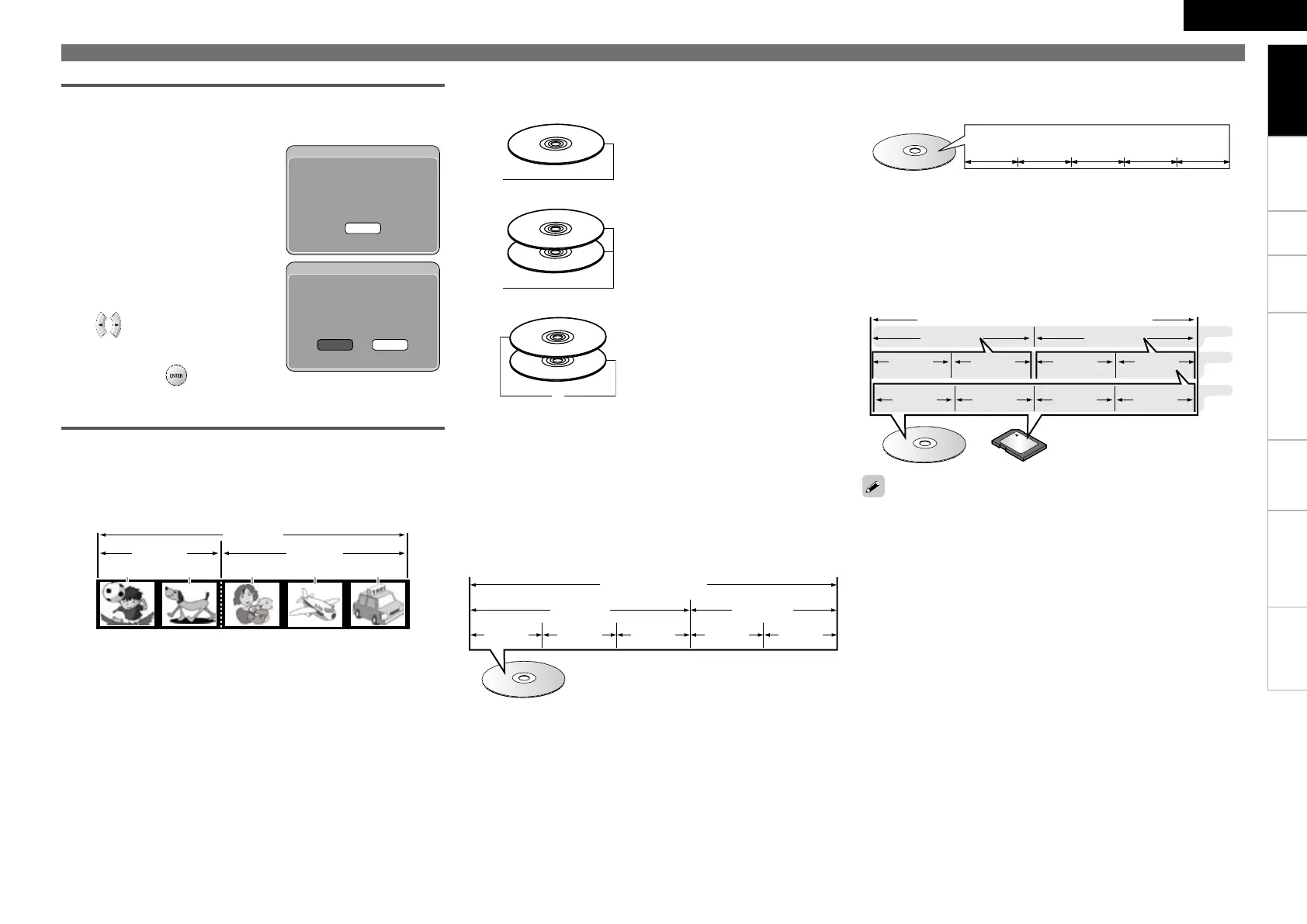
About Discs and Files
BD-Video, DVD-Video
BD/DVD-Video discs are divided into several large sections (titles)
and small sections (chapter). These sections are all allotted
numbers, called the title numbers and chapter numbers.
GExampleH
BD、DVD
タイトル1
チャプター1 チャプター2 チャプター1 チャプター2 チャプター3
タイトル2
n
Super Audio CD
GType of Super Audio CDH
Single layer disc•
Single layer Super Audio CD with
only an HD layer
z
.
Dual layer disc•
Super Audio CD with a double HD
layer
z
, offering extended playing
time and high sound quality.
Hybrid disc•
Two-layer Super Audio CD with an
HD layer
z
and a CD layer.
The signals on the CD layer can
be played on a regular CD player.
n
CD layer
HD layer
HD layer
HD layer
z
:
All Super Audio CDs contain an HD (High Density) layer with high
density Super Audio CD signals. This layer can contain a stereo
channel area, a multi-channel area, or both a stereo channel and
multi-channel area.
CD
CDs are divided into several sections (tracks). These sections are
all allotted numbers, called the track numbers.
File
MP3/WMA/AAC/LPCM/JPEG/DivX
®
les recorded on DVD-R/-RW/
+R/+RW, CD-R/-RW and SD Memory Card are divided into large
segments (folders) and small segments (les). Files are stored in
folders, and folders can be placed for storage in a hierarchy. The
DVD-A1UD can recognize up to 8 hierarchies of folder.
SD
Memory Card
DVD-R/-RW、CD-R/-RWまたはSDカード
File1 File2 File3 Folder3
1st level
2nd level
3rd level
File4 File5
File6 File7
Folder1 Folder2
n
n
Track1 Track2 Track3 Track4 Track5
Title1 Title2
Chapter 3
BD, DVD
Chapter 2Chapter 1Chapter 2Chapter 1
DVD-R/-RW/+R/+RW, CD-R/-RW
or SD Memory Card
OK
DivX Authorization Error
Authorization Error.
This player is not authorized
to play this video.
Yes No
DivX Rental
View DivX(R) VOD Rental
This rental has 3 views left.
Do you want to use
one of your 3 views now?
When writing MP3/WMA/AAC/JPEG/DivX
®
les on a CD-R/-RW disc,
set the writing software’s format to “ISO9660”. The les may not play
properly if they are recorded in other formats. For details, refer to the
instructions of your writing software.
DVD-Audio
DVD-Audio discs are divided into several large sections (groups)
and small sections (tracks). These sections are all allotted numbers,
called the group numbers and track numbers.
♪ ♪ ♪ ♪
DVDオーディオ
Track1 Track2 Track1Track3
グループ1 グループ2
♪
Track2
n
DVD-Audio
Group1 Group2
Getting Started


 To Next Page