24
3. Version Display Mode
Displays the version of F/W or DSP.
Hold down buttons "SHIFT" "FWD"and "X-F LINK" at the same time and press the power button to turn on the power.
DSP version display by pressing the PLAY button.
F/W version display by pressing the CUE button.
Press [SHIFT] to return to Normal Mode.
How to read the version number
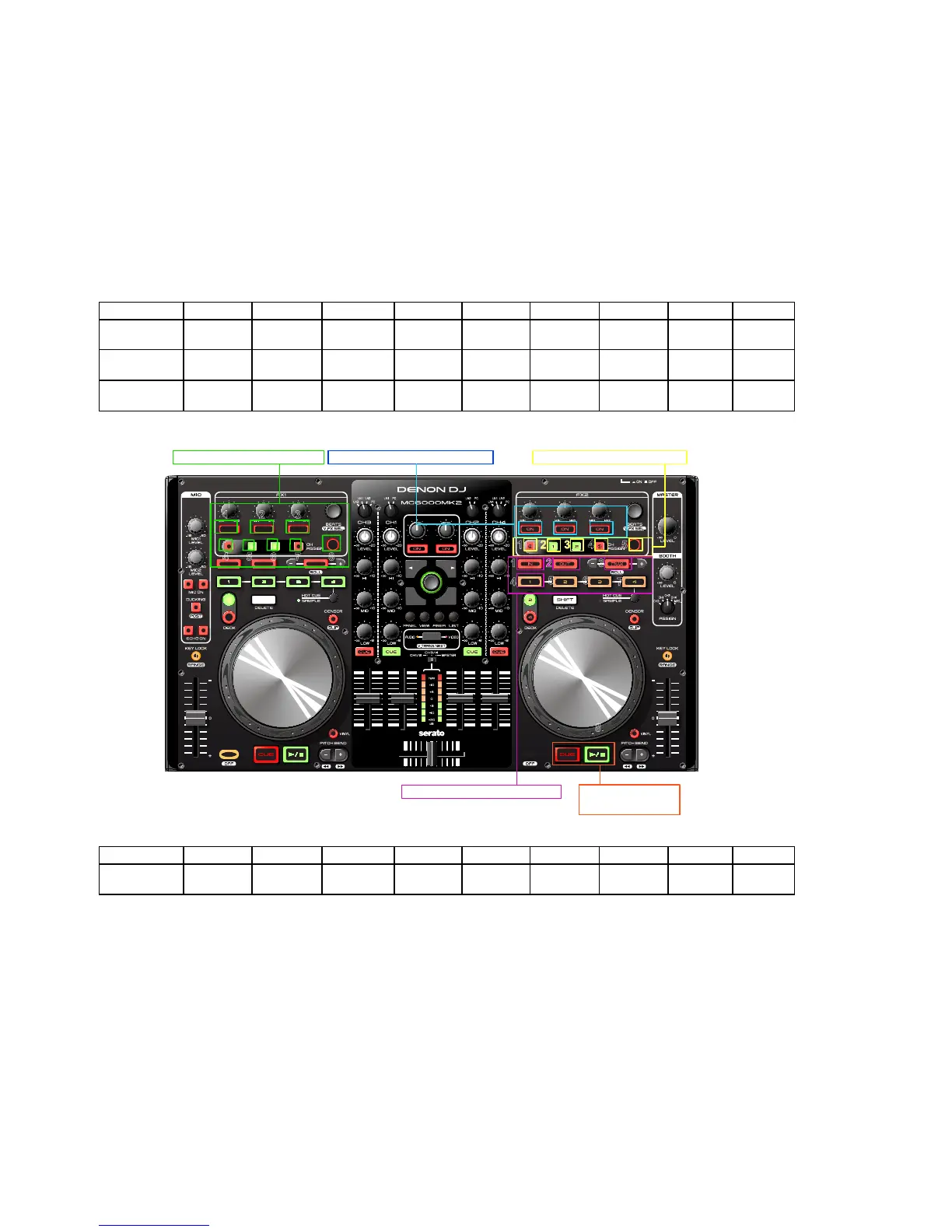
Firmware Version LED (Ver A.XYZ. After Ver1.000, it is commercial version).
A : LEFT DECK (for commercial version No.)
X, Y, Z : RIGHT DECK
1 2 3 4 5 6 7 8 9
A (LEFT
DECK)
FX1-L FX1-M FX1-R DECK3 DECK1 DECK2 DECK4 TAP -
X (RIGHT
DECK)
FX2-L FX2-M FX2-R - - - - - -
Y (RIGHT
DECK)
DECK3 DECK1 DECK2 DECK4 TAP - - - -
1 2 3 4 5 6 7 8 9
Z (RIGHT
DECK)
LOOP IN LOOP OUT AUTO LOOP HOT CUE1 HOT CUE2 HOT CUE3 HOT CUE4 - -
Example : Ver1.132
DECK A side : FX1-L.
DECK B side : FX2-L, DECK3, DECK1, DECK2, LOOP IN, LOOP OUT
Seven places of LED turns on.
1 2 3
4 5 86 7
1 2 3
1
65
7
8
1 2 3
4
2 3
A: The 1st digit numeric display. X: The 2nd digit numeric display.
Y: The 3rd digit numeric display.
Z: The 3rd digit numeric display.
54
CUE:System version
PLAY: DSP version


 To Next Page