EN3
INSTALLATION
PRECAUTIONS
• Choosethemountinglocationcarefullysothattheunitwillnotinterferewiththenormaldrivingfunctionsofthe
driver.
• Avoidinstallingtheunitwhereitwouldbesubjecttohightemperatures,suchasfromdirectsunlightorhotair
fromtheheater,orwhereitwouldbesubjecttodust,dirtorexcessivevibration.
• Useonlythesuppliedmountinghardwareforasafeandsecureinstallation.
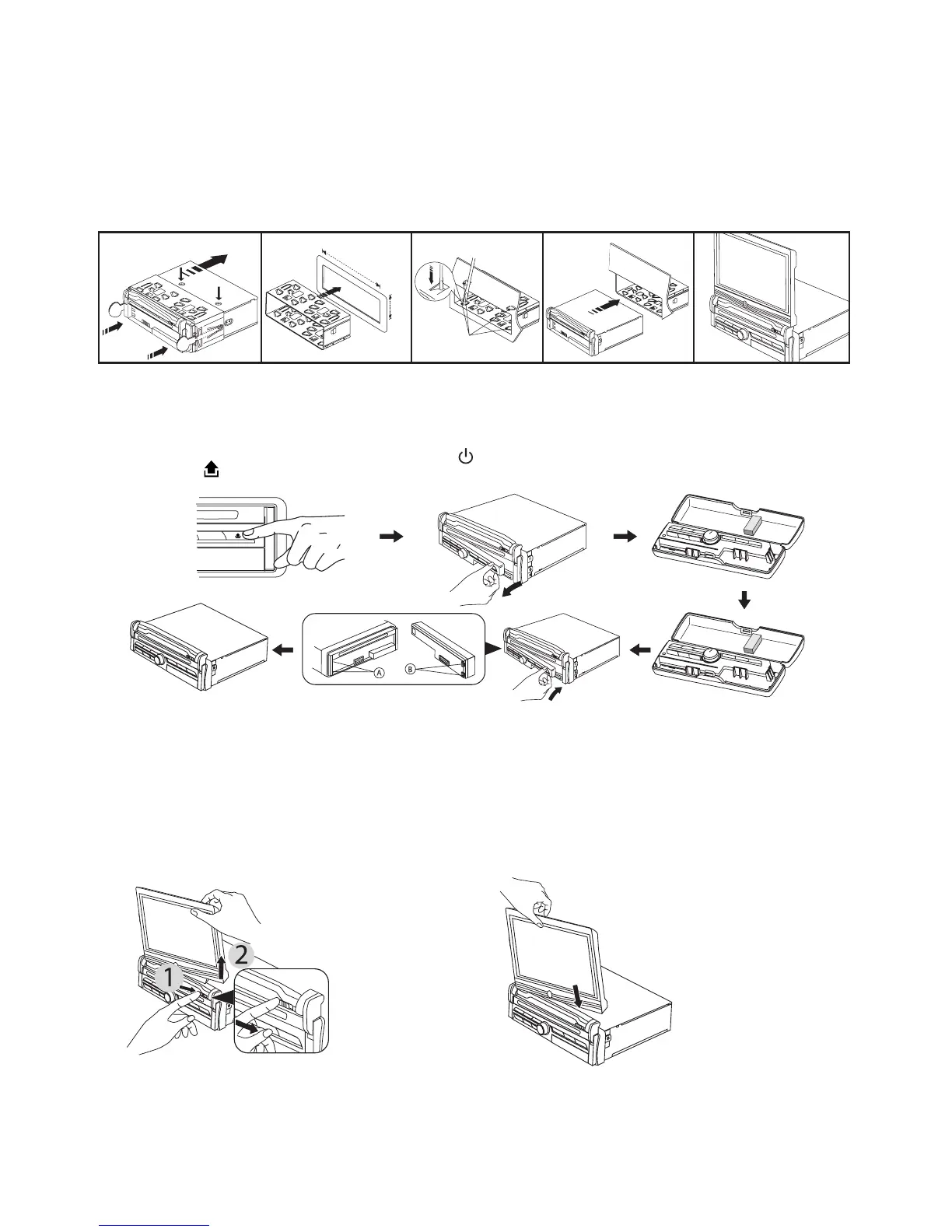
• Besuretoremovethefrontpanelbeforeinstallingtheunit.
NOTE :Inclinationangleforcarradioinstallationmustnotexceed30˚otherwisethefrontpanelwillnotopen.
NOTE: Keepthereleasekeyinthesafeplaceasyoumayneeditinfuturetoremovetheunitfromthecar.
Detaching and attaching the front panel
Thefrontpanelofthisunitcanbedetachedinordertopreventtheunitfrombeingstolen.
Beforedetachingthefrontpanel,besuretopressthe button(1)OFFrst.
Then press the buttonanddetachthepanelbypullingittowardsyouasillustrated.
Notes:
• Donotpressthefrontpanelhardagainsttheunitwhenattachingit.Itcanbeeasilyattachedbypressingitlightly
againsttheunit.
• Whenyoucarrythefrontpanelwithyou,putitinthesuppliedfrontpanelcase.
• Donotpresshardorgiveexcessivepressuretothedisplaywindowofthefrontpanelwhenattachingittothe
unit.
Detaching and attaching the display screen
• Donotpresshardorgiveexcessivepressuretothedisplaywindowofthefrontpanelwhenattachingittothe
unit.
• Payattentionnottoputanypressureonthedisplayorcontrolbuttons.
Notes :
• Donotpressthefrontpanelhardagainsttheunitwhenattachingit.Itcanbeeasilyattachedbypressingitlightly
againsttheunit.
• Whenyoucarrythefrontpanelwithyou,putitinthesuppliedfrontpanelcase.
B
A
C
2
182mm
53mm
3
4 5
Bend these claws,
ifnecessay
Release screw and
bracket
To detach
Slidethescreenreleasebutton
totherightthenremovethe
displaytowardsright.
To attach
Pushandinsertthescreenalltheway
downuntilyouheard2click sounds
indicatingbothholeconnectoris
attachedproperly.



 To Next Page