EN4
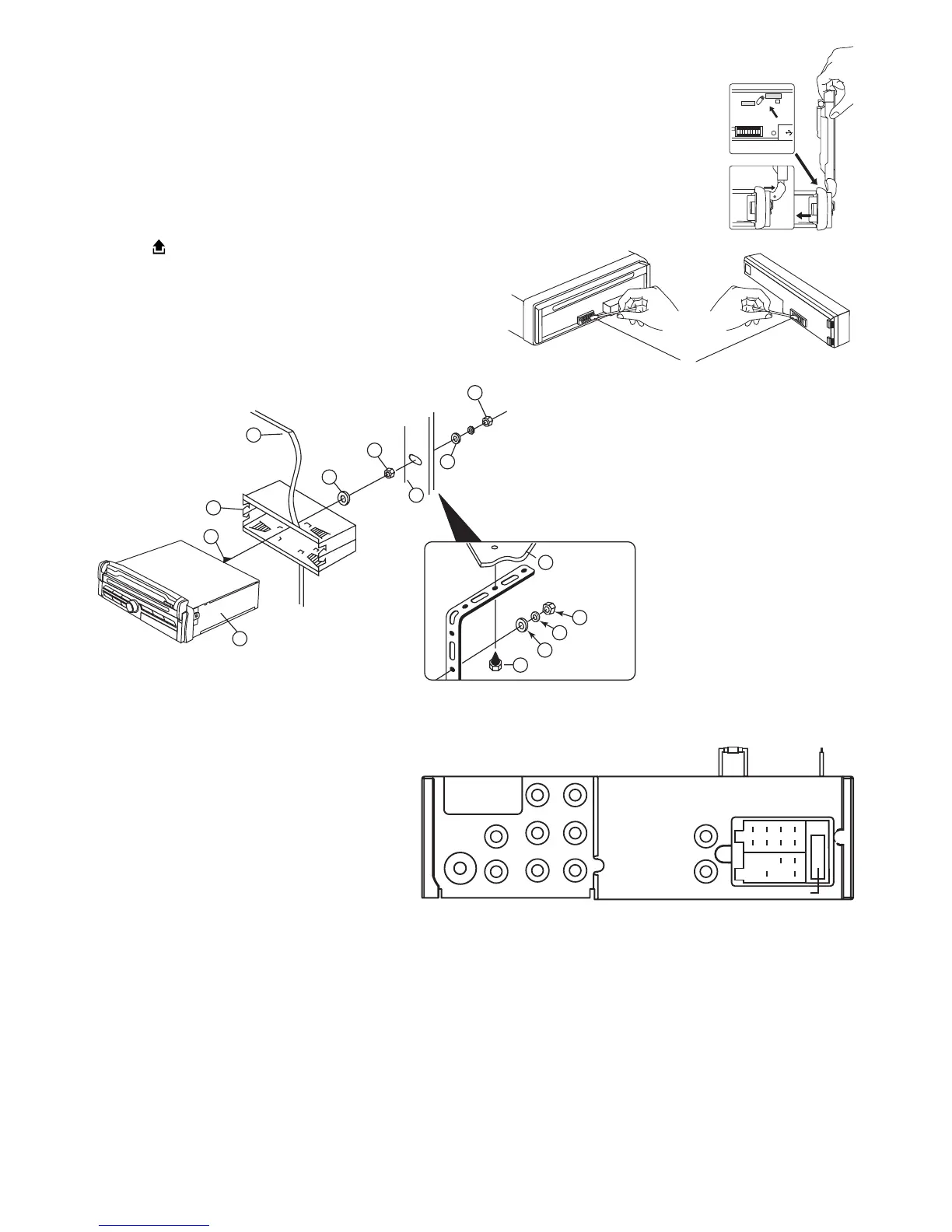
Moving the screen forward
Dependingonvehicles’sdashboarddesign,theremightbecasewherethedisplayscreenmight
collideorbumpintothedashboard’scontrolknobs.
Followthestepsbelowtomovethescreenforward.
1. SlidetheswitchtoUNLOCKposition.
2. HolditinUNLOCKpositionthenmovethescreenforward.Theunlockswitchwillmoveto
LOCKpositionautomaticallywheninplace.
CLEANING THE CONNECTOR
Theunitmaynotfunctionproperlyiftheconnectorsbetweentheunitandthefrontpanelare
contaminatedwithdirt.Inordertopreventthisfromhappening,detachthefrontpanelbypress-
ingthe buttonandcleantheconnectorfromtimetotime.
Cleantheconnectorwithacottonswabtogetherwithcontact
cleanerasillustrated.Besuretocleanthemcarefullypinbypin
andmakesurenottodamagetheconnectingpoints.
CottonSwab
Rearof
frontpanel
Mainunit
LOCK
UNLOCK
1. UNIT
2. RELEASECASE
3. DASHBOARD
4. HEXNUT
5. LOCKWASHER
6. PLAINWASHER
7. CARBODY
8. REARSUPPORTSTRAP
9. TAPPINGSCREW
10. M5X15HEXBOLT
TO SUPPORT THE UNIT
Dashboard
10
7
1
2
3
4
4
4
5
5
6
6
8
9
WIRE CONNECTION
IN / OUT CONNECTOR
DVD Audio Out: White (L) Red (R)
Connect this wire to rear seat
A/VmonitorsystemtoenjoyDVDmovie
Audio Out (Front): White (L) Red (R)
Audio Out (Rear): White (L) Red (R)
Video Out (1/2) : Yellow
ConnecttoexternalA/Vsystemtodisplay
Video In : Yellow
ConnecttoexternalVideoequipment
Rear camera In : Blue
Connect to rear camera output
CONTROL WIRE
Parking (Gray) : Connect this wire to car hand brake system
Rear camera (Red) : Connect to back rear camera
Duringbackgearcondition,thiswireshouldbeconnectedtohighvoltage.
DRIVING WITHOUT VIDEO DISPLAY
Followtheinstallationbelowsowhenthecarisinmotion,novideowillcomeoutfromtheLCDscreen.Onlysound
canbeheardfromspeaker.
FUSE 10A
WHITE (-)
GREY (+)
PARKING
RED



 To Next Page