EN5
Note:
- Onlysoundcanbeheardwhencarisinmotion.
- Referandfollowyourcountry’slawregardingdrivingwithvideo.
Caution:
- Donotattempttoinstallitbyyourselfiftheinstructionisnotcleartoyou.Consultyoudealerconcerningtheinstal-
lationprocedures.
DRIVING WITH VIDEO DISPLAY
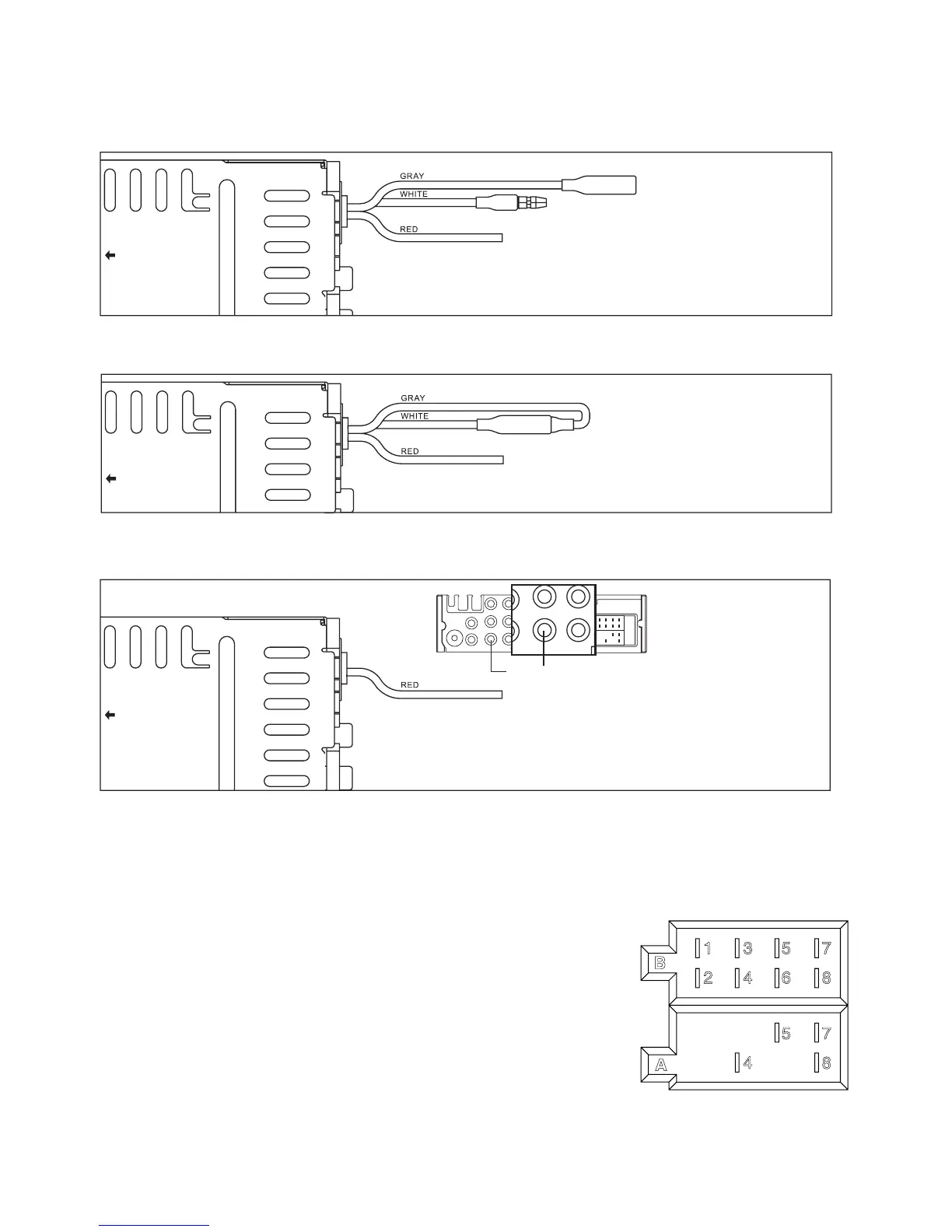
Byfollowingtheinstallationbelow,videowillalwaysbeshownonLCDscreennomatterthecarisinmotionornot.
INSTALLING REAR CAMERA FOR PARKING/REVERSE MOTION
Youcaninstallanseparatecameraatthecarrearendsowhendoingparkingorreversemotion,theunitwillauto-
maticallyswitchthevideototherearcameratoguidethedriver.
CONNECTOR A
4. MEMORY+12V
5. AUTOANTENNAOUTPUT
7. +12V(TOIGNITIONKEY)
8. GROUND
NOTE: (connectorAno.7)mustbeconnectedbycarignitionkeyinordertoavoidthatcarbatterybecomesweak
whenthecarwillbenotusedforlongperiod.
CONNECTOR B
1. REARRIGHTSPEAKER(+)
2. REARRIGHTSPEAKER(-)
3. FRONTRIGHTSPEAKER(+)
4. FRONTRIGHTSPEAKER(-)
5. FRONTLEFTSPEAKER(+)
6. FRONTLEFTSPEAKER(-)
7. REARLEFTSPEAKER(+)
8. REARLEFTSPEAKER(-)
Maintenance
FUSE REPLACEMENT
Ifthefuseblows,checkthepowerconnectionandreplacethefuse.Ifthefuseblowsagainafterthereplacement,
theremaybeaninternalmalfunction.Inthiscase,consultyournearestrepairingcenter.
Warning
Usethespeciedamperagefuseforeachlead.Useofahigheramperagefusemaycauseseriousdamage.
Steps:ConnecttheGRAYwiretotheWHITEwire.
Steps:
1. ConnecttheRearCameraINplugtotherearcamera’svideooutplug.
2.ConnecttheREDwireto“REVERSE”gearcontrolswitch.
3.Checkyourgearcontrolswitchandmakesureitisconnectedto+12V.
Steps:
1.Connectthegraywiretothehandbrakesystem.
2. Checkyourhandbrakeswitchandmakesureitisconnectedto
carbodychassisandproperlygrounded.
To rear camera video out
To reverse gear control switch


 To Next Page
 Loading...